Appendix B: Web User Application
iConnect User Manual
43
Help–offersonlineexplanationsonhowto usetheWebApplication
plusFAQandcustomersupportoptions.
Status Bar
The Status bar displays information on your system’s status and the name of the user
currentlyloggedin.Abovethestatusbar,thetimewhenthesystemstatusdisplaywaslast
updatedisshown.Thisinformationisdisplayedaccordingtothe localtimeatthecontrol
system. When logging into the WUApp with a GPRS Control System, the system status
refreshes automatically, and can be refreshed manually as well. To refresh the current
systemstatus,clicktheRefreshStatusbuttonontheright‐handside oftheStatusbar.
Workspace
The workspace offers additional links to the following pages of the application: Users
and Codes, History, Automation,Alerts,Change Password, Video. Whenyou choose a
page, either from the Main Menu, or from the workspace, the page is displayed in the
workspace. For example, if you choose Automation from the Main Menu, a list of
automatedappliancesisdisplayedintheworkspace.
SMSalertsrelateonlytoSMSsentfromELAS(WEBUserApplication).
Options Available from Main Page
Arm/Disarm
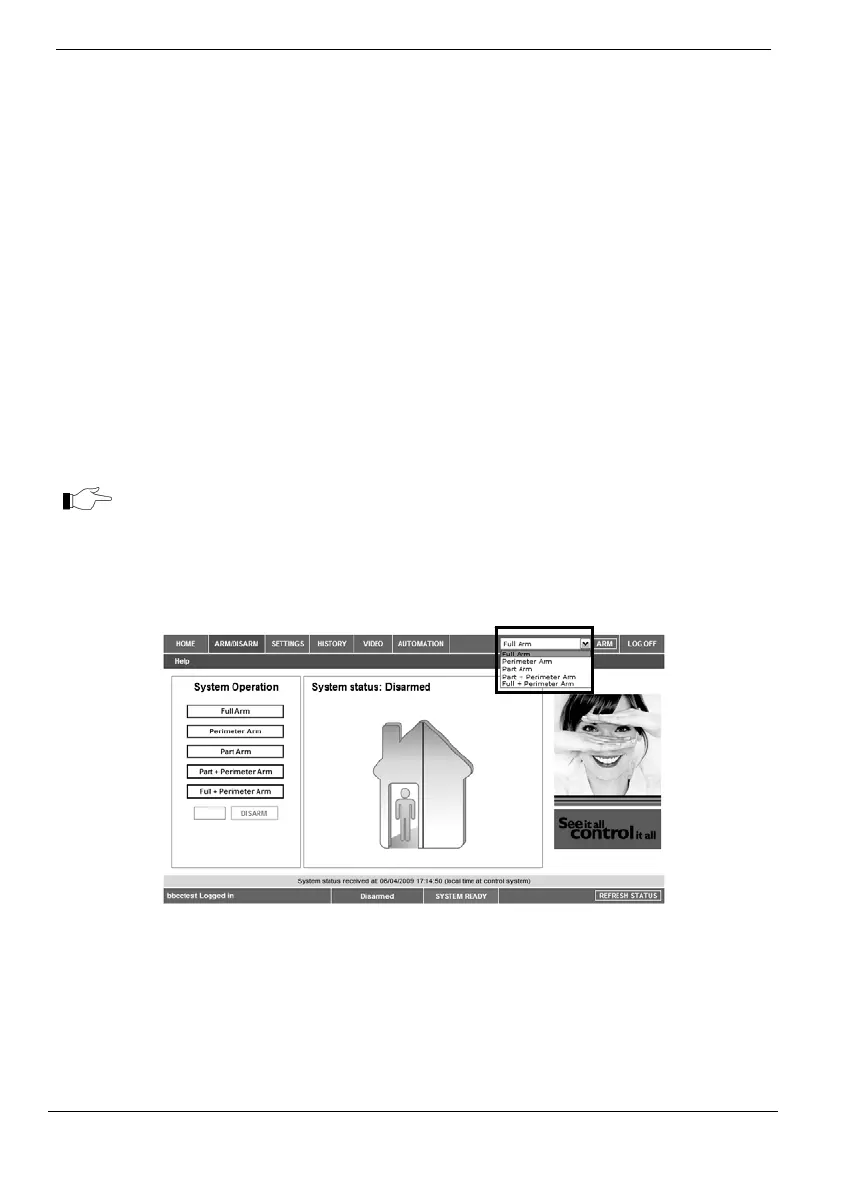
YoucanarmanddisarmthesystemusingtheArm/Disarmdrop‐downbox(upper‐right
partofthepage)orusingthebuttonsintheSystemOperationArea.
The Web Application allows you to arm and disarm your system via the Web
Applicationusinganyoftheavailablearmingmethods.It
isimportanttonotethatwhen
youarmusingtheWebapplication,thesystemisarmedwiththeprogrammeddelay.
1. OntheStatusBarbelowonthepageyoucanseethecurrentstatusofthe
system(inourexampleitisDisarmedandSystemReady,whichmeansthat



 To Next Page