2. The User Interface
iConnect User Manual
7
LED Status Meaning
Off The system is disarmed.
On Green The system is armed.
Flashing Red An alarm has occurred. Alarm indication is cleared the next
time you arm the system or view the relevant event in the
event log.
Alarmindicationisnotdisplayedafterasilentpanicalarm.
System Trouble Indication
In the event that the system detects a trouble condition, “System Trouble” appears on
the display. To identify the problem, scroll through the trouble list by pressing .
Scrolling the trouble list also silences system trouble tones that may be sounded if
enabledinprogramming.Whenthetroubleconditionisrestored,itisremovedfromthe
systemtroublelist.
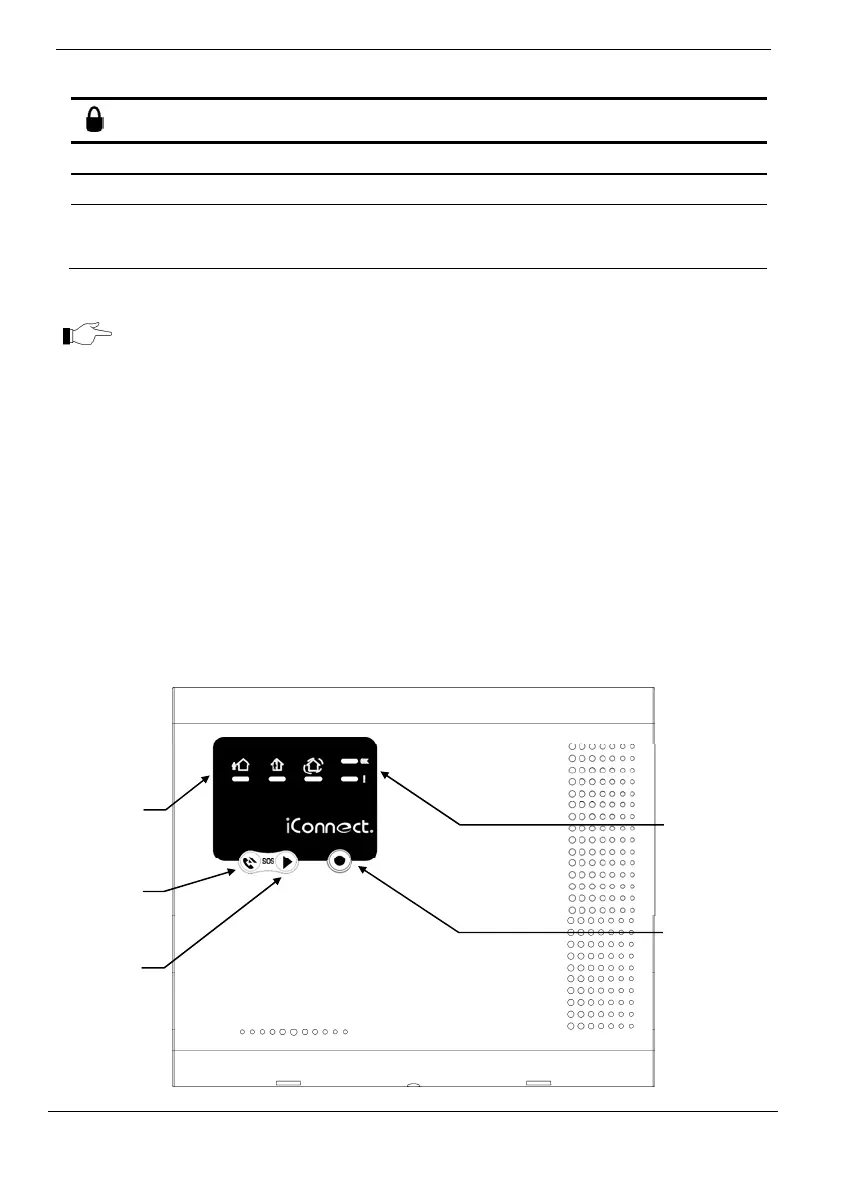
2.2. Front Panel (LED Configuration)
Asthenamesuggests,theLEDFrontPanelusesonlyLEDstoinformyouoftheControl
System status. In addition to System Status LEDs (OK andʺ!ʺ), there are three Arming
Status LEDs: full, part, and perimeter. The three‐button keypad allows you to make
servicecall,recordandplayaudiomessage,andtoactivateSOSpanicalarm.
System
Status
LEDs
Arming
Status
LEDs
Service
Call
Button
Message
Play
Button
Message
Record
Button



 To Next Page