3. Arming and Disarming
iConnect User Manual
15
3. Arming and Disarming
Armingcanbedefinedasactivatingthesystem.Whenthesystemisarmed,itmonitors
the zones that are protected by the sensors. If a sensordetects an intrusion, the system
generatesanalarm.
3.1. System Type - Partitioned /Unpartitioned
Your system may be defined in programming as partitioned or unpartitioned.
Partitioningoptionallowsyoutodivideyourhomeintotwosections(partitions)eachof
thembeingarmedanddisarmedindependentlyofoneanotherandoffullarming.
Partitioningmustbeenabledinprogrammingbyyourinstaller.
3.2. Arming Modes: Unpartitioned Systems
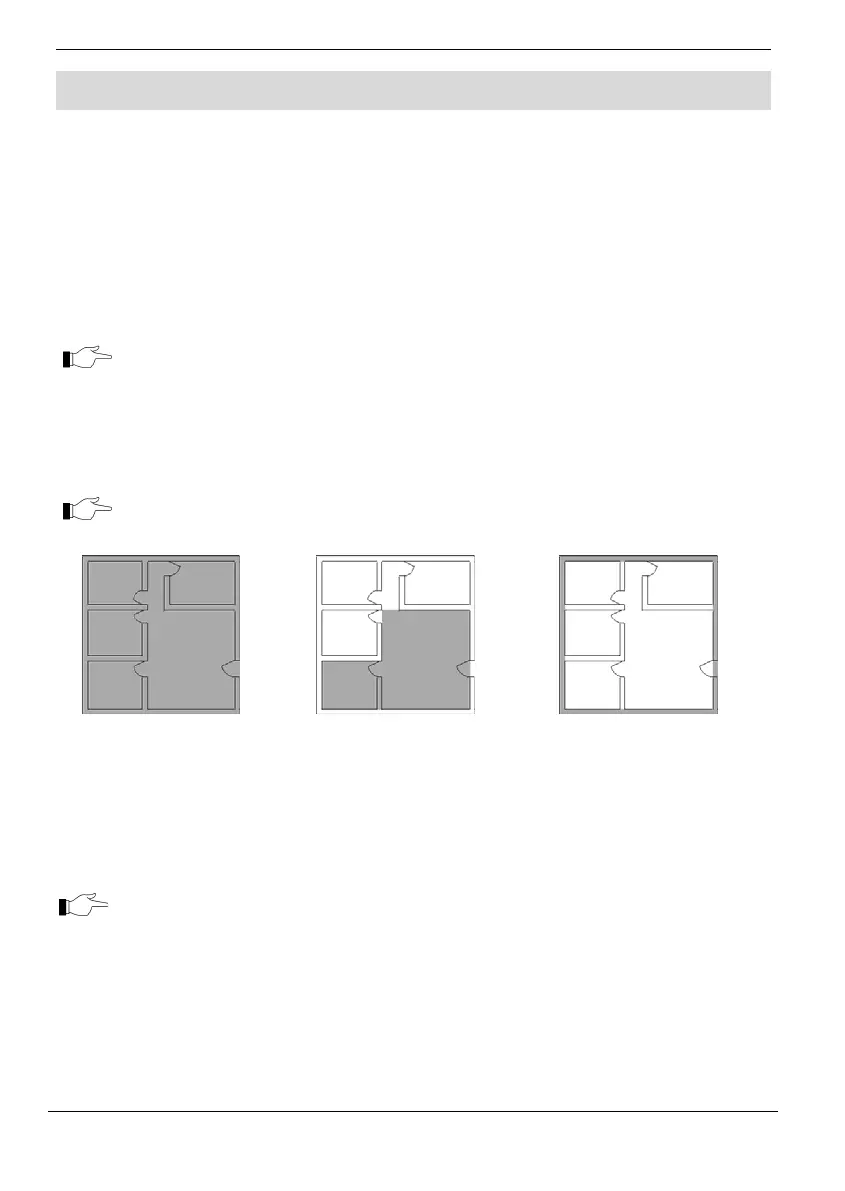
Threearmingmodesareavailable:Full,PartandPerimeter.Thesemodesenableyouto
armyoursystemaccordinglytosuitdifferentcircumstances.
Inunpartitionedsystems,youcanonlydisarmalltheactivearmingmodes.
Full Arming
Full arming activates the
entire system. This
arming method is used
when you intend to leave
your home, leaving the
premises empty.
Part Arming
This arming method
enables you to arm a
section of your home while
remaining on a different
part of the premises.
Perimeter Arming
Perimeter arming enables
you to activate the
perimeter zones (the
windows and doors of your
home) enabling you to
move freely within the
protected area.
Certain sensors, such as smoke sensors, are always active regardless of system
status.
3.3. Arming Modes: Partitioned systems
If partitioning is enabled in programming, three arming modes are available: Full,
Partition1,andPartition2.
Partitions are entirely customizable; each partition can be armed and disarmed
independently.



 To Next Page