Appendix B: Web User Application
iConnect User Manual
47
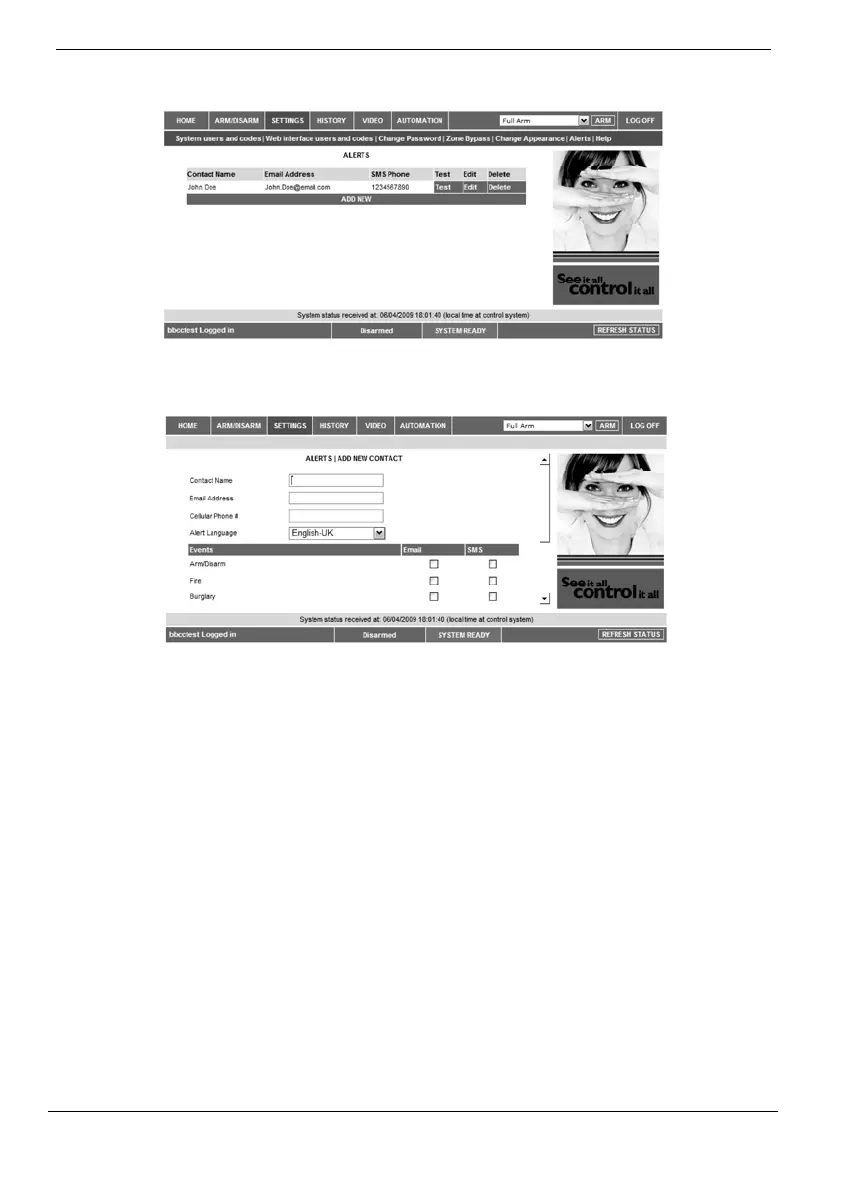
Thefollowingpageappears:
2. PressAddnewtoaddemailaddressesorcellulartelephonenumbersfor
thealertmessages.
3. IntheContactNamefield,enterthenameofthecontacttoreceivealerts.
4. IntheEmailAddressfield,entertheemailaddressforemailalerts.
5. IntheCellularPhone#field,enterthecellularphonenumberfor
SMSalerts.
6. Tostartreceivingtheeventsmessages,in
theareabelow,selectthe
checkboxesaccordingtotheeventtypeandmessagetypeyouprefer
(emailorSMS).
7. TestthealertsyouhaveprogrammedbyclickingtheTestbuttononthe
Alertspagenearthenewlyaddedalert.
History
TheHistorypageenablesyoutoviewthesystem’sevent log.Theeventsarearrangedin
a table that offers the advantage of allowing you to view a large number of events at
once. In addition to viewing the event log, you may also save the log to a file (HTML,
PDForRTF)orprintthelog.
ForfurtherdetailsonhowtousetheWebApplication,refertotheHelpmenuincluded
intheapplication.
OnTheMainPagemenu,clickHistory,thefollowingpageappears:



 To Next Page