3. PANEL LAYOUT AND CONNECTORS
10
3. PANEL LAYOUT AND CONNECTORS
3.1 FRONT PANEL
Polyphonic Digital Synthesizer
Digitone
12
13
23
24
14
15
6
521
25
20 21 22
19181716
7
9
8
11
10
3 4
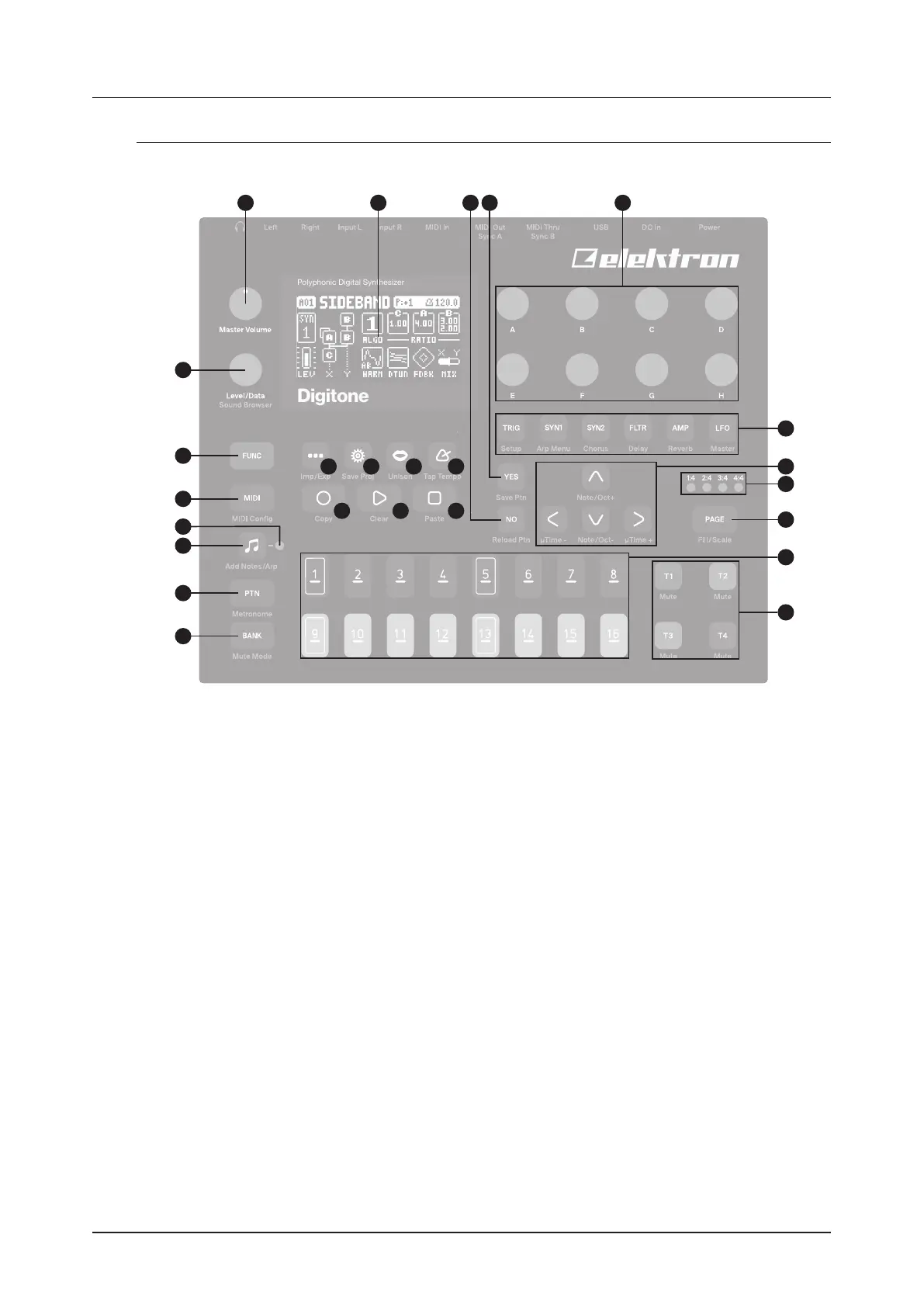
1. MASTER VOLUME sets the volume for the main outputs and the headphones output.
2. Screen.
3. [NO] key. Used for exiting an active menu, backing one step and negating. The secondary function is a
temporary reload of the active pattern.
4. [YES] key. Used for entering sub-menus, selecting and confirming. The secondary function is a tempo-
rary save of the active pattern.
5. DATA ENTRY knobs A-H. Used for setting parameter values. Press and turn the knobs to change values
in larger increments.
6. [PARAMETER] keys access the PARAMETER pages of the active track. The color of the keys indicates
if the page is active (red/blue) or inactive (o).
• [TRIG PARAMETERS] accesses parameters such as NOTE, VELOCITY, and other trig related
parameters. The secondary function accesses the SOUND SETUP menu.
• [SYN1] accesses the SYN1 pages. Here you can find parameters related to the FM engine. For MIDI
tracks this page has parameters such as CHANNEL, PROGRAM, and AFTERTOUCH. The secondary
function accesses the ARPEGGIATOR menu.
• [SYN2] accesses the SYN2 pages. Here you can find further parameters related to the FM engine. The
secondary function accesses the CHORUS page.
• [FLTR] accesses the FILTER pages. Here are the parameters for the base-width and multimode filters.
On MIDI tracks you find the CC value settings here. The secondary function accesses the DELAY page.
• [AMP] takes you to the AMP page, where you find parameters for the amplitude envelope and eect
sends. On MIDI tracks you find the CC select settings here. The secondary function accesses the
REVERB page.
• [LFO] accesses the LFO parameters for both synth and MIDI tracks. The secondary function accesses
the MASTER page.
7. The [ARROW] keys. Used for navigation and for setting parameter values. In menus, they are called
[UP], [DOWN], [LEFT], and [RIGHT].



 To Next Page