Elna International Corps. SA 6004 Service manual
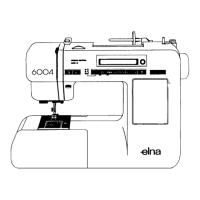
CIRCUIT BOARD C
To remove
1. Remove the front panel (see page 4).
2. Loosen screws A, B, C and D, and remove set screw E and F.
3. Remove the rear cover.
4. Unplug the four (4) connectors and remove set screws G
5. Remove circuit board C
To attach
6. Attach the circuit board C with three (3) screws and insert the connectors
7. Attach the rear cover with six (6) set screws.
8. Attach the front panel unit (see page 4).
A = Circuit Board A K = Transformer (primary)
M = Machine socket (primary) 0 = Transformer (secondary)
Page 18


 To Next Page