Elna International Corps. SA 6004 Service manual
BUTTONHOLE SENSOR
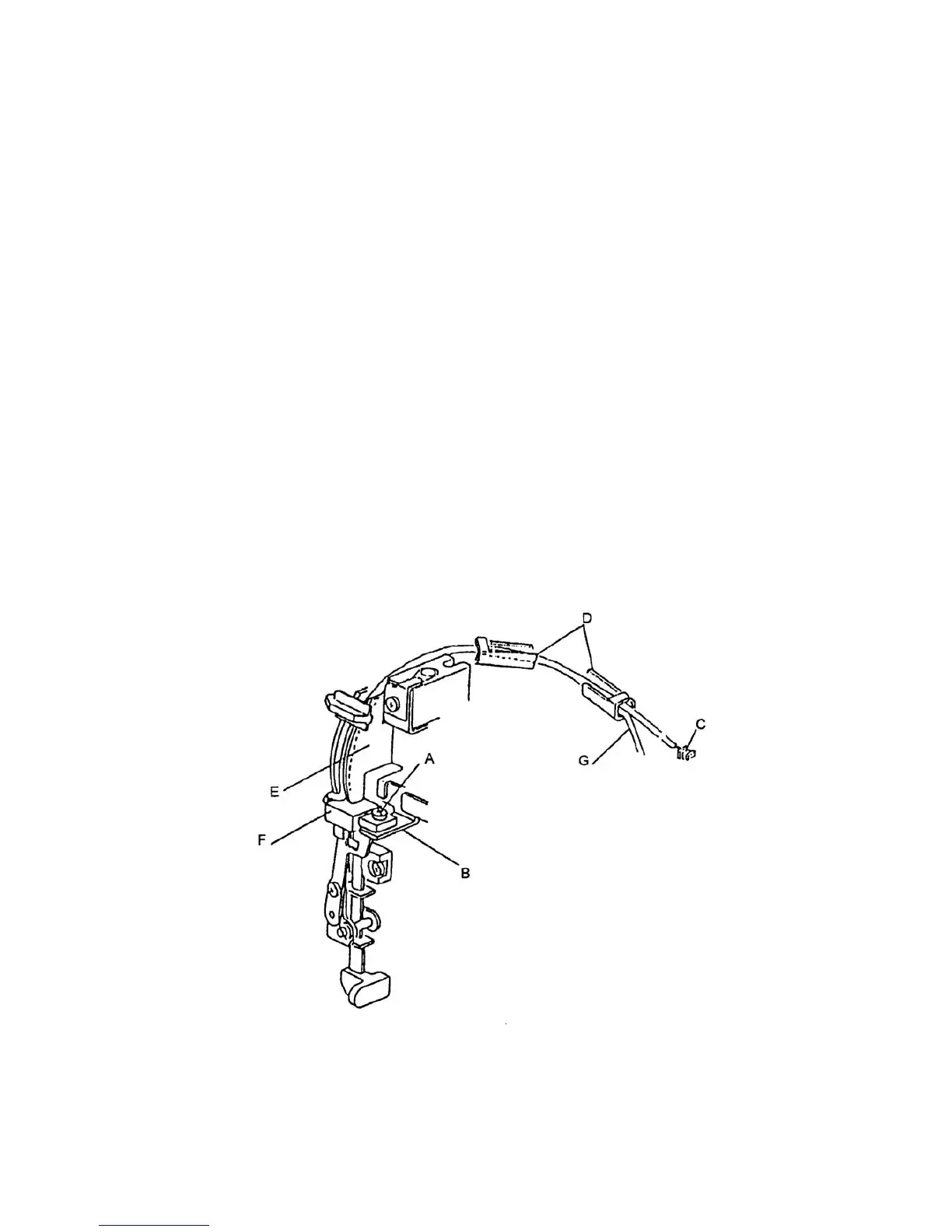
To remove
1. Remove the front panel (see page 4).
2. Remove set screw A and removes the buttonhole sensor F from sensor set plate B.
3. Unplug the connector C of BH sensor from circuit board K.
4. Remove the cord of BH sensor from cord guides D and remove the BH sensor.
To attach
5. Insert the cord of BH sensor between front bracket and cord guide plate E and into the two
cord guides D.
6. Insert the connector of BH sensor C in circuit board K.
7. Attach the BH sensor F to the sensor set plate B and adjust the position so that the shield
plate does not touch the BH sensor (see page 16).
8. Tighten set screw A.
9. Attach the front panel.
Note: When replacing the BH sensor, "adjust the BH lever" (See page 16).
G = Lamp cord
Page 25


 To Next Page