Elna International Corps. SA 6004 Service manual
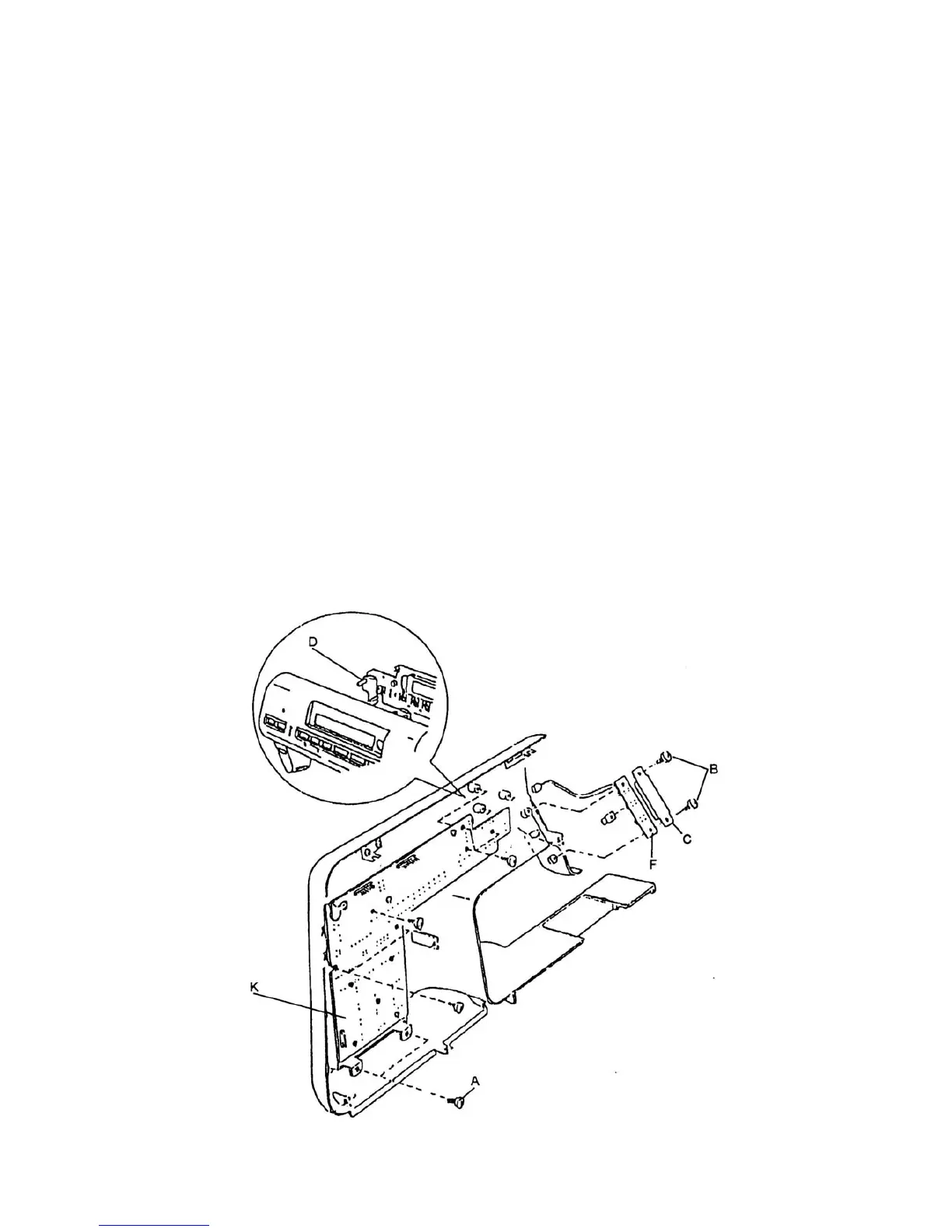
CIRCUIT BOARD K AND F
CIRCUIT BOARD K
To remove:
1. Remove the front panel (See page 4).
2. Remove the eught (8) screws A.
3. Unplug the connector of circuit board F and remove circuit board K.
To attach:
4. Insert the LCD light reflector D between front panel and circuit board K and fasten eight (8)
screws A.
5. Insert the connector of circuit board F to circuit board K.
CIRCUIT BOARD F
To remove:
1. Remove the front panel (See page 4).
2. Remove the two screws B.
3. Unplug the connector of circuit board K and remove the circuit board F.
To attach:
4. Insert the reverse button in the front panel and fasten circuit board F with two screws B and
isolation paper.
5. Insert the connector of circuit board F to circuit board K.
6. Attach the font panel.
Page 24


 To Next Page