21
Replacing Touch Panel
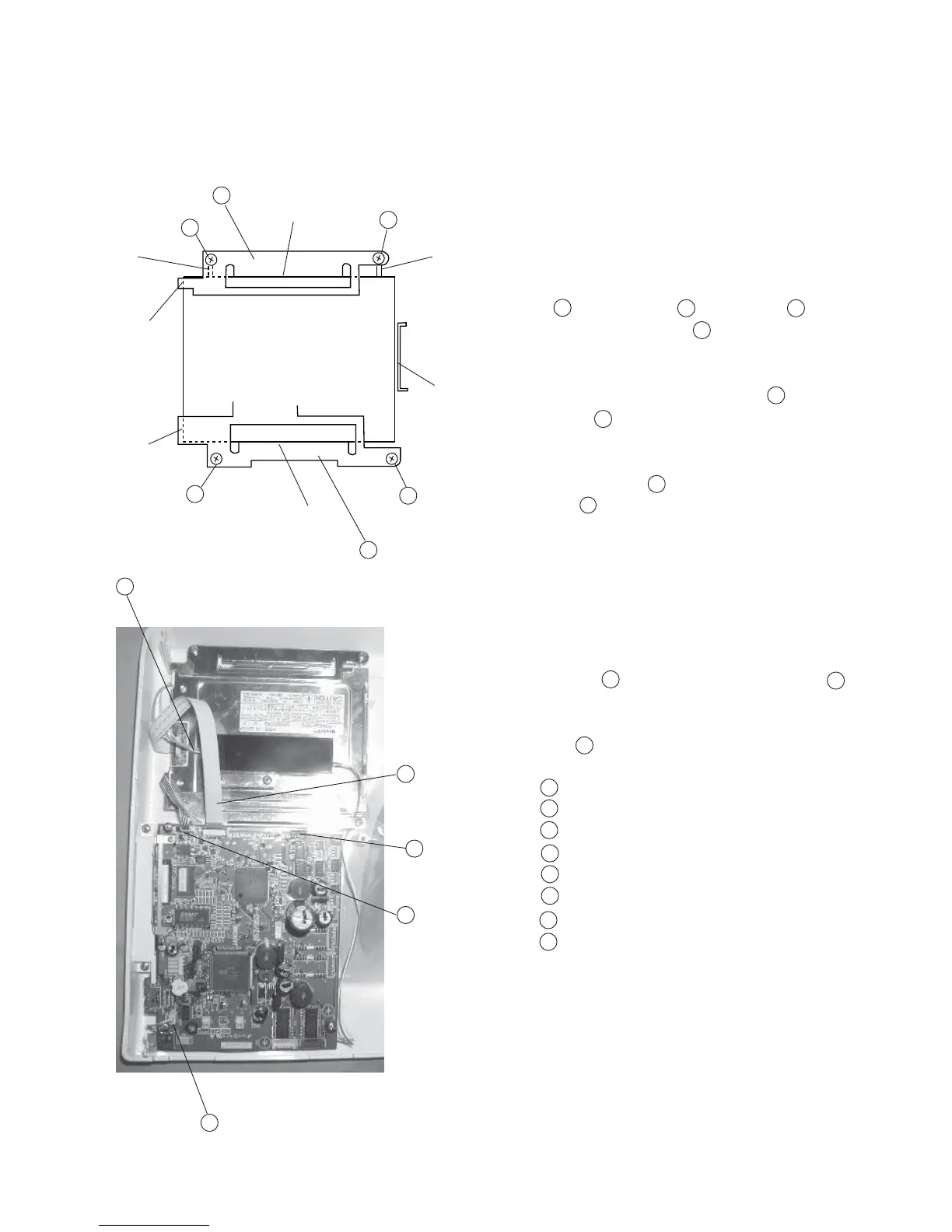
To replace the touch panel, follow the instructions below.
Touch panel
To remove:
1 Remove the front cover. (See page 6)
2 Pull out the Connectors of printed circuit board
F , LCD Harness and Inverter and
Touch panel connector .
3 Pull out the Touch panel connector from the
Inverter .
4 Remove Screws (4 pieces) and remove the touch
panel .
To attach:
5 While butting the LCD to the ribs (A), (B), (C) spots,
butt the (D) and (E) of the LCD fixing plate
(bottom) to the LCD and tighten screws .
6 While butting the (F) and (G) of LCD fixing plate
(Top) to the LCD, tighten the screws.
1
2
3
(A)
(B)
(F)
(C)
(G)
(E)
(D)
4
5
6
7
8
2
2
2
Fixing plate (Top)
Screw
Fixing plate (Bottom)
Touch panel connector
LCD Harness
Printed circuit board F
Touch panel
Inverter
6
5 8
4
4
8
2
7
3
2
1
1
2
3
4
5
6
7
8



 To Next Page