28
Adjusting X Motor Gear
If the X-motor gear sound is noisy when sewing the embroidery stitches, follow the
instructions below.
1Remove the base unit (See page 5).
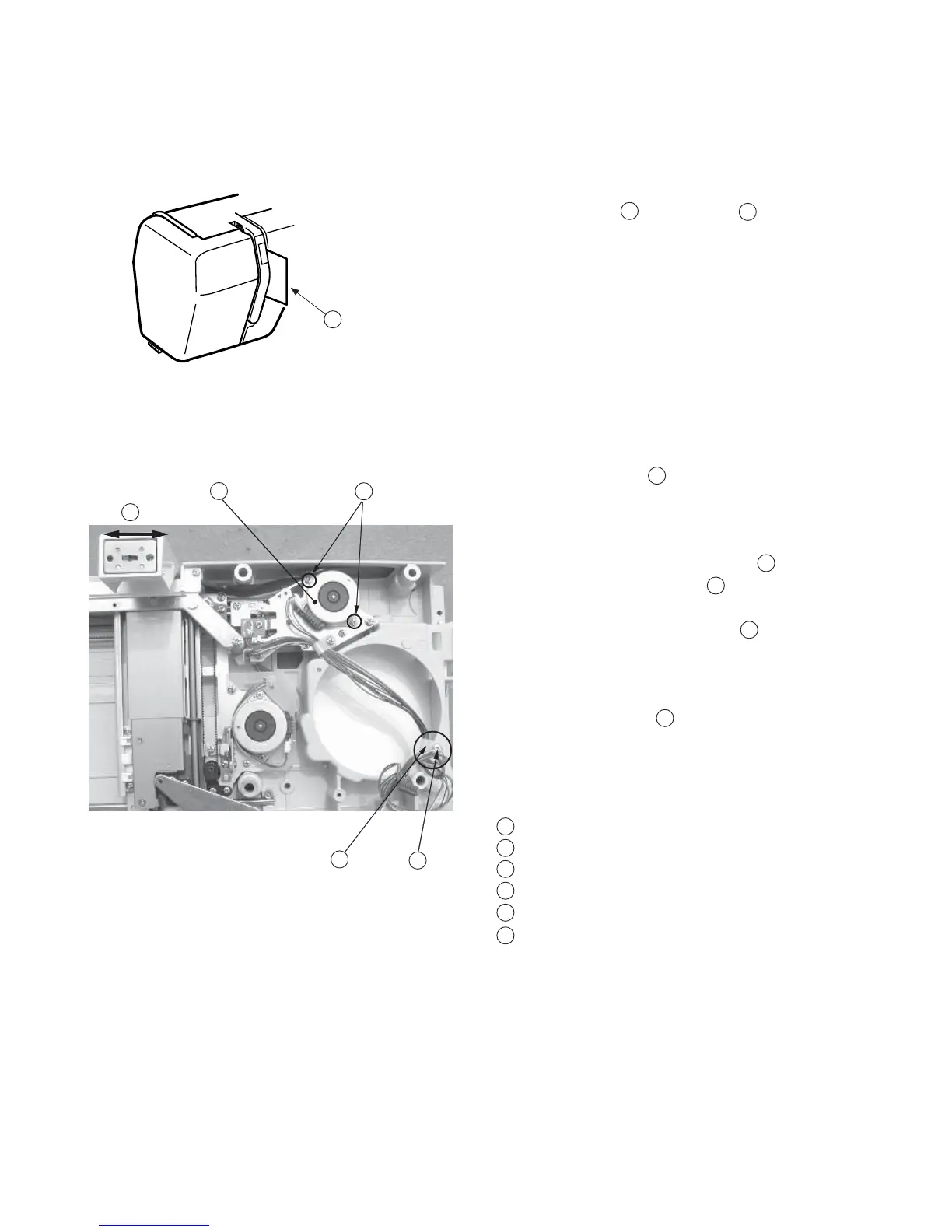
2 Remove Screw (A) and Nylon clip .
3 Attach the X and Y motor connectors to printed
cirboard A.
4Turn the power “ON” and select Monogramming
in the Embroidery Mode.
(Select large “A” in Gothic style and memorize it
3 times.)
5Lower the presser foot after the carriage movement.
6 Insert a Piece of paper between the thread
tension discs as shown so that the needle thread
sensor will not work.
7 Run the machine and loosen Screws (B)
(2 pieces) and move the X-motor to detect
the quiest position, while the carriage is moving
in lateral direction then tighten Screws .
8Return the carriage to the home position and turn
the power “OFF”.
9 Pull the X and Y motor connectors and secure the
nylon clip with screw (A) .
10 Reattach the base unit.
Screw A
Insert a piece of paper
Screw B
X- motor
Nylon clip
Carriage moving in lateral direction
1
3
45
2
3
1
2
4
5
4
1
6
1
2
3
4
5
6



 To Next Page