24
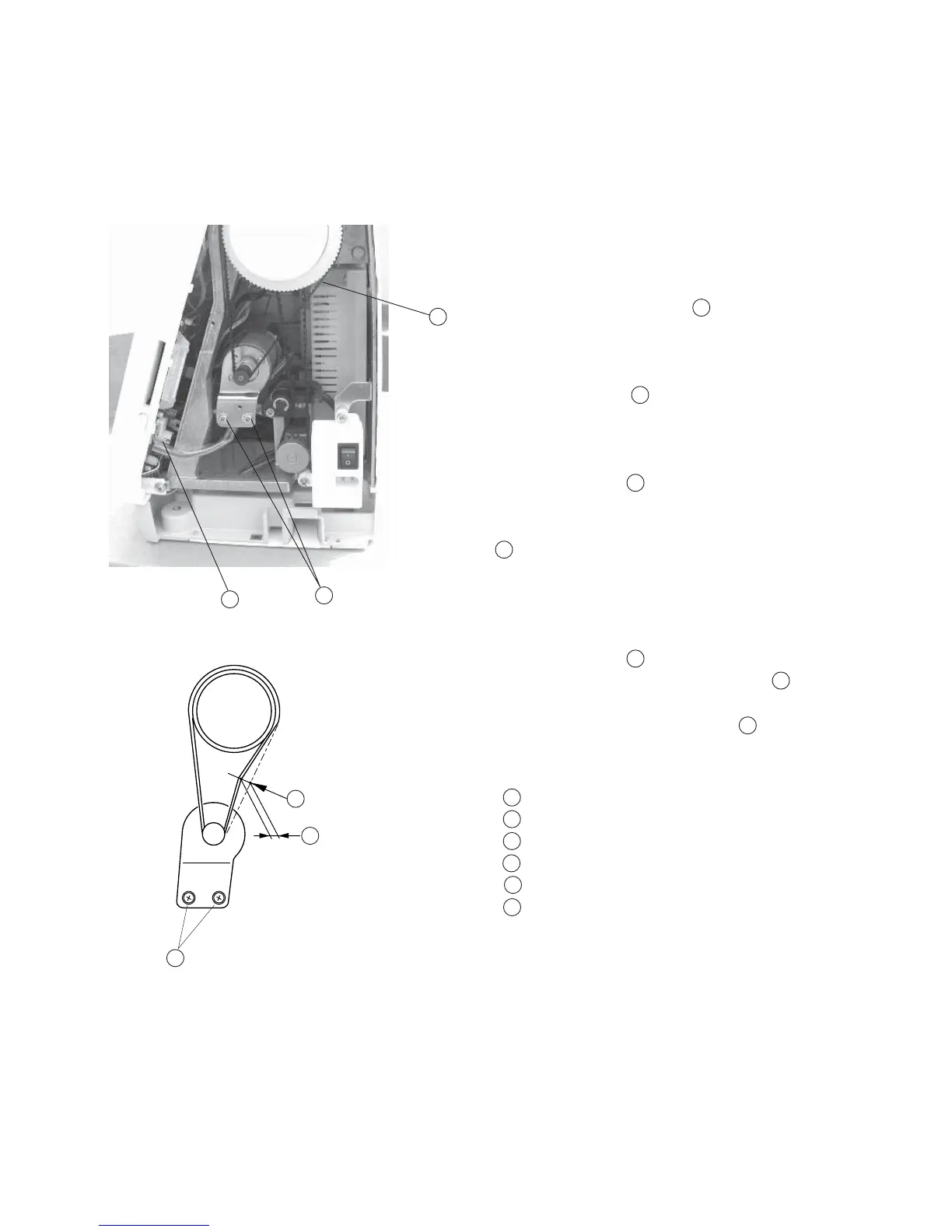
Replacing DC Motor and Motor Belt Tension Adjustment
To remove:
1 Remove the belt cover. (See page 2)
2 Remove the motor belt.
3Remove the Motor connector from the printed
circuit board A.
4Remove Screws (A) (2 pieces) and replace the
motor.
To attach:
5 Tighten Screws (A) (2 pieces) temporarily and
attach the motor.
6 Adjust the motor belt tension and tighten screws (A)
(2 pieces) firmly.
Adjusting motor belt tension
1. Tighten screws (B) (2 pieces) temporarily.
2. Adjust the Belt deflection to about 5.0 mm by
pressing the middle of the motor belt with your
finger with approximately 200 grams of pressure.
Replacing DC Motor
1
2
3
4
5
6
1
3
5
3
3
4
6
Motor belt
Motor connector
Screws (A)
Screws (B)
Pressure 200 grams
Deflection 5 mm
1
2
3
4
5
6



 To Next Page