28 Chapter 5 iCOM Controller
Liebert. PEX+Series Precision Air Conditioner User Manual
5.6 USER MENUS
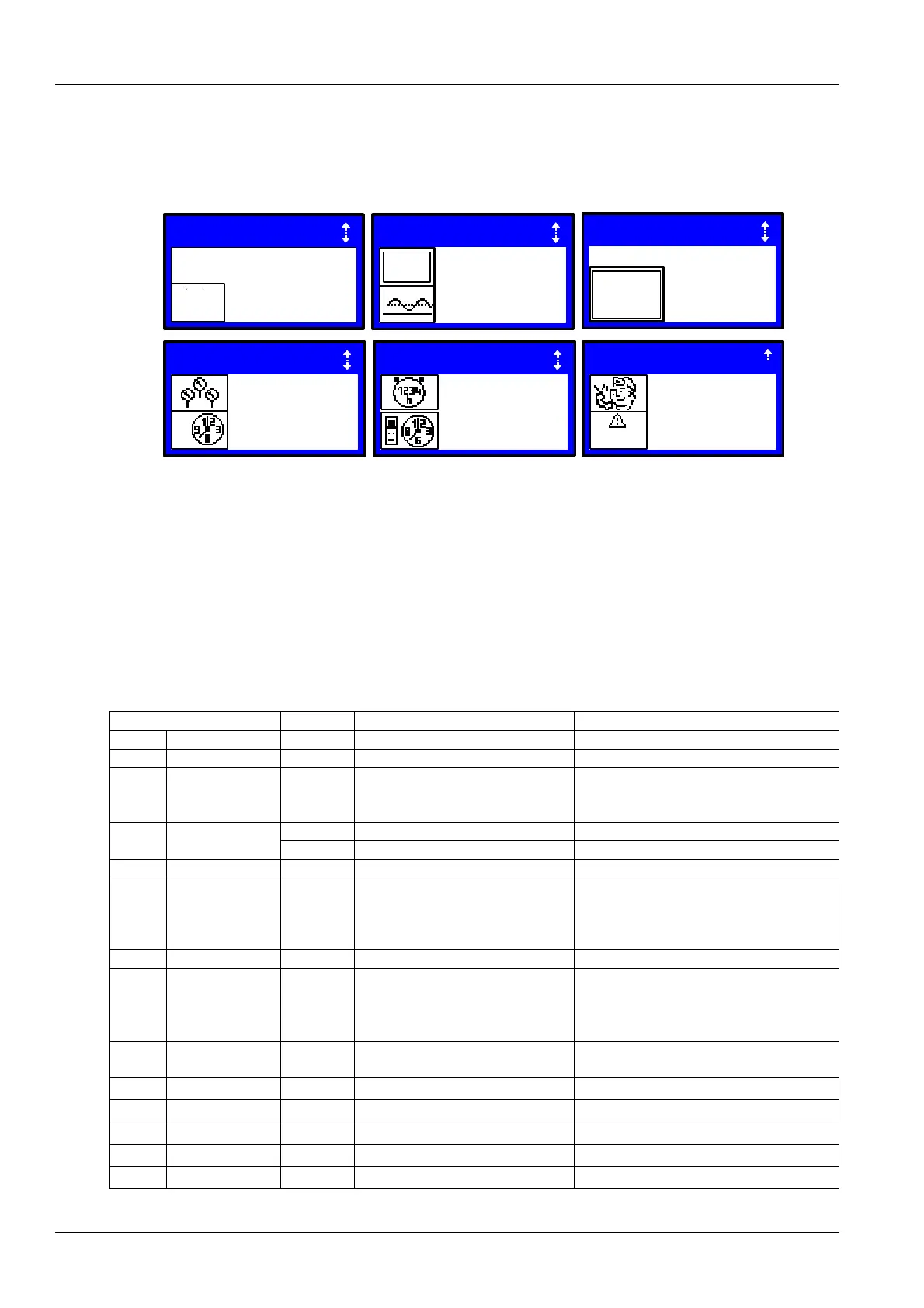
Press the ENTER or DOWN button on the main interface to enter the USER MENUS, as shown in Figure 5-6. The
USER MENUS are displayed in six pages, each displaying one or two submenus. Press the ENTER button to highlight
the submenu, the up or down button to browse the submenus, and the ENTER button to enter the selected one.
Figure 5-6 USER MENUS
5.6.2 PASSWORD
The password is necessary for some set points. After inputting the password (user password: 149), use the up button
and DOWN button to browse all the options, and then press the ENTER button to enter the selected one.
5.6.3 SET POINTS
The set points will not be lost when the power fails. You can enter to browse and set the parameters in the SET
POINTS submenu through the USER MENUS. The left row displays the parameter codes; the middle row, the
parameter name; the right row, the set points, as shown in Table 5-4.
Table 5-4 Descriptions of SET POINTS parameters
Air Temperature Set Point
Actual Air Temperature Set Point
Temperature Control Sensor
0 = Rel
1 = Comp
2 = Pred
3 = DewP
Humidity Proportional Control Type
Fan Speed Temperature Set Point
0 = SUP
1 = REM
2 = RET
3 = MAN
2nd Temperature Set point
Supply Temp Limit Set point
BMS Backup Temp Set point
Return Compensation Set point
1 / 6
USER MENUS
PASSWORD LEVEL
SETPOINTS
0
C / F
H%R
SET
?
???
2 / 6
USER MENUS
EVENT LOG
GRAPHICS
EVENT
LOG
3 / 6USER MENUS
SET ALARMS
ALARMS
SET
4 / 6
USER MENUS
SENSOR DATA
DISPLAY SETUP
SET
5 / 6
USER MENUS
TOTAL RUN HRS
SLEEP MOOE
6 / 6
USER MENUS
SERUICE INFO
ALARMS
ACTIVE ALARMS
ACTIVE






 To Next Page