32 Chapter 5 iCOM Controller
Liebert. PEX+Series Precision Air Conditioner User Manual
5.6.8 DISPLAY SETUP
The DISPLAY SETUP menu is used to set the LCD display attributes. Password is not required for changing the set
points. The parameters are described in Table 5-8.
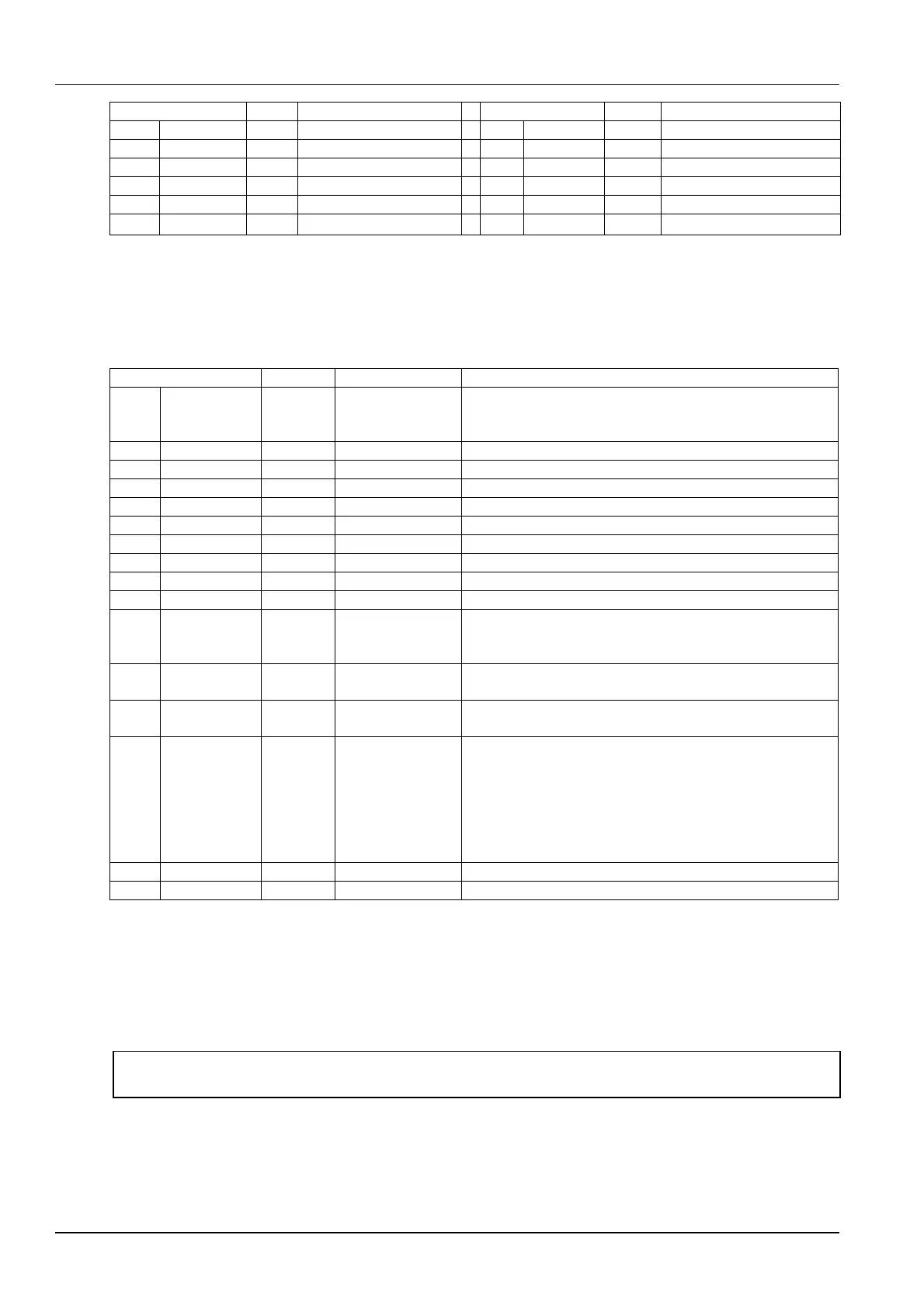
Table 5-8 Descriptions of DISPLAY SETUP parameters
RUS, CZE, CHI,
ESP, FRE, ITA,
DEU, EN, POR
Buzzer frequency. 0% means buzzer silenced
Buzzer frequency test switch. It determines whether or not there
will be sound accompanying the adjustment of BUZ FREQ
through the setting
5min, 10min,
30min, 1hr, 12hr
Backlight time, or the backlight time when there is no button
operation
Graph, Simple,
SimCo, GraCo
Main interface display mode
Main interface display mode of set points and actual values.
Range:
SET: only set points of the temperature and humidity are
displayed.
ACT: only actual temperature and humidity are displayed.
A + S: both set points and actual values of the temperature and
humidity are displayed
5.6.9 TOTAL RUN HRS
The TOTAL RUN HRS menu records the total run time (unit: hr) of the system components. You can also set the run
time limits of the system components through this menu. If the actual component run time exceeds the set limit, alarms
will be raised.
This menu requires password. You can reset the total run time to zero in order to restart timing.
Note
Resetting the timers is not needed unless the components are replaced.
The parameters on this menu are described in Table 5-9. Each component has a LIMIT option to set the run time limit
of the corresponding component.







 To Next Page