22
Navigating the Patient Screen and Menu
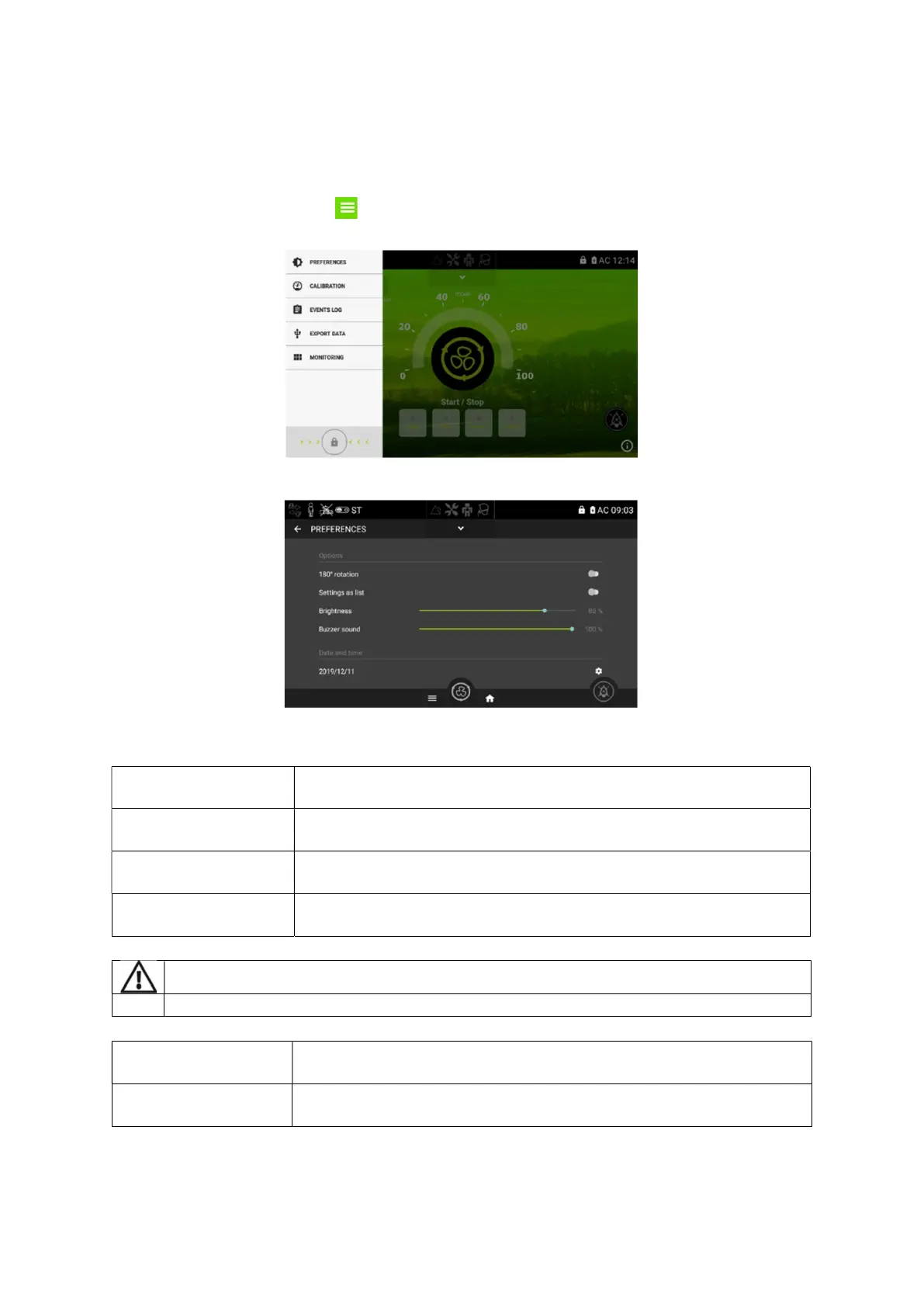
From this screen the patient can change preferences and calibrate the ventilator. Calibration should
be performed at every circuit configuration change and is explained in Chapter 4 of this manual.
From the Home Screen, choose to access the Preferences, Calibration, Event Logs, Export data
and Monitoring menus.
Press on Preferences to choose the Preferences Screen. (see below)
From this screen the patient can adjust the following settings for the device.
Allows the screen to be rotated 180°. Press the small circle to rotate the
screen.
Allows the display of settings and alarm settings as a list in the clinical
menu
Allows brightness levels from low to high. Simply swipe the blue circle
from left to right to choose the preferred brightness.
Adjustable sound level for alarms. Simply swipe the blue circle from left
to right to choose the preferred sound level.
The sound level should be adjusted according to the criticality of the patient.
day, month and year. To set the date, click on the text
and choose the date from the calendar. Press done when completed.
Sets the current time on 24h clock. To set the time, choose the time
from the dial and press done when completed.
In the preference menu, the user can also access traceability and connection information.


 To Next Page