56
Chapter 4 - Alarms
Test the effectiveness of the alarm after any changes to the circuit, ventilation settings or
co-therapy. Alarm settings are sensitive to these changes.
Alarms may deactivate if the alarms are set to extreme values. This could put the patient at
risk.
The EO-150 is equipped with alarms to ensure the safety of the patient and to alert the user to
certain conditions that require a response. When an alarm is activated, it is both audible and visible.
When an alarm is activated:
1. A series of beeps will sound
2. A message will appear on the touch screen showing the priority of the alarm and giving the
reason for the alarm
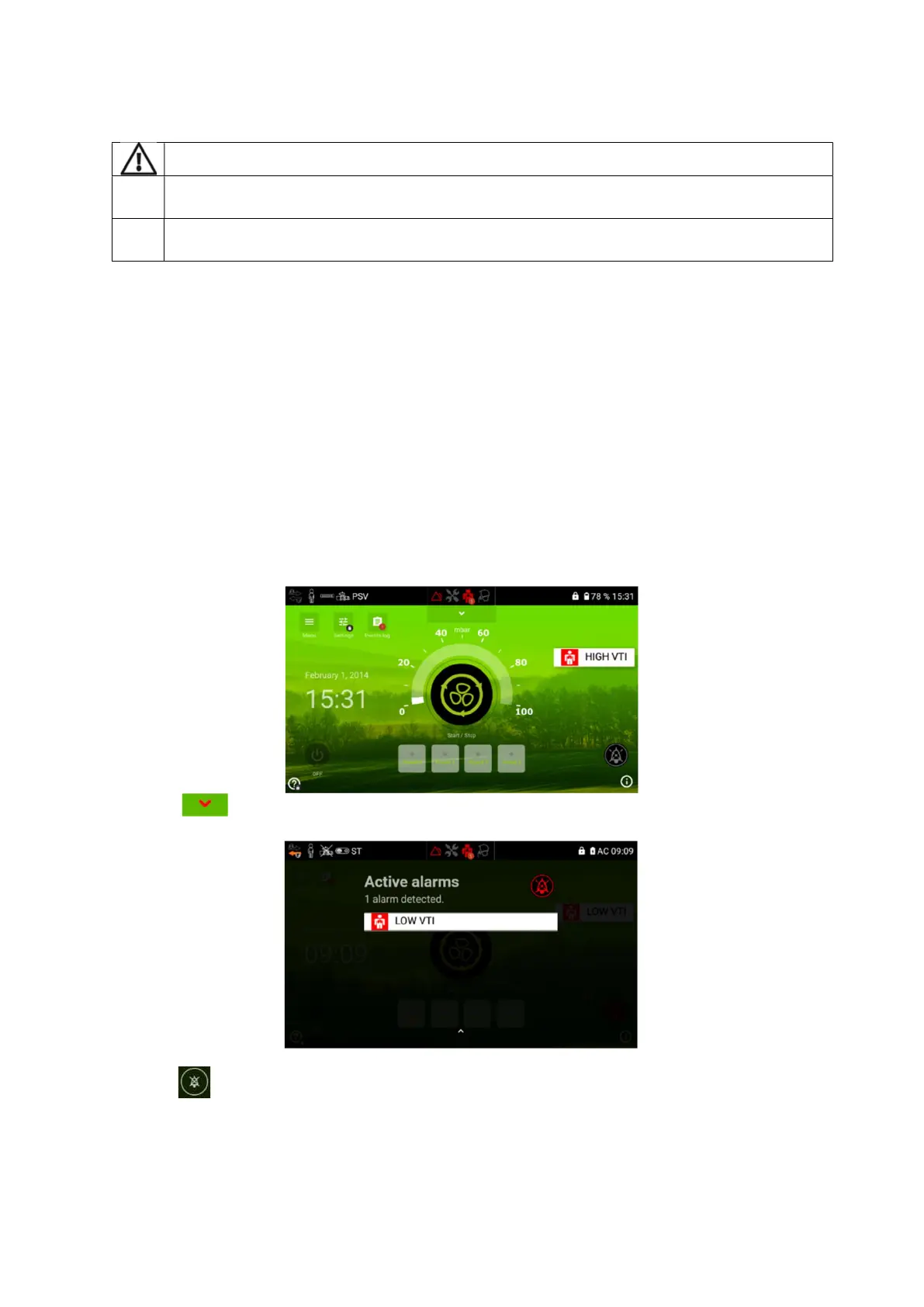
3. A pop-up on the Home Screen will show the nature and priority of the alarm and the red
arrow on the touch screen will flash until it is selected
4. The alarm button on the top panel of the machine will also flash and the icons will indicate
the nature of the alarm.
Viewing active alarms
1. Press to access the alarms Log screen from the Home Screen.
2. Hold to temporarily mute the alarm. The alarm sound will be temporarily muted for two
minutes. If after two minutes the conditions of the alarm are still present, the alarm sound will
be set off again.


 To Next Page