Name Function
C
Rear foot fixing points
(two points)
Attach the feet when using the projector on a surface such
as a desk. (Only models with feet supplied)
s "Attaching the feet (Only models with feet supplied)"
p.14
D
Wall mount fixing
points (four points)
Attach the setting plate when mounting on a wall. (Only
models with setting plate supplied)
s Installation Guide
s "Optional Accessories" p.146
E
Front foot fixing point
Attach the foot with a spacer when using the projector on a
surface such as a desk. (Only models with feet supplied)
s "Attaching the feet (Only models with feet supplied)"
p.14
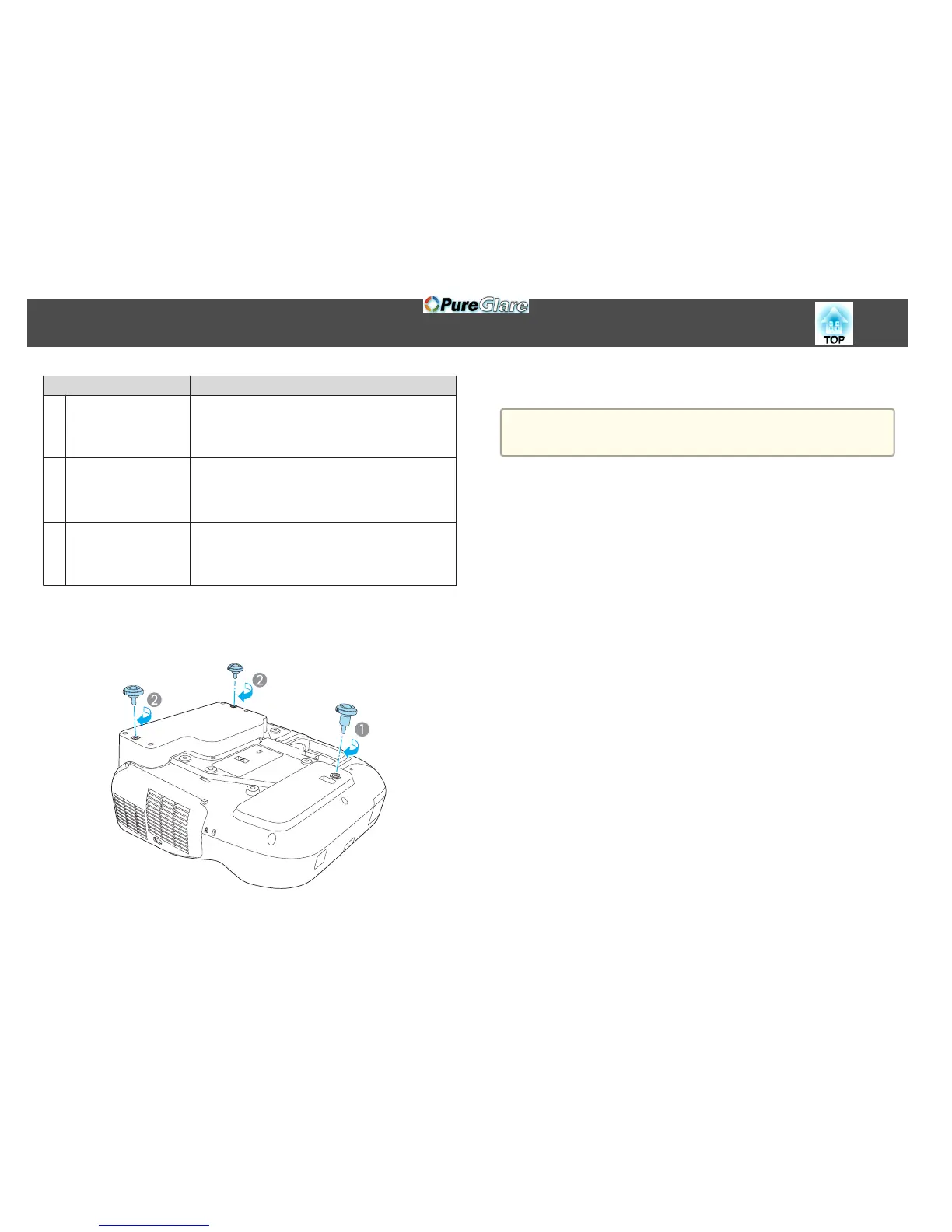
Attaching the feet (Only models with feet supplied)
Insert the feet into the foot fixing points.
A
Insert the foot with the spacer into the front foot fixing point.
B
Insert the rear feet (x2) into the foot fixing points.
a
You can install this projector vertically on a desk.
s "Installation Methods" p.24
Part Names and Functions
14


 To Next Page