Home
Epson
Printer
WF-C878RDWF
Page 437
Epson WF-C878RDWF - Page 437
535 pages
Manual
Save Page as PDF
To Next Page
To Next Page
To Previous Page
To Previous Page
Loading...
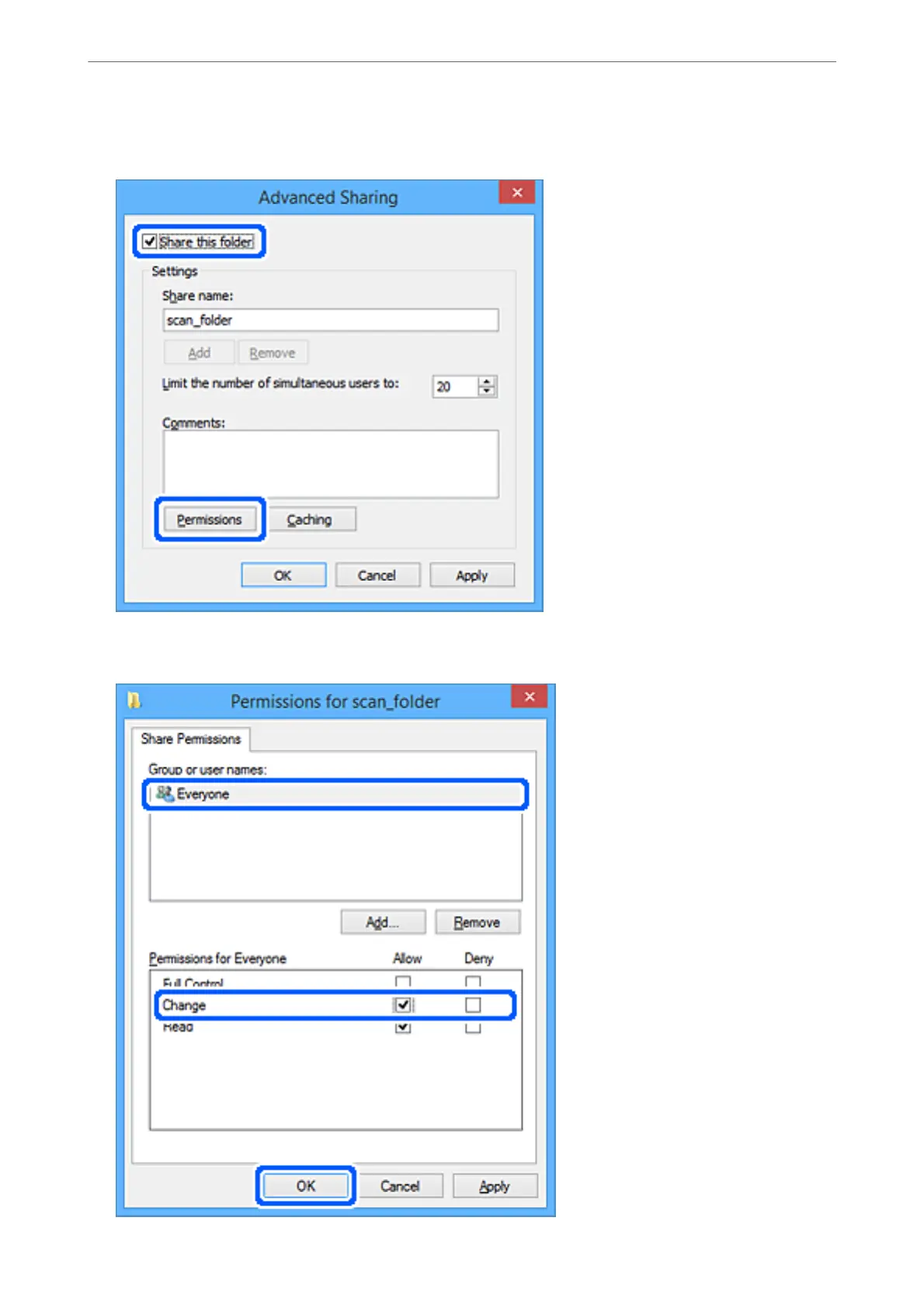
6.
Se
lec
t
Share this fo
lder
, and t
hen click
Pe
r
m
i
s
s
i
o
n
s
.
7.
Se
lec
t
Ever
yon
e
group o
f
Group or user nam
es
, selec
t
Allow
on
Cha
n
ge
, and then cl
ick
OK
.
Administr
ator Information
>
Settings to Use the Printer
>
Setting a Shared Network F
older
437
436
438
Table of Contents
Main Page
Table of Contents
2
Guide to this Manual
8
Introduction to the Manuals
8
Searching for Information
8
Printing Only the Pages You Need
9
About this Manual
9
Marks and Symbols
9
Notes on Screenshots and Illustrations
10
Operating System References
10
Trademarks
11
Copyright
12
Important Instructions
14
Safety Instructions
15
Safety Instructions for Ink
16
Printer Advisories and Warnings
16
Advisories and Warnings for Setting up the Printer
16
Advisories and Warnings for Using the Printer
17
Advisories and Warnings for Using the Touchscreen
17
Advisories and Warnings for Using the Printer with a Wireless Connection
17
Advisories and Warnings for Transporting or Storing the Printer
18
Protecting Your Personal Information
18
Part Names and Functions
19
Front
20
Rear
24
Guide to the Control Panel
26
Control Panel
27
Home Screen Configuration
28
Guide to the Network Icon
29
Menu Screen Configuration
30
Job/Status Screen Configuration
31
Entering Characters
32
Viewing Animations
32
Loading Paper
34
Paper Handling Precautions
35
Paper Size and Type Settings
36
List of Paper Type
36
List of Detected Paper Sizes
37
Loading Paper
37
Loading Envelopes
38
Loading Pre-Punched Paper
38
Loading Long Papers
39
Placing Originals
40
Placing Originals
41
Detecting the Original Size Automatically
43
Originals that Are Not Supported by the ADF
43
Inserting and Removing a Memory Device
44
Inserting an External USB Device
45
Removing an External USB Device
45
Sharing Data on a Memory Device
45
Printing
47
Printing Documents
48
Printing from a Computer - Windows
48
Printing a Document Using the Postscript Printer Driver (Windows)
71
Printing from a Computer - Mac os
75
Printing Using a Postscript Printer Driver - Mac os X
83
Printing PDF Files from a Memory Device
88
Printing Documents from Smart Devices (Ios)
89
Printing Documents from Smart Devices (Android)
90
Printing on Envelopes
91
Printing on Envelopes from a Computer (Windows)
91
Printing on Envelopes from a Computer (Mac OS)
91
Printing Photos
92
Printing JPEG Files from a Memory Device
92
Printing TIFF Files from a Memory Device
93
Printing Web Pages
94
Printing Web Pages from a Computer
94
Printing Web Pages from Smart Devices
94
Printing Using a Cloud Service
95
Registering to Epson Connect Service from the Control Panel
95
Copying
98
Available Copying Methods
98
Copying Originals
98
Copying on 2-Sides
98
Copying by Enlarging or Reducing
99
Copying Multiple Originals Onto One Sheet
100
Copying in Page Order
101
Copying Originals Using Good Quality
101
Copying ID Card
102
Copying Books
102
Basic Menu Options for Copying
102
Color Mode
103
Density
103
Paper Setting
103
Reduce/Enlarge
103
Original Type
103
2-Sided
104
Advanced Menu Options for Copying
104
Multi-Page
104
Original Size
104
Finishing
104
Mixed Size Originals
105
Orientation (Original)
105
Book->2 Pages
105
Image Quality
105
Binding Margin
105
Reduce to Fit Paper
106
Remove Shadow
106
Remove Punch Holes
106
ID Card Copy
106
Scanning
107
Available Scanning Methods
108
Scanning Originals to a Network Folder
108
Destination Menu Options for Scanning to a Folder
109
Scan Menu Options for Scanning to a Folder
110
Scanning Originals to an Email
111
Recipient Menu Options for Scanning to an Email
112
Scan Menu Options for Scanning to an Email
112
Scanning Originals to a Computer
114
Scanning Originals to a Memory Device
116
Basic Menu Options for Scanning to a Memory Device
116
Advanced Menu Options for Scanning to a Memory Device
117
Scanning Originals to the Cloud
118
Basic Menu Options for Scanning to the Cloud
118
Advanced Menu Options for Scanning to the Cloud
119
Scanning Using WSD
120
Setting up a WSD Port
120
Scanning Originals to a Smart Device
122
Faxing (Fax-Capable Printers Only)
123
Before Using Fax Features
124
Overview of this Printer's Fax Features
124
Feature: Sending Faxes
124
Feature: Receiving Faxes
125
Feature: PC-FAX Send/Receive (Windows/Mac OS)
127
Features: Various Fax Reports
127
Feature: Status or Logs for Fax Jobs
127
Feature: Fax Box
128
Feature: Security When Sending and Receiving Faxes
128
Features: Other Useful Features
128
Sending Faxes Using the Printer
129
Selecting Recipients
129
Various Ways of Sending Faxes
130
Receiving Faxes on the Printer
137
Receiving Incoming Faxes
137
Receiving Faxes by Making a Phone Call
138
Saving and Forwarding Received Faxes
140
Viewing Received Faxes Saved in the Printer on the LCD Screen
141
Menu Options for Faxing
142
Recipient
142
Fax Settings
143
More
145
Menu Options for Fax Box
146
Inbox/Confidential
146
Stored Documents
148
Polling Send/Board
149
Checking the Status or Logs for Fax Jobs
153
Displaying Information When Received Faxes Are Unprocessed (Unread/Not Printed/Not Saved/Not Forwarded)
153
Checking Fax Jobs in Progress
154
Checking the Fax Job History
155
Reprinting Received Documents
155
Sending a Fax from a Computer
155
Sending Documents Created Using an Application (Windows)
156
Sending Documents Created Using an Application (Mac OS)
158
Receiving Faxes on a Computer
160
Saving Incoming Faxes on a Computer
160
Canceling the Feature that Saves Incoming Faxes to the Computer
161
Checking for New Faxes (Windows)
161
Checking for New Faxes (Mac OS)
162
Checking the Consumables Status
165
Improving Paper Feeding Problems for Paper Cassette
165
Improving Print, Copy, Scan, and Fax Quality
166
Adjusting the Print Quality
166
Checking and Cleaning the Print Head
167
Running Power Cleaning
168
Preventing Nozzle Clogging
169
Aligning Ruled Lines
169
Cleaning the Paper Path for Ink Smears
170
Cleaning the Scanner Glass
170
Cleaning the ADF
172
Adjusting Print Quality Per Paper
175
Saving Power
176
Saving Power (Control Panel)
176
Installing or Uninstalling Applications Separately
177
Installing the Applications Separately
177
Installing a Postscript Printer Driver
179
Adding the Printer (for Mac os Only)
180
Uninstalling Applications
180
Updating Applications and Firmware
182
Moving and Transporting the Printer
184
Moving the Printer
184
Transporting the Printer
185
Replacing Maintenance Rollers in Paper Cassette 1
186
Replacing Maintenance Rollers in Paper Cassette 2 to 4
191
Solving Problems
196
The Printer Does Not Work as Expected
197
The Printer Does Not Turn on or off
197
Power Turns off Automatically
197
Paper Does Not Feed or Eject Correctly
198
Cannot Print
203
Cannot Start Scanning
221
Cannot Send or Receive Faxes
234
Error Code Is Displayed on the Status Menu
250
Cannot Operate the Printer as Expected
256
A Message Is Displayed on the LCD Screen
261
Paper Gets Jammed
262
Preventing Paper Jams
263
It Is Time to Replace Ink Supply Units
263
Ink Supply Unit Handling Precautions
263
Replacing Ink Supply Units
265
It Is Time to Replace the Maintenance Box
265
Maintenance Box Handling Precautions
265
Replacing a Maintenance Box
265
Printing, Copying, Scanning, and Faxing Quality Is Poor
266
Print Quality Is Poor
266
Copy Quality Is Poor
274
Scanned Image Problems
280
The Quality of the Sent Fax Is Poor
282
Received Fax Quality Is Poor
284
Cannot Solve Problem after Trying All Solutions
285
Cannot Solve Printing or Copying Problems
285
Adding or Replacing the Computer or Devices
286
Connecting to a Printer that Has Been Connected to the Network
287
Using a Network Printer from a Second Computer
287
Using a Network Printer from a Smart Device
288
Re-Setting the Network Connection
288
When Replacing the Wireless Router
288
When Changing the Computer
289
Changing the Connection Method to the Computer
290
Making Wi-Fi Settings from the Control Panel
292
Connecting a Smart Device and Printer Directly (Wi-Fi Direct)
294
About Wi-Fi Direct
294
Connecting to an Iphone, Ipad or Ipod Touch Using Wi-Fi Direct
295
Connecting to Android Devices Using Wi-Fi Direct
298
Connecting to Devices Other than Ios and Android Using Wi-Fi Direct
300
Disconnecting Wi-Fi Direct (Simple AP) Connection
304
Changing the Wi-Fi Direct (Simple AP) Settings such as the SSID
304
Checking the Network Connection Status
305
Checking the Network Connection Status from the Control Panel
305
Printing a Network Connection Report
306
Printing a Network Status Sheet
312
Checking the Network of the Computer (Windows Only)
312
Using Optional Items
314
List of Optional Items
315
Wiring Codes with Clamps
316
Printer Stand
316
Installing the Printer Stand
316
Moving the Printer While the Printer Stand Is Attached
322
Printer Stand Specifications
323
Optional Cassette Unit
323
Installing the Paper Cassette Units
323
Setting the Paper Cassette Unit in the Printer Driver
328
Moving the Printer While the Paper Cassette Units Are Attached
329
Problems with the Paper Cassette Unit
329
Paper Cassette Unit Specifications
330
Product Information
331
Paper Information
332
Available Paper and Capacities
332
Unavailable Paper Types
338
Consumable Products Information
339
Ink Supply Unit Codes
339
Maintenance Box Code
339
Maintenance Rollers Codes
339
Software Information
340
Software for Printing
340
Software for Scanning
345
Software for Faxing
347
Software for Package Creation
348
Software for Making Settings or Managing Devices
348
Software for Updating
351
Settings Menu List
351
General Settings
351
Print Counter
377
Supply Status
377
Maintenance
377
Language
378
Printer Status/Print
379
Contacts Manager
379
User Settings
380
Authentication Device Status
380
Epson Open Platform Information
380
Product Specifications
380
Printer Specifications
380
Scanner Specifications
381
ADF Specifications
382
Fax Specifications (Fax-Capable Printers Only)
382
Using Port for the Printer
383
Interface Specifications
385
Network Specifications
385
Postscript Level 3 Compatibility
388
Supported Third Party Services
388
Memory Device Specifications
388
Supported Data Specifications
389
Dimensions
389
Electrical Specifications
390
Environmental Specifications
390
Installation Location and Space
391
System Requirements
392
Font Specifications
393
Available Fonts for Postscript
393
Available Fonts for PCL (URW)
394
List of Symbol Sets
396
Epson Barcode Fonts (Windows Only)
398
Regulatory Information
407
Standards and Approvals
407
German Blue Angel
409
Restrictions on Copying
409
Administrator Information
410
Connecting the Printer to the Network
411
Before Making Network Connection
411
Panel
413
Settings to Use the Printer
415
Using the Print Functions
415
Setting up Airprint
423
Configuring a Mail Server
423
Setting a Shared Network Folder
427
Making Contacts Available
443
Preparing to Scan
454
Making Fax Features Available (Fax-Capable Printers Only)
456
Making Basic Operation Settings for the Printer
472
Problems When Making Settings
475
Managing the Printer
476
Introduction of Product Security Features
476
Administrator Settings
477
Restricting Available Features
486
Disabling the External Interface
488
Monitoring a Remote Printer
489
Backing up the Settings
491
Advanced Security Settings
492
Security Settings and Prevention of Danger
492
Controlling Using Protocols
494
Using a Digital Certificate
499
SSL/TLS Communication with the Printer
504
Encrypted Communication Using Ipsec/Ip Filtering
505
Connecting the Printer to an IEEE802.1X Network
517
Solving Problems for Advanced Security
520
Using Epson Open Platform
526
Where to Get Help
528
Technical Support Web Site
529
Contacting Epson Support
529
Before Contacting Epson
529
Help for Users in Europe
529
Help for Users in Taiwan
529
Help for Users in Australia
530
Help for Users in New Zealand
530
Help for Users in Indonesia
531
Help for Users in Malaysia
533
Help for Users in the Philippines
533
Help for Users in Singapore
534
Help for Users in Thailand
534
Help for Users in Vietnam
534
Help for Users in India
535
Help for Users in Hong Kong
535
Related product manuals
Epson WF-C878R Series
535 pages
Epson WF-C879R Series
53 pages
Epson WF-C8690 Series
17 pages
Epson WF-C869R Series
18 pages
Workforce Pro WF-C8190 Series
162 pages
Workforce Pro WF-C8610 Series
254 pages
Epson WF-C5790
608 pages
Epson WF-C5390
4 pages
Epson WF-C5210
608 pages
Epson WF-C5790DWF
266 pages
Epson WF-C5710 Series
239 pages
Epson WF-C579R Series
328 pages















 To Next Page