6 Wireless TimeClock Configuration Guide
Replace the Battery
The CR2032 battery is only used to maintain time in case of a power out-
age. Estimated battery life is up to 10 years, depending on usage. To
replace the battery:
1. Remove the faceplate and unscrew the station from the electrical box
to access the back cover.
2. Unplug the pigtail connection from the receptacle, and the RP-SMA
connector, if using.
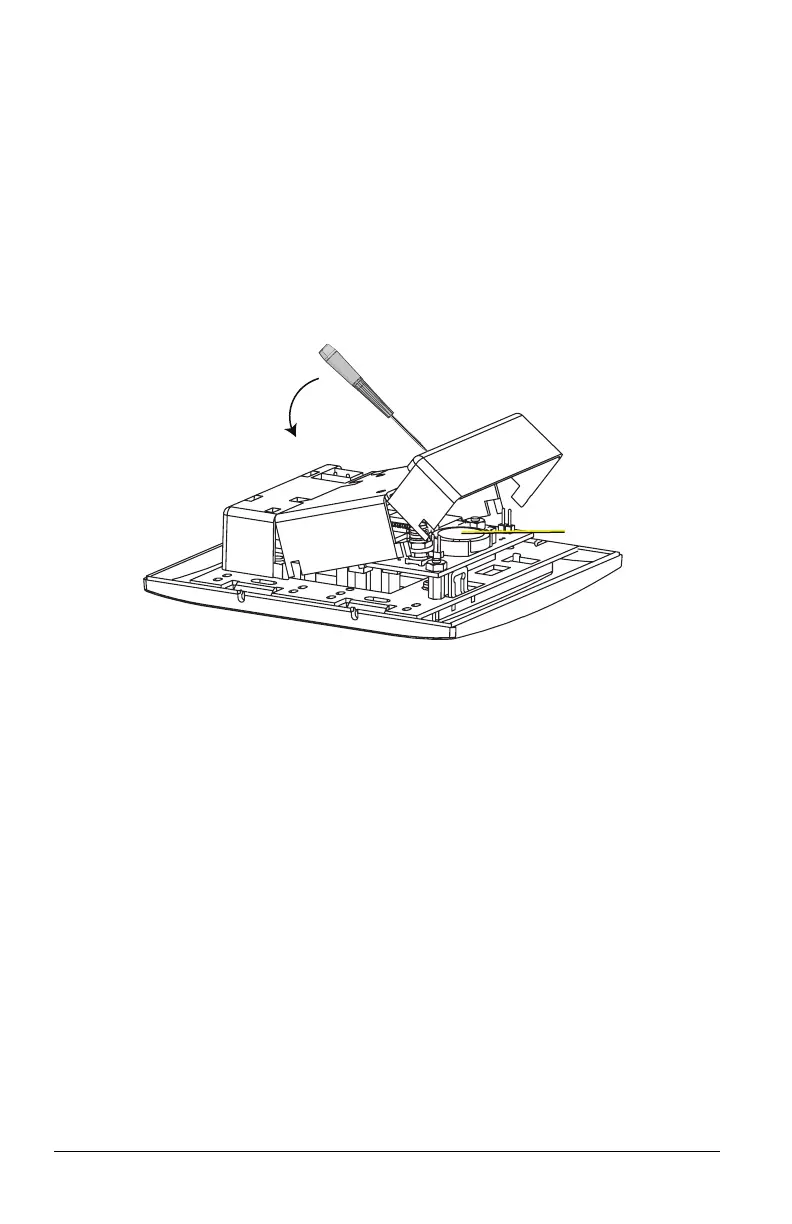
3. Insert a screwdriver into one of the holes on the side of the back cover
and pry carefully to free the side. Repeat to free the other side. The
back cover folds into three sections.
4. Remove the cover and insert the new battery under the clip with the
positive side (+) up.
5. Replace the cover, restore the connections, reinstall the station, safely
position the whip antenna, and attach the faceplate.
User Interface
The display screen is backlit for easy viewing. Press any button on the
keypad to wake the display and backlight. The backlight sleeps after two
minutes of inactivity.
Keypad Navigation
The user interface has an easy-to-use keypad that includes [Up], [Down],
[Back], and [Enter] buttons to navigate configuration settings (see Main
Menu on page12). The [Hold] button suspends scheduled events (see Hold
Options on page22). The [Recall Preset] button activates defined scene set-
tings (see Recall Preset on page23).



 To Next Page