8 Wireless TimeClock Configuration Guide
Definitions
Scene – a lighting scenario that describes the overall lighting set in a space.
A scene may require lighting fixtures to be ON at different intensity levels,
OFF, or color temperature values to be set. A space may have several dif-
ferent scenes. For example, a conference room could have scenes for gen-
eral lighting, presentations, movie viewing, and video conferencing.
Preset – a configured setting that stores a value between 0% and 100% in
an Echoflex controller. Echoflex controllers have 15 configurable presets
(and one reserved for zero, or OFF). Use Garibaldi Pro software to change
preset defaults and create a customized configuration.
Group – a logical group of Echoflex controllers, numbered between 1 and
24. Echoflex controllers can be member of one or more of the 24 groups.
Event – a scheduled lighting instruction for a group of controllers.
Organize
Proper planning is required to design the lighting effects and schedules for
different scenes that light a space.
Consider creating a plan to manage the lighting effects you want to con-
trol. You may need different plans for different building types, like a lecture
hall, office, or school. The settings are organized with simple numbering sys-
tems that can be customized for every installation.
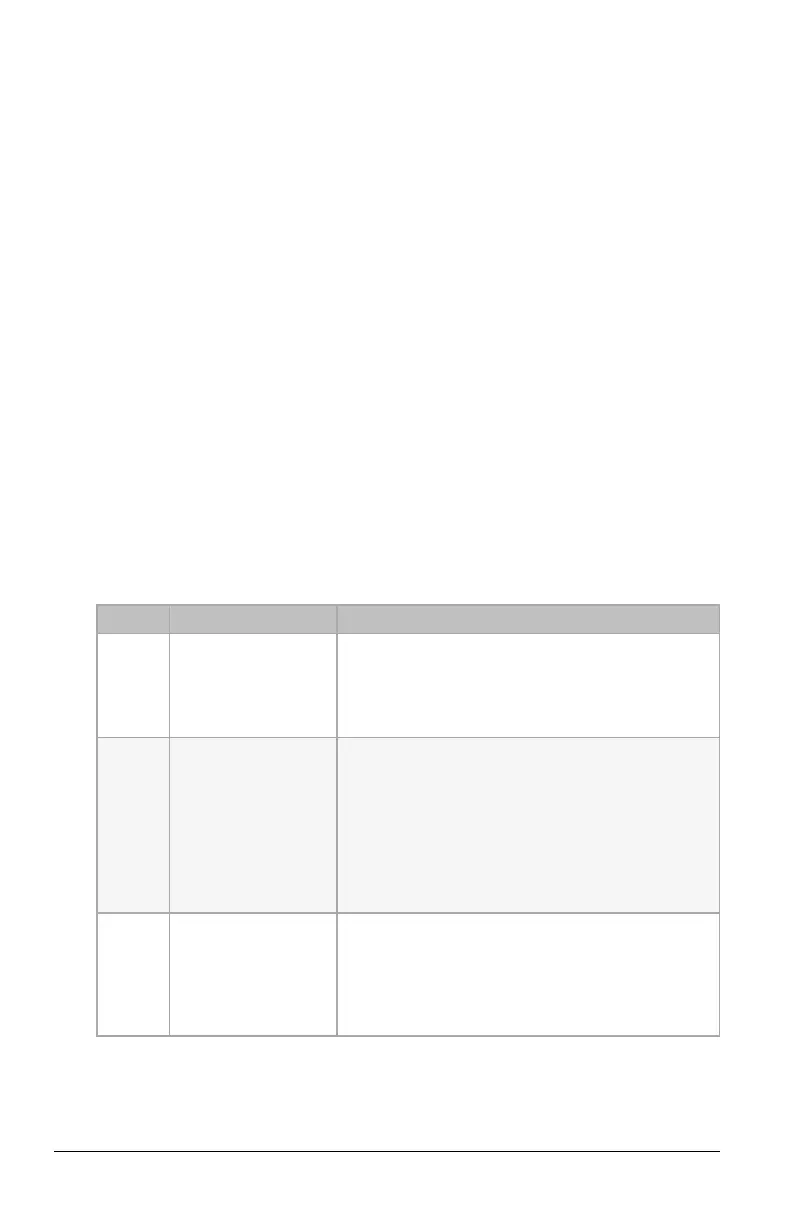
Element Description Example Usage
Events
1–50
A defined lighting
event for a specified
group that runs on a
configured schedule.
Consider creating a pattern, such as:
Scheduling ON/OFF Events: 1–10
Scheduling Scenes: 11–26
Device Masking: 27–40
Special: 41–50.
Groups
1–24
A defined area or
role to coordinate
selected controllers.
Each controller is
associated with
Group 1 by default.
Controllers can be associated with multiple
groups. A group should relate to a common area
in a facility that includes several controllers. Create
a name to identify each group, for example:
Group 1 = Reception
Group 2 = Open Office Area
Group 3 = Corridors
Group 4 = Exterior Lights
Scenes
1–15
A defined lighting
level that can be
used in a scheduled
event or manually
activated.
An event can use a scene number to set the
lighting level on a schedule. Buttons on a Scene
Station can be used to manually activate a scene.
A recalled preset combines a group number (target
controllers) and a scene number to create the
lighting effect.



 To Next Page