Configure the Fixture 22
Set Calibration
Navigate:Main Menu → Settings → Calibration
This menu is passcode protected and reserved for authorized technician use only. Contact ETC
Technical Support for assistance.
Once you have accessed the Calibration menu, select an individual feature on the fixture and
manually calibrate it to a new "home" setting.
Note:
Changes you make to the fixture settings in the Calibration menu are not
changed if you reset the fixture to the factory default settings. The Calibration
settings are saved until they are changed in the Calibration menu.
Access Service Settings
Navigate:Main Menu → Settings → Service
This menu is passcode protected and reserved for authorized technician use only. Contact ETC
Technical Support for assistance.
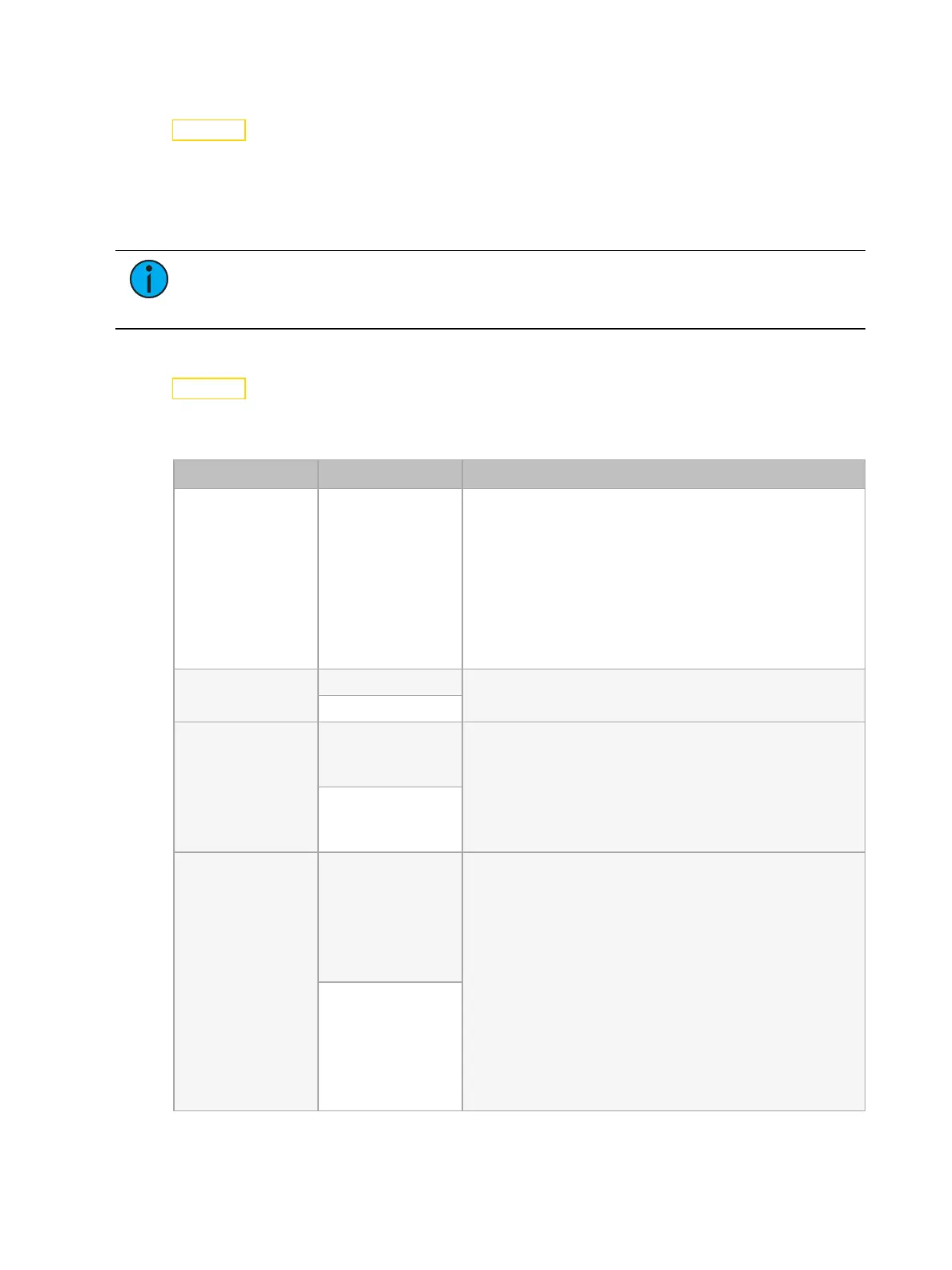
Menu Item Options Description
RDM UID Randomly
generated number
Modify the RDM unique identifier (UID).
If you are using RDM control, ensure that each fixture
in the same DMX control run has a unique RDM UID.
Duplicate RDM UIDs in the same DMX control run will
result in a data collision, causing a communication
failure.
If you are using DMX splitters and RDM control, the
splitters must support RDM.
Reset Error History Yes Clear error messages after you have fixed the errors.
Cancel
CMY Curve Color Linear Set the method used for color mixing.
• Color Linear: Makes color mixing with color
pickers as accurate as possible. This is the default
setting.
• Mech Linear: Provides mechanically linear
motion.
Mech Linear
LEDEngine Type Ultra-Bright Change the LED engine type if you replace the LED
engine with the other engine type.
Changing the LED Engine Type setting also:
• Changes the fixture's RDM UID, which the
console uses to determine the engine type of the
fixture
• Changes the default setting for the Gobo Color
Correction option in the Settings menu. The
default Gobo Color Correction is On for Ultra-
Bright LED engines and Off for High Fidelity LED
engines. See
Set Gobo Color Correction on page
20
for details.
High Fidelity











 To Next Page