Use Fixture in Stand-aloneMode 17
Studio Mode
1. Press the Function button ( ), use the Intensity encoder to navigate to Studio Mode, and
then press the Intensity encoder to select it.
Studio
3200K 4500K 5600K
CCT 3200 K
Tint 0.0 Green
Tune Brightest
Int 100%
Studio
3200K 4500K 5600K
CCT 3125 K
Tint 0.0 Green
Tune Brightest
Int 100%
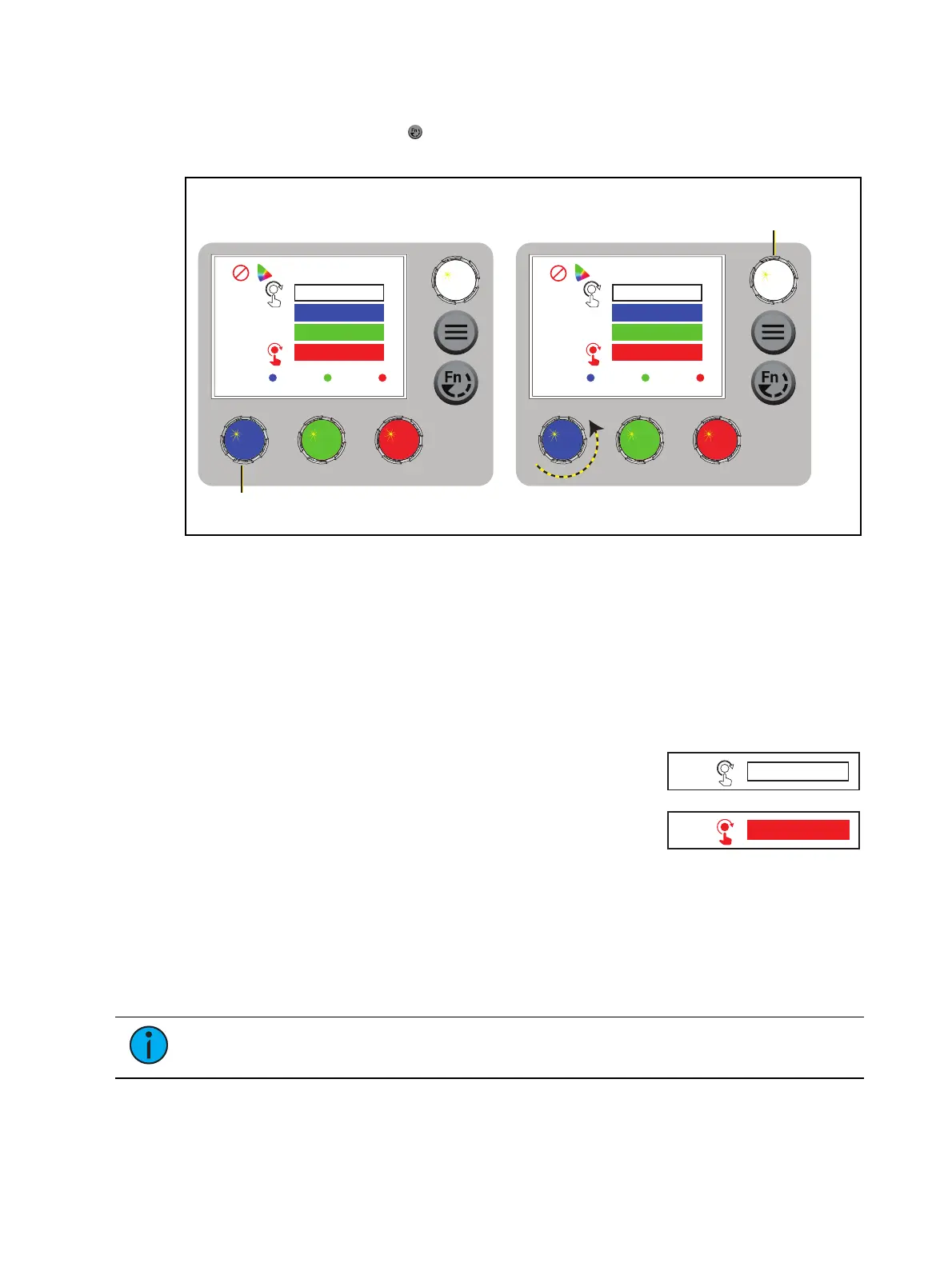
Press an encoder to play that
studio preset...
...or turn an encoder to modify the
value in the matching field.
Turn to adjust intensity, press to toggle
between current intensity and 0, or
press and turn to adjust by 1/4 stop.
2. Press the color encoder that matches the studio preset you want to use (Blue = 3200K,
Green= 4500K, Red= 5600K).
More Options
Turn off the preset: Press the Intensity encoder to toggle the intensity value from the
current value to 0. Press the Intensity encoder again to toggle back to the previous
intensity value.
Modify the preset:Turn the encoders to change the corresponding values. For example,
turn the Intensity encoder to change the intensity value, or turn the blue encoder to
change the color temperature value.
Modify the intensity:Turn the Intensity encoder to adjust the
intensity, or press and turn the Intensity encoder to adjust the
intensity by 1/4 stop.
Modify the tuning:Press and turn the red encoder to change
the value to Metamer, and then turn the red encoder to
change the Tune value (the "recipe" of the metamer). Press
and turn the red encoder again to return to the Brightest or Spectral options. For more
information on the three methods, see
Tuning(Color calculation method)
.
Revert to the original preset:Press the encoder that corresponds to the preset again to
restore the original values.
Save the modified preset:Press and hold the encoder that corresponds to the preset that
you want to re-record. The display shows a three-second countdown before re-recording
the preset.
Note:
The CCT, Tint, and Tune values match the values that are available when the
DMX mode is set to Studio. See DMX Control Channels on page13.




 To Next Page