20 Source Four LED Series 3 User Manual
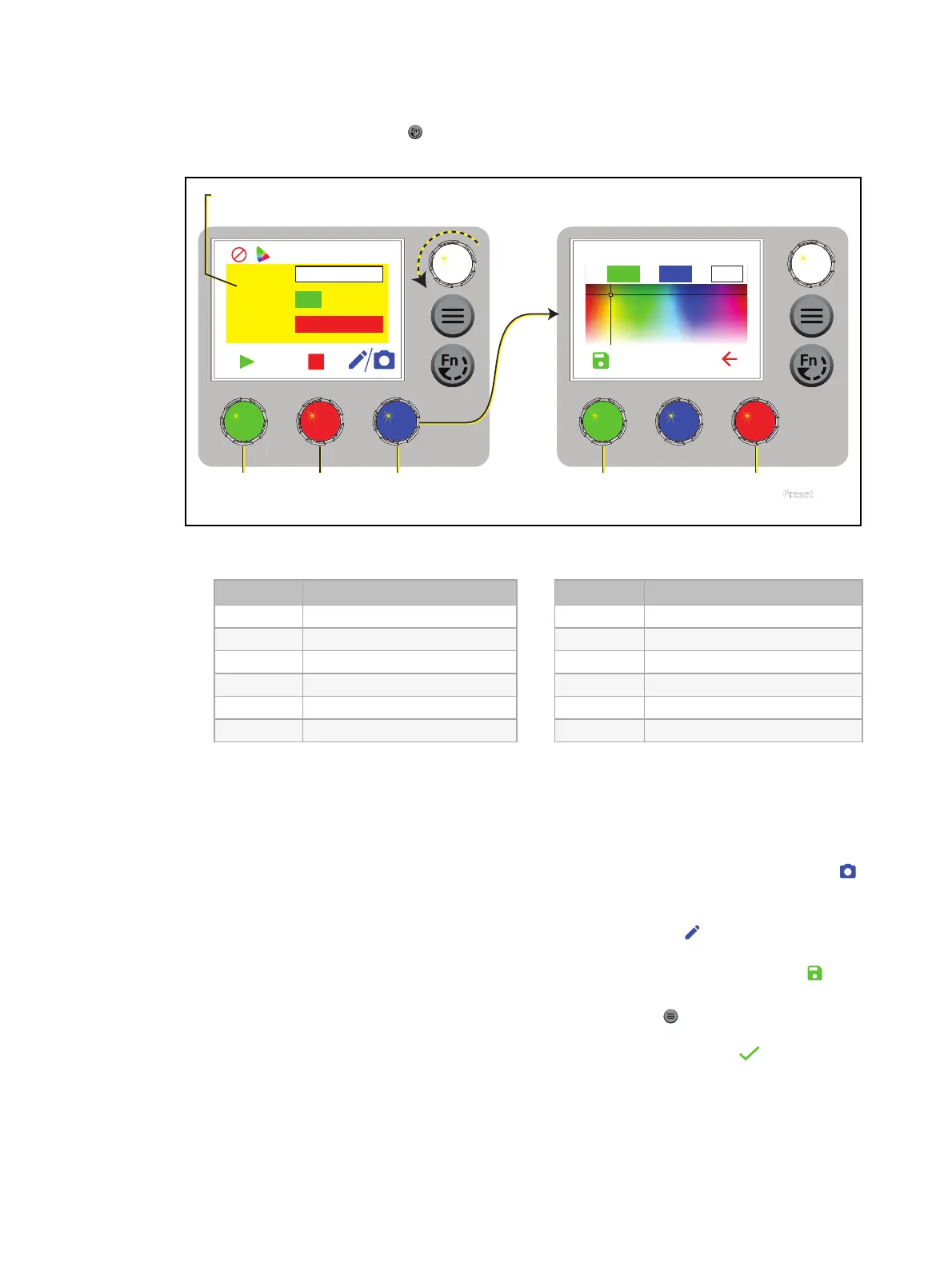
Preset Mode
1. Press the Function button ( ), use the Intensity encoder to navigate to Preset Mode, and
then press the Intensity encoder to select it.
Edit Preset Color 4
100%
215
39H: S: I:
100%
Preset
Preset 4
Fade 3 seconds
Int 100%
Yellow
Press to
play/pause
the preset.
Turn an encoder to modify the
value in the matching field.
Press to
stop the
preset.
Press to modify the
preset color, or hold
to capture DMX.
Press to return
to the Preset
screen.
The background approximates
the preset color.
Press to
save the
new color.
2. Turn the green encoder to select a preset, and then press the encoder to play the preset.
Number Preset
1 3200K
2 4500K
3 5600K
4 Yellow
5 Dark Straw
6 Red
Number Preset
7 Medium Pink
8 Magenta
9 Medium Blue
10 Primary Blue
11 Blue Green
12 Green
More Options
Pause the preset fade: Press the green encoder to toggle between play and pause.
Stop the preset: Press the red encoder.
Modify the preset:Turn the Intensity encoder to change the intensity, or turn the red
encoder to change the fade value.
Capture the current DMX look: Press and hold the blue encoder (for the Snapshot icon ).
The display shows a 3-second countdown before re-recording the preset. Capture is
limited to three DMX modes: 3 Ch RGB, Studio, and Expanded.
Modify the preset color:Press the blue encoder (for the Edit icon ). In the Edit Preset
Color screen, turn the encoders to change the corresponding values. The crosshairs on the
display indicate the approximate color. Press the green encoder (for the Save icon ) to
save the new color to the preset.
Push the preset to connected fixtures:Press the Menu button ( ), and then use the
Intensity encoder to navigate through the menu: Local Settings>Push Presets. When the
screen prompts you to confirm, press the green encoder (for the OK icon ) to continue.














 To Next Page