To check or replace the fuses proceed as follows
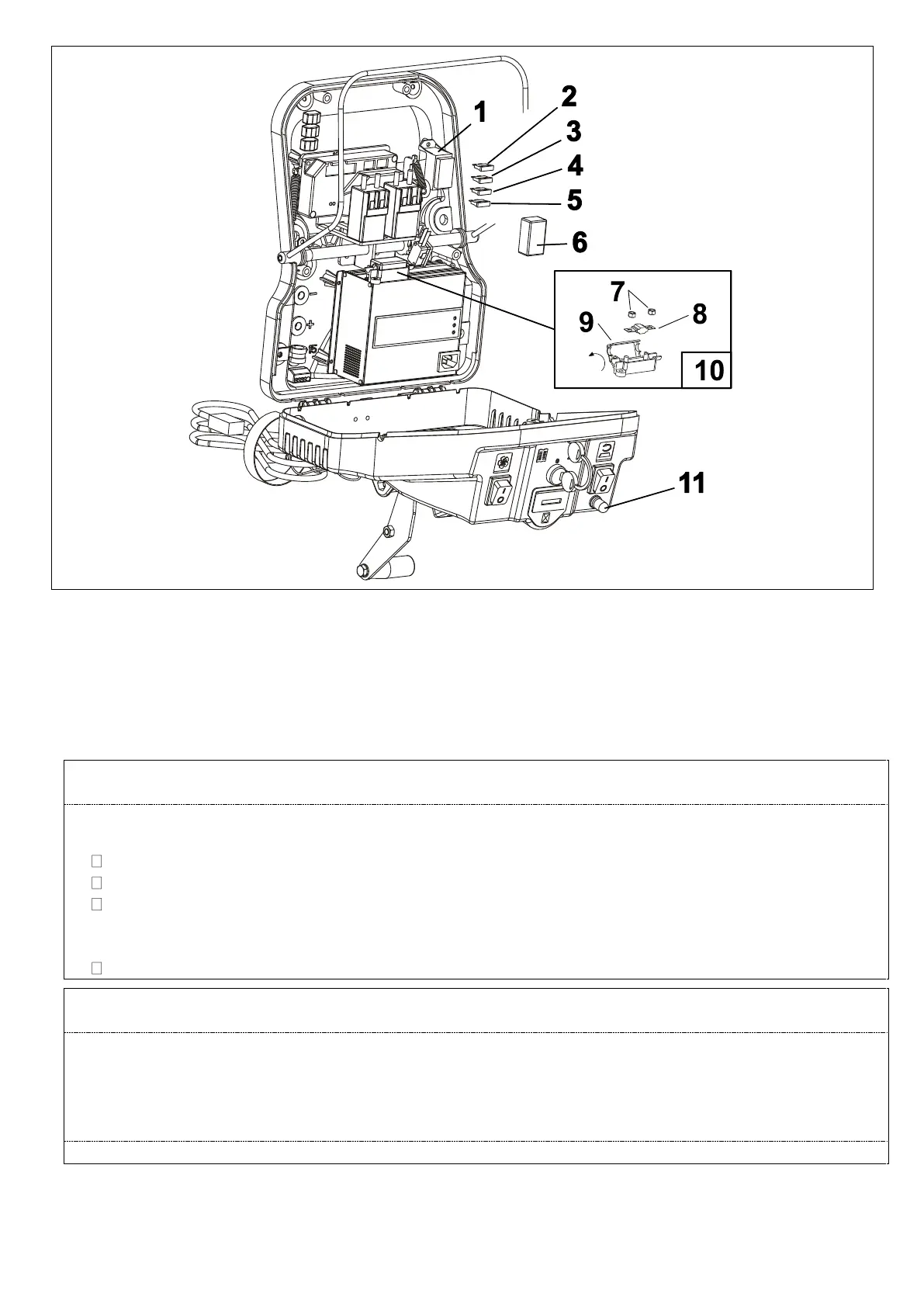
Remove the lid pos. 6 from the fuse holder pos. 1;
There are 4 fuses located in the fuse holder with the following functions and features:
POSITION 1: 5 A fuse for electrical equipment protection;
POSITION 2: 5 A fuse for electronic drive board protection;
POSITION 3: 30 A fuse for suction motor protection;
POSITION 4: 30 A fuse for drive system protection.
E50-M500 UNTIL FRAME 500005830515 S/N. 1514
E55-M550 UNTIL FRAME 055002060515 S/N. 1130
BRUSH MOTOR PROTECTION POS. 10;
REPLACING THE BRUSH MOTOR FUSE:
Pull the fuse-holder lid (POS. 9) towards the direction indicated by the arrow and open it;
Unscrew the 2 locking nuts (pos. 7) that hold the fuse;
Replace the fuse (POS. 5) with a fuse of equal amperage;
CAUTION: 30 A FUSE FOR E50-M500
CAUTION: 40 A FUSE FOR E55-M550
Screw the nuts back into place and close the fuse-holder lid.
E50-M500 UNTIL FRAME 500005840615 S/N. 1515
E55-M550 UNTIL FRAME 055002070615 S/N. 1131
BRUSH MOTOR PROTECTION FUSE POS. 11
When the brush motors exceed a power draw, the fuse will engage and stop the motor. Wait for 1-2
minutes then press the fuse button and the brush will resume operation. If it occurs repeatedly, check to
see if there are any objects that prevent the brushes from spinning freely or if the type of brushes are
suited for the type of floor.
Once the fuses are checked or replaced, put everything back together and bring the machine back to its
operating condition.


 To Next Page