DreamCatcher Replay System
Page 20 Revision 1.13
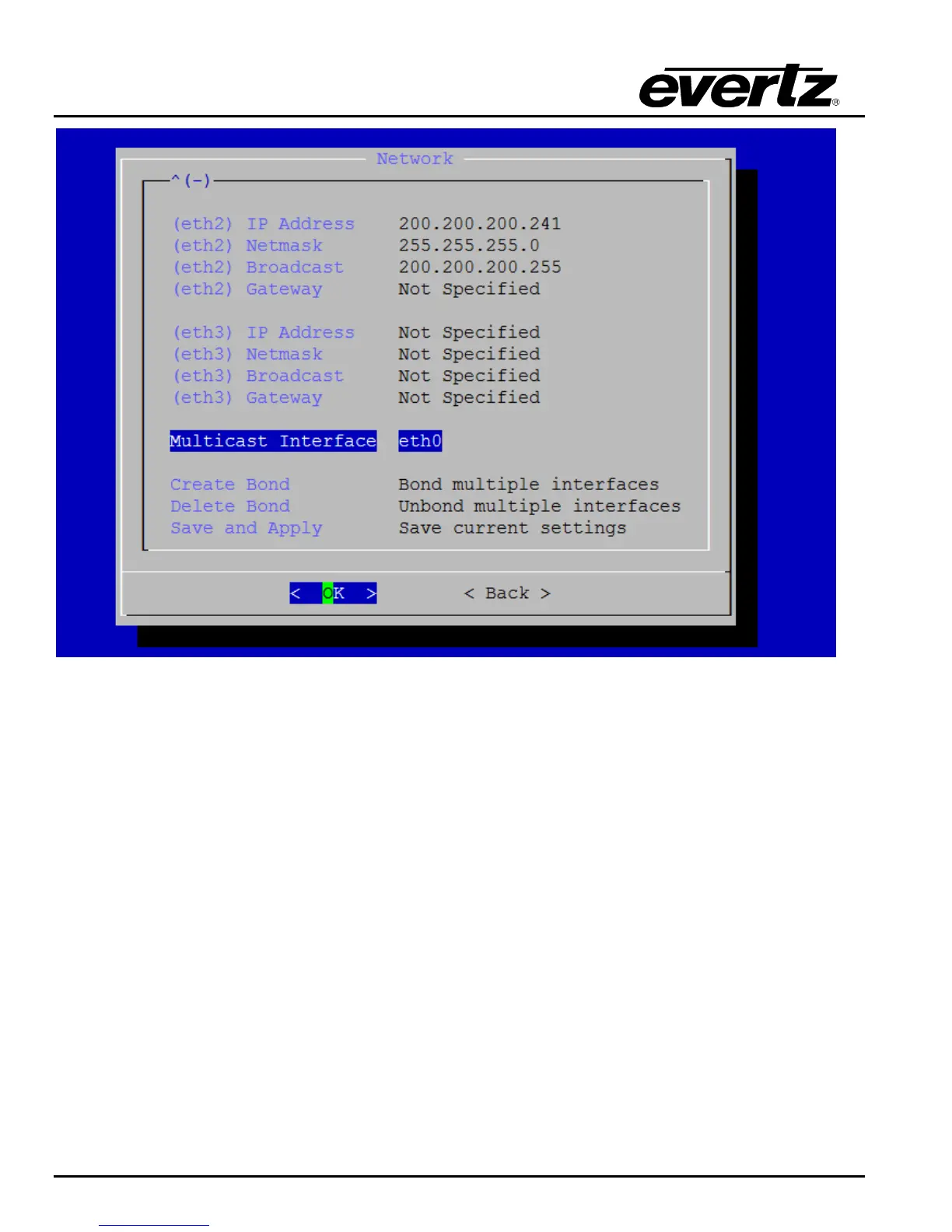
Figure 3-4: Network Configuration Menu
Ethernet 1 is set aside for all other infrastructure communication including router control, system
monitoring, web configuration and network access across a 1G network. Ensure Ethernet 1 is
initialized.
Ethernet 2 will be used as primary 10G network for distributed DreamCatcher systems. If multiple
DreamCatcher are being used in a distributed model this IP must be initialized.
Ethernet 3 will be used as the redundant 10G for Ethernet 2. In the case where a bonded 10G network
is required, initialize Ethernet 3 and bond Ethernet 2 and 3 using the Create Bond menu item
Once the above steps have been completed save the current settings using the Save and Apply menu
item. When prompted for a password type “admin” then press ENTER.
Once the network settings have been saved exit the Network Configuration menu and enter the
System Configuration menu show below in Figure 3-5.
Shutdown DreamCatcher using the Shutdown the Server menu option, when prompted for a password
type “admin” then press ENTER.


 To Next Page