DreamCatcher Replay System
Page 32 Revision 1.13
3.3. CONFIGURATION INTERFACES
This section is meant to show the user the 3 unique interfaces that can be used to modify system
configuration. The user can log in through a web browser on the Infrastructure Network, use the Controller
or change the configuration using DreamCatcher‟s user interface.
3.3.1. Web Configuration
To access the web configuration connect a computer on the Infrastructure Network.
Once you have access to the Infrastructure Network, open a web browser and type the IP of server
you are trying to access in the address bar (i.e. http://10.10.10.241/).
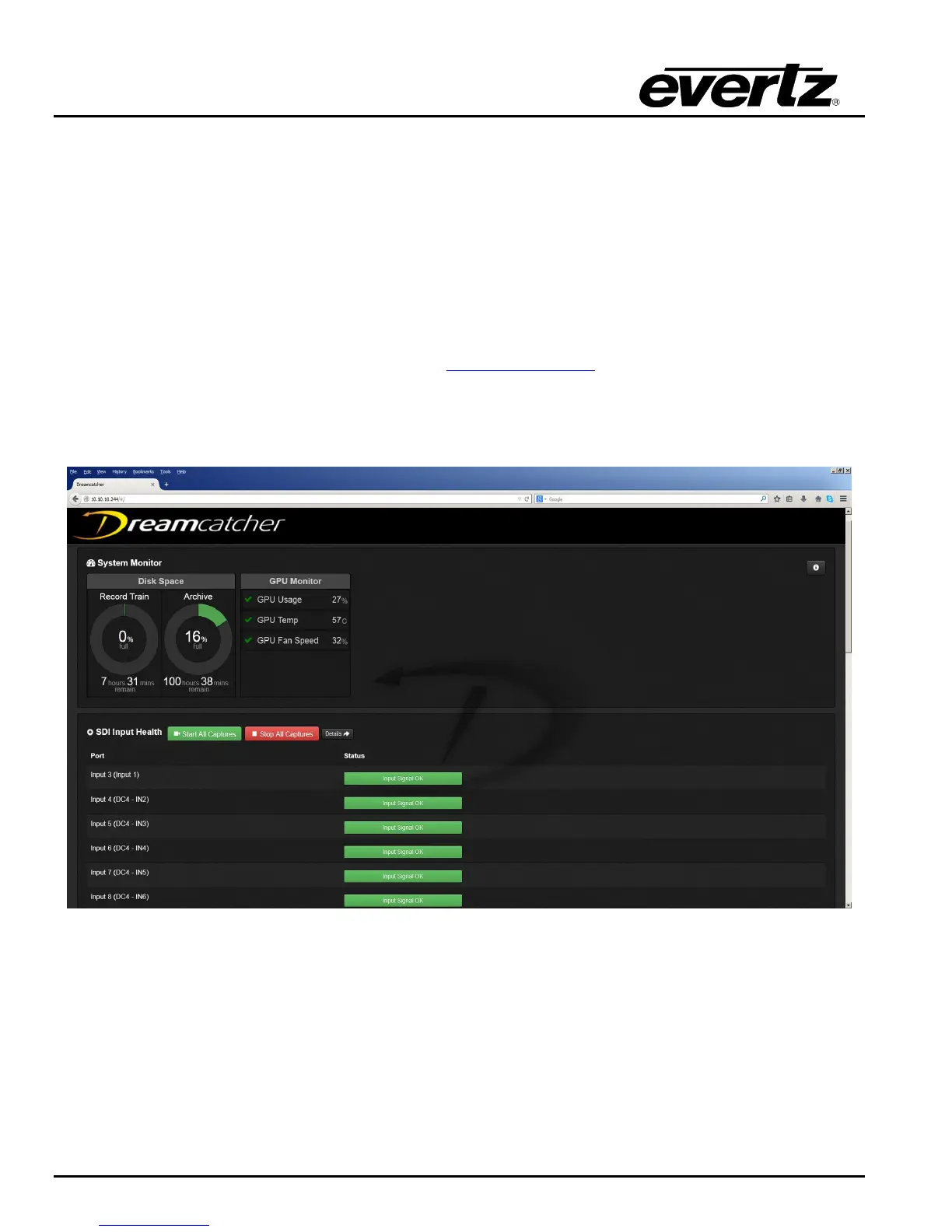
You should see the following menu in Figure 3-16 if you have successfully connected to the Web
Configuration.
Figure 3-16: Web Configuration main Page
3.3.2. DreamCatcher Server Settings and Diagnostics Widget
Click on the Settings and Diagnostics icon to expand the Settings and Diagnostic Widget as shown in
Figure.
Once the Settings and Diagnostics Widget has maximized click on the Engineering Menu, Followed by
DreamCatcher‟s Server Menu.


 To Next Page