DreamCatcher Replay SystemDream Catcher
Revision 1.13 Page 37
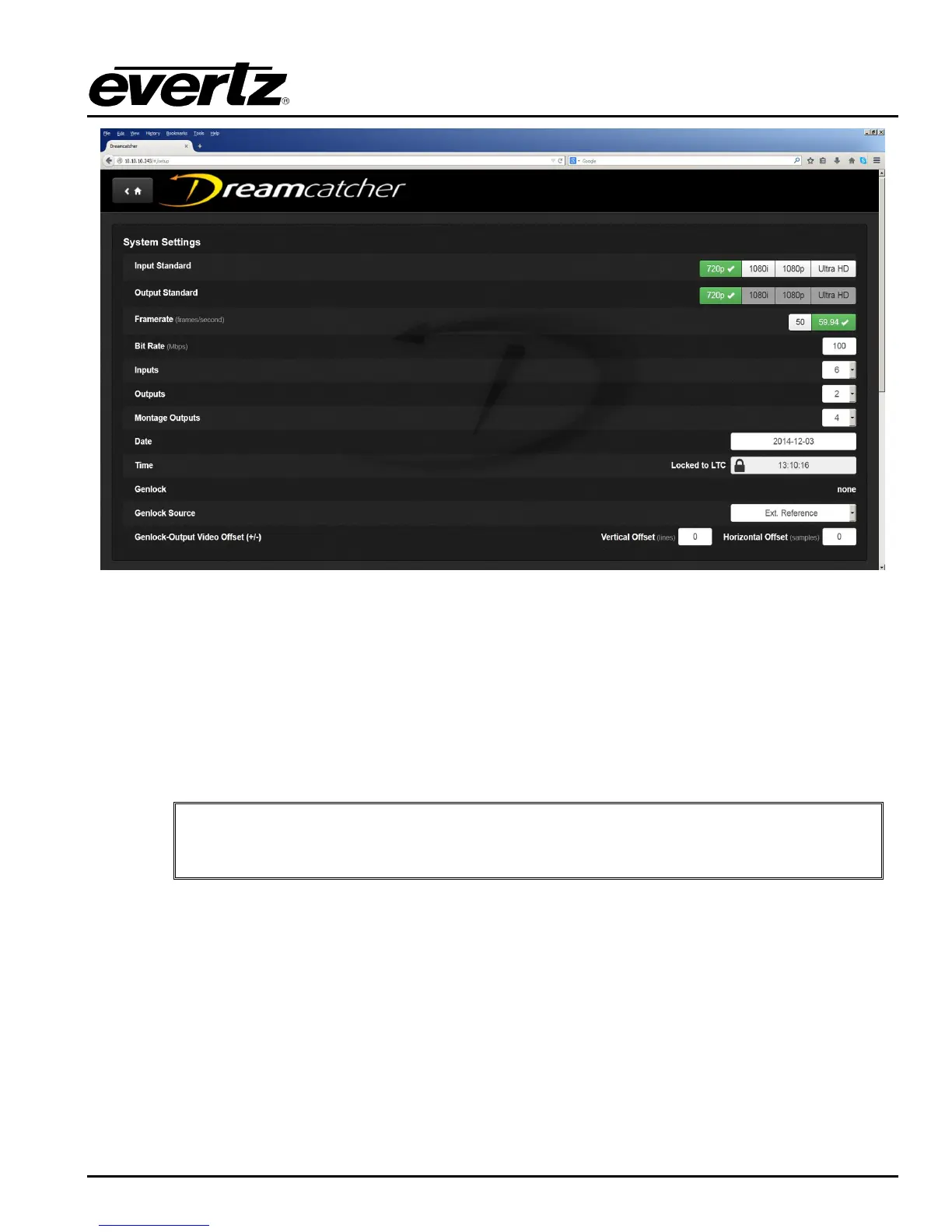
Figure 3-21: DreamCatcher Configuration
Select the Video Standard, Frame Rate, Inputs and Outputs for the system as shown in Figure 3-21.
Ensure the Date is accurate on every system on the network.
Confirm your changes and confirm the clearing of all record trains and clipped content.
DreamCatcher will take approximately 30 seconds to clear all content.
IMPORTANT: The Date on every DreamCatcher server must be set correctly for the
distributed content sharing to work.
If at any point you lose connectivity to the keyboard, mouse or panel and need to access IP‟s of the
server and panel you can use Tight VNC to view these. Tight VNC allows the user to see/operate the
VUE off a separate machine. On a laptop or PC connected to the DreamCatcher network, open Tight
VNC. You will load the server IP address (see Figure 3-22) and it will connect you to the server and
show you a VUE layout of the system (See Figure 3-23). In the systems section you can find the IP‟s
of the server and panel.


 To Next Page