EMC-DCP
EMC DESKTOP CONTROL PANEL
Page 10 Revision 1.1
3.5. CONNECTING EMC-DCP TO QMC-2 SYSTEM
The EMC-DCP is an extension of the existing family of control panels for the QMC-2 Master Control
system. Like the QMC-CP-FP-FPE, the EMC-DCP will communicate with the QMC-2 over an Ethernet
connection. At this time, Ethernet is the only method of communicating with the QMC-2.
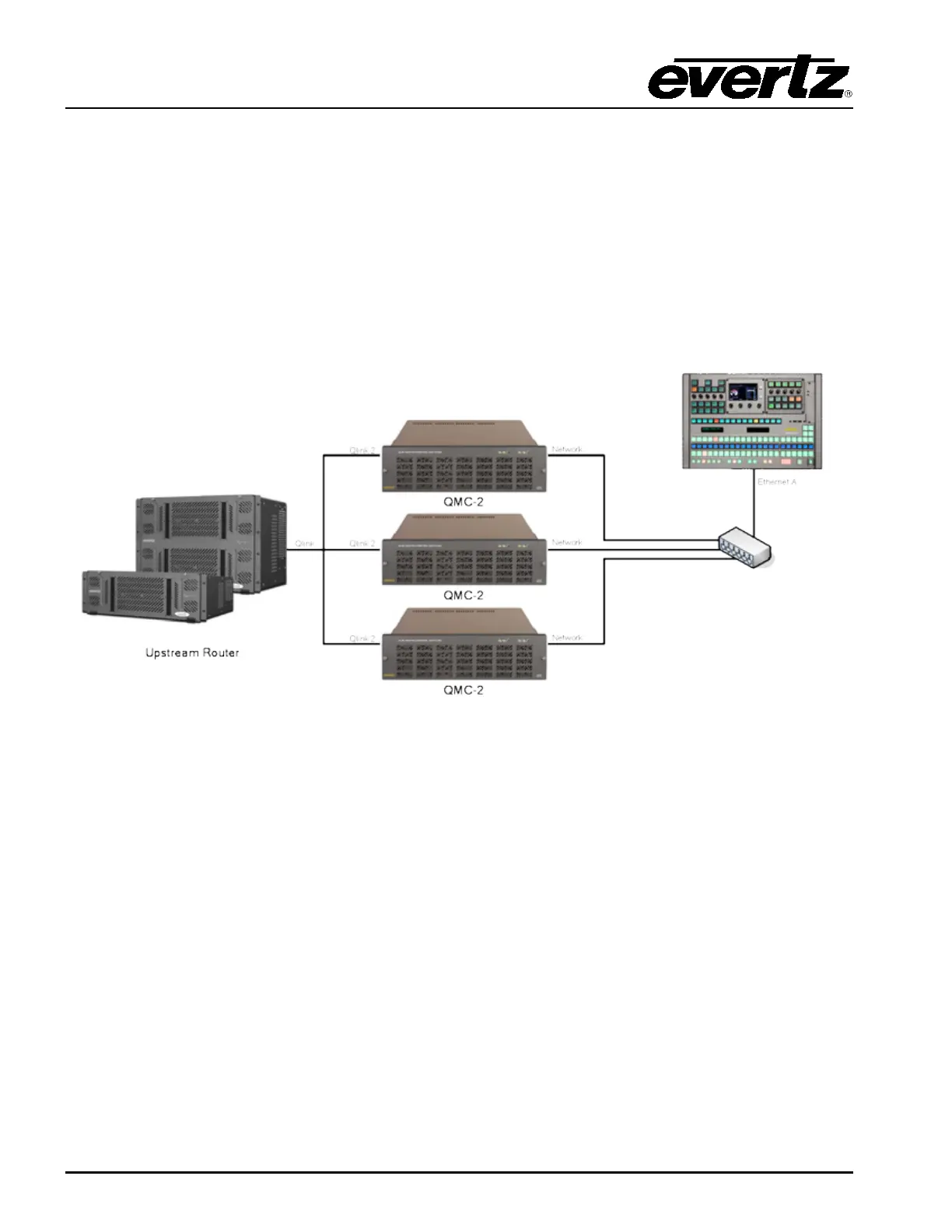
Error! Reference source not found. shows a basic QMC-2 System configuration. The QMC-2 will still
communicate with an upstream router via Q-Link or Serial (if router is a third party router). To connect
the EMC-DCP to the QMC-2, a network hub/switch is required. Connect a Cat 5 Ethernet cable from
Ethernet A (on EMC-DCP) to the network hub. The user will then connect a Cat 5 Ethernet cable to the
Network Port of the QMC-2. Use the EMCSetup software to setup the IP addresses, network settings,
etc. (See section 3.8).
Figure 3-7: Basic QMC-2 Configuration
3.6. CONNECTING EMC-DCP TO PKG9625SW OR PKGHD9625SW
(MINI MASTER CONTROL)
Figure 3-8 shows a basic Mini Master Control configuration. The EMC-DCP will communicate with the
Mini Master Control over Ethernet. To connect the EMC-DCP to the Mini Master Control, a network
hub/switch is required. Connect a Cat 5 Ethernet cable from Ethernet A (on EMC-DCP) to the network
hub. The user will then connect a Cat 5 Ethernet cable to the Ethernet port on the Mini Master. The
EMC-DCP will require an IP address in order to connect to the Mini Master Controls (see section 3.7).



 To Next Page