EMC-DCP
EMC DESKTOP CONTROL PANEL
Page 14 Revision 1.1
Once the user has set the desired parameters, the user will select the “Save and Exit” button in the Top
Row to save the settings and revert the panel back to its normal operating mode.
For Mini Master Control users, please continue to section 3.9. For QMC-2 users, continue to the next
section (section 3.8).
3.8. SETTING UP ETHERNET CONTROL USING EMC SETUP
Once the EMC-DCP has been setup, the user must now configure the rest of the EMC system to see
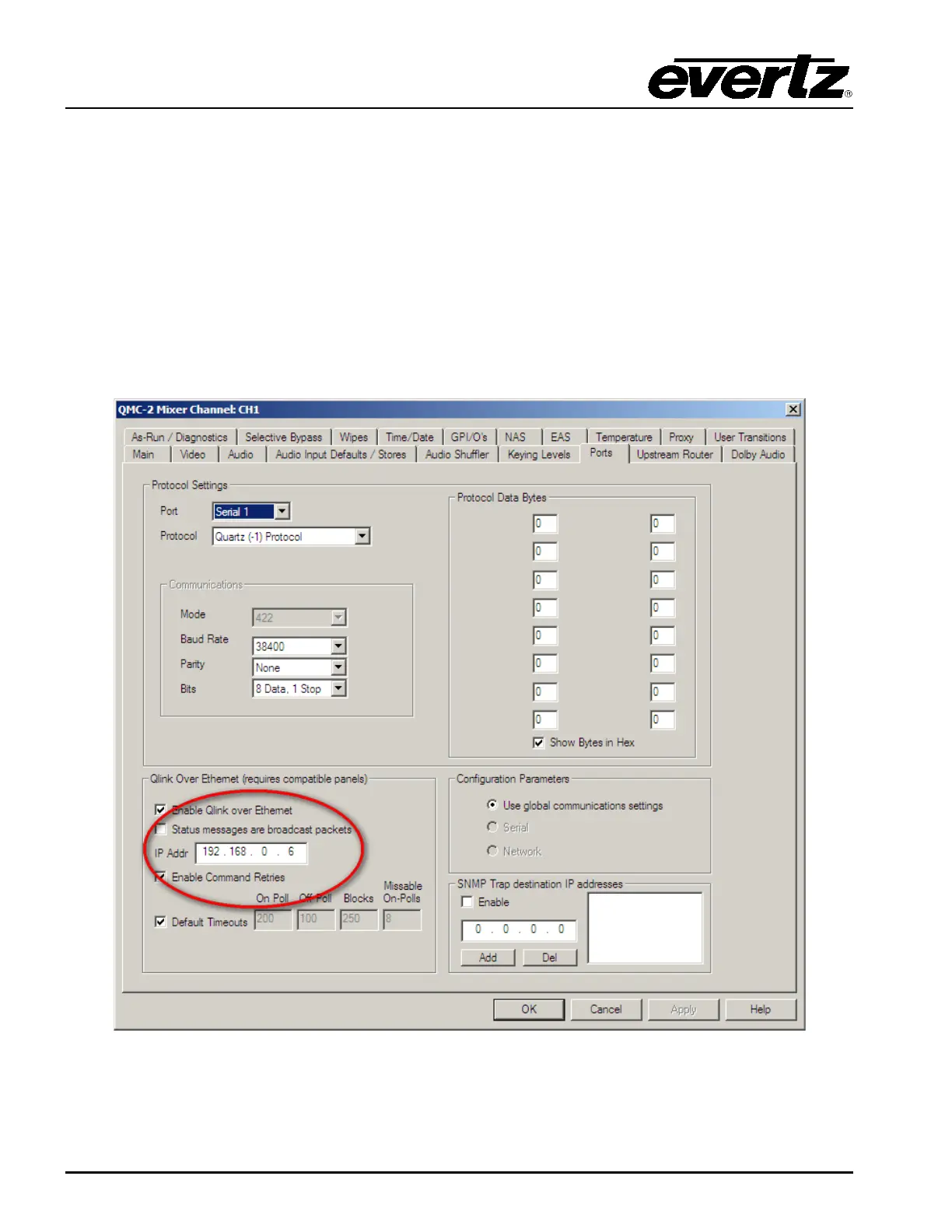
the panel. This is done using the QMCSetup (or newer EMCSetup) software tool. The user will first set
an IP address for the EMC channel and configure the EMC to send Q-Link packets over Ethernet
(select checkbox). The settings are found under the Ports Tab of the EMC channel configuration (see
Figure 3-12). The user MUST enter an IP address that is on the same network as the EMC-DCP.
Figure 3-12: Setting IP Address of EMC using QMCSetup v4.00+
After setting this parameter, the EMC will be able to communicate to the EMC-DCP (and other Ethernet
enabled control panels) over Ethernet.



 To Next Page