EMC-DCP
EMC DESKTOP CONTROL PANEL
Page 30 Revision 1.1
5. INSTALLING THE EMC-DCP DESKTOP MOUNT
When you receive an EMC-DCP, it usually comes without a Desk Mount kit. This option can be added
later on.
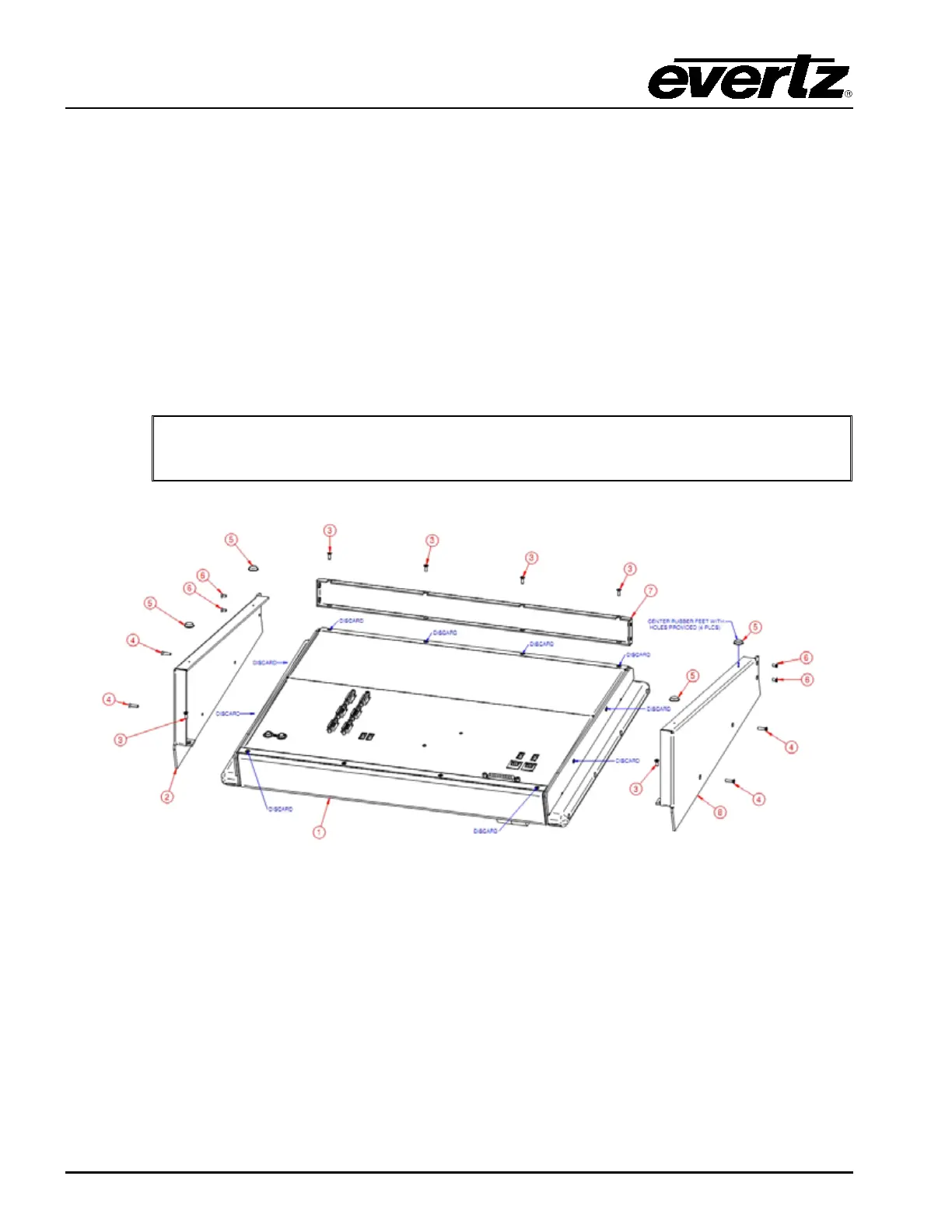
This kit contains the following parts:
2 - 1 x EQMC-DCP2-MB-2 (Desktop Mount Bracket LH)
3 - 6 x HMMP38FCNSS (M3x8mm Flat DIN)
4 - 4 x HMS388-075 (M3x12 Flat Head)
5 - 4 x HBMSJ5012.BLK (Black Rubber Bumper)
6 - 4 x HMMM3X6MFLATZC (M3x6mm Flat)
7 - 1 x EQMC-DCP2-BR-1 (Desktop Mounting Front Brace)
8 - 1 x EQMC-DCP2-MB-1 (Desktop Mounting Bracket RH)
Note: Prior to assembly, remove and discard screws from pre-assembled unit as
illustrated in Figure 5-1 (10 screws in total).
Figure 5-1: Pre-assembled Unit



 To Next Page