Raptor User Manual
2017 EverySight Ltd. Proprietary Page 38 of 46 Rev 1.0
Cleaning Your Raptor
You can use a microfiber cloth to clean your Raptor’s visor. If you would like a more
thorough cleaning, these steps will describe how to remove the visor.
WARNING: Your Raptor glasses cannot under any circumstances be washed with soap and
water. Doing so will cause permanent damage.
1. Make sure that your Raptor is powered off. See Section 15.2
for instructions on powering down your Raptor.
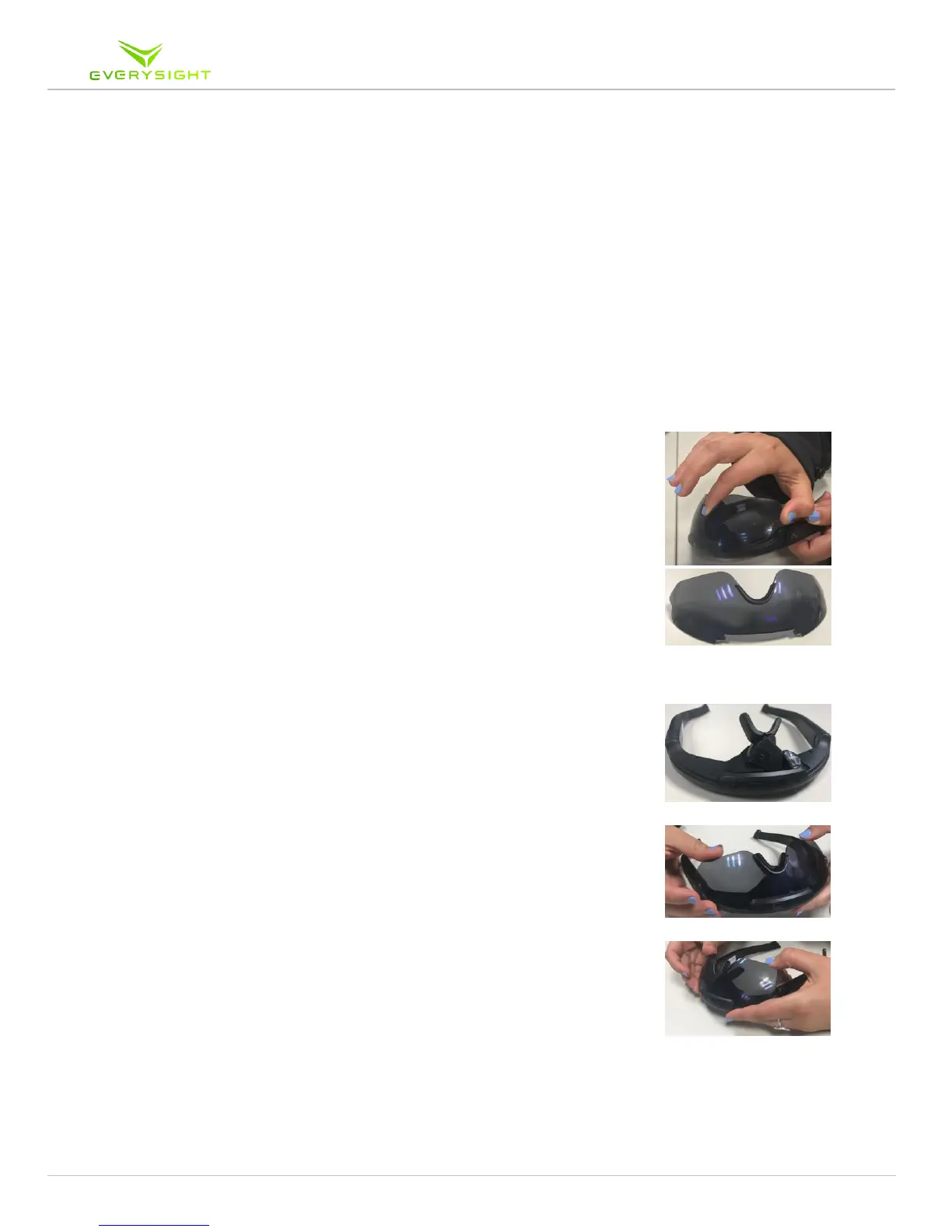
2. Hold your Raptor upside down. Simply place one finger
between the corner of the visor and the frame and your thumb
in the bridge piece over the nose and simply pull on the corner
of the visor to remove it from the frame
3. Wash the visor with lukewarm water and dry with a soft
cotton or microfiber cloth. Continue to wipe with a clean & dry
cloth until the visor is cleaned to your satisfaction
4. You can wipe the Optical Module and Camera with a Soft Dry
cotton of Microfiber cloth
4.1. Be sure NOT to get the frame wet as this may void your
warranty.
5. Clip the visor back into the front of the Raptor. After aligning
the teeth of the visor correctly, press on the both of the bottom
edges of the visor until you hear it click. Make sure the visor
seats well and is flush with the inside the frame, otherwise it
may come loose when you are in motion.



 To Next Page