Raptor User Manual
2017 EverySight Ltd. Proprietary Page 41 of 46 Rev 1.0
Raptor Controller - What’s in the Box?
1. Everysight Controller
2. CR2032 Lithium Battery 3V (Installed)
3. Road Bike Mount
4. Mountain Bike Mount
5. 2 Zip Ties
6. Documentation
Getting to Know Your Controller
Your controller was designed to work almost identically to the touchpad located on the side
of your glasses. This gives you yet another simple way of controlling your glasses without
having to take your hands too far away from the handlebars.
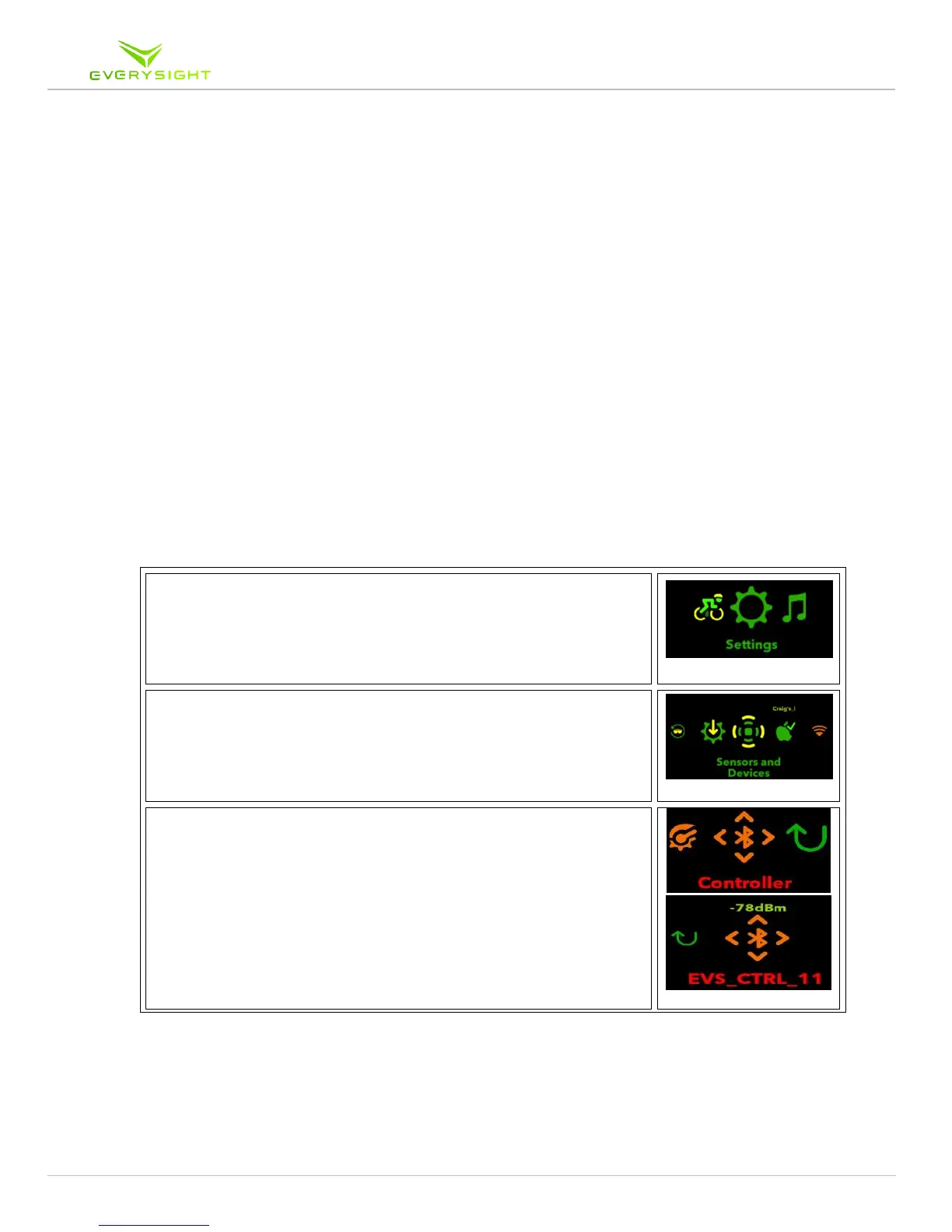
Pairing Your Controller
1. On your Raptor glasses main menu, navigate by swiping
the touchpad to Settings. Tap to select.
2. Once in the Settings menu, navigate to Sensors and
Devices. Tap to select.
3. Press the Center button for two seconds and release, a Red
LED light will begin to flash
4. Once in the Sensors and Devices menu, navigate to the
Controller. Tap on the Controller to begin a Bluetooth
scan, now swipe to your device controller (EVS_CTRL_XX)
and tap on it to pair it with your Raptor.
5. Once connected, you will be returned to the sensors and
devices menu and the device or sensor you are connected
to, will be highlighted in green.



 To Next Page