59
PRODUCT INFORMATION EVOLVEO DOORPHONE AP2
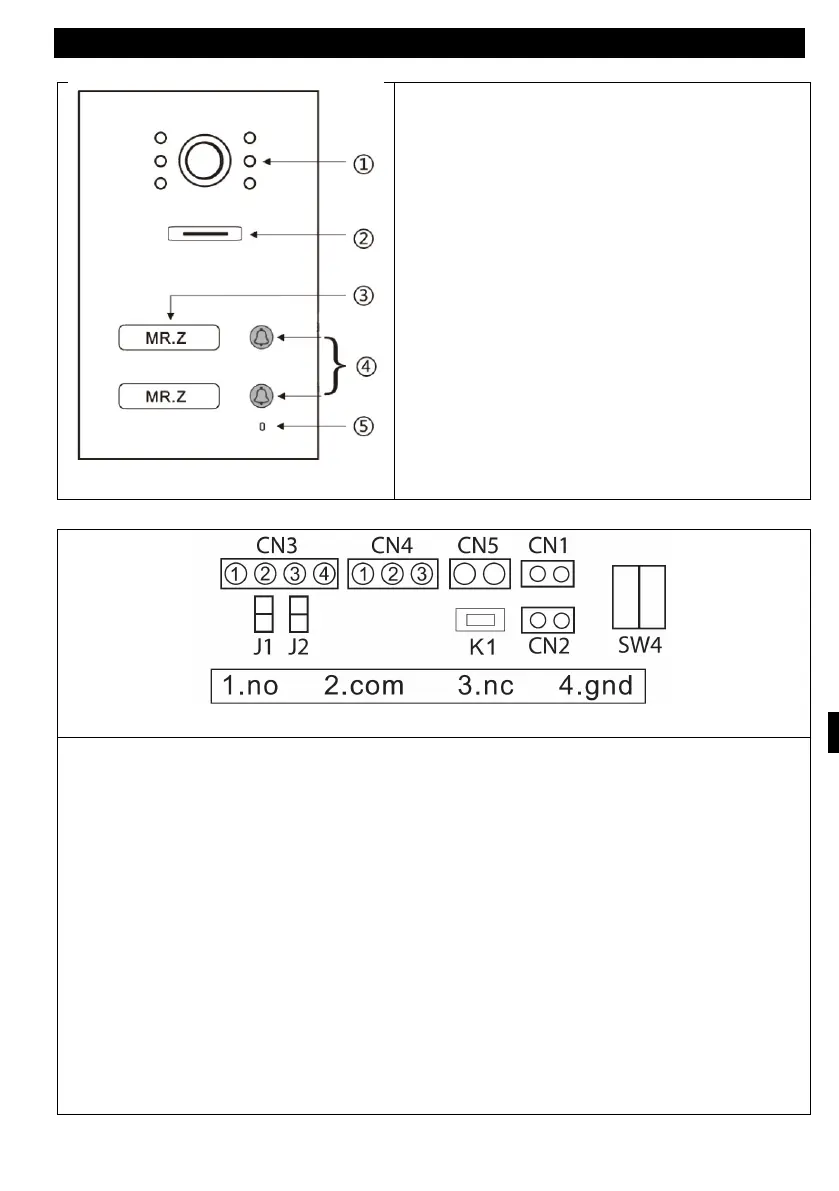
2) Reproduktor
3) Jmenovka
4) Call button
5) Microphone
View of the outdoor station
1. NO 2. COM 3. NC 4. GND
CN3: To lock 1 (the door station can power the electronic lock, the magnetic lock
must be connected to an external power supply).
CN4: To lock 2 (the lock must be connected to an external power source, NO and
COM are connected to the magnetic lock, NC and COM to the electronic lock).
CN5: Connecting to an internal monitor
CN1: Lock control button 1 (CN3). Button directly controls the lock without an app
or internal unit - any button can be used
CN2: Lock control button 2 (CN4) This button directly controls the lock without an
application or internal unit - any button can be used.
SW1: disconnection as CN3 for connection of electronic lock.
SW2: connect as CN3 power output, disconnect as CN3 without power output.
SW4: Our station ID.
K1: RFID card learning button



 To Next Page