74
INSTALLATION OF MONITOR AND OUTDOOR UNITS
The package also includes a set for fixing
screws and dowels.
Use the fixing frames as a template to
mark the holes to be drilled.
For mounting the indoor monitor, the
KU 68 wiring box can be used, which has
a distance of screw holes identical to the
metal monitor bracket.
O
utdoor unit AP1 - also allows mounting
directly on the wiring box KU 68.
Wa
rning: When installing outdoor units, always use the supplied rubber gaskets as
shown in the following illustrations. Always secure outdoor units with screws. In the
package you will find a Torx for easy fixing.
A
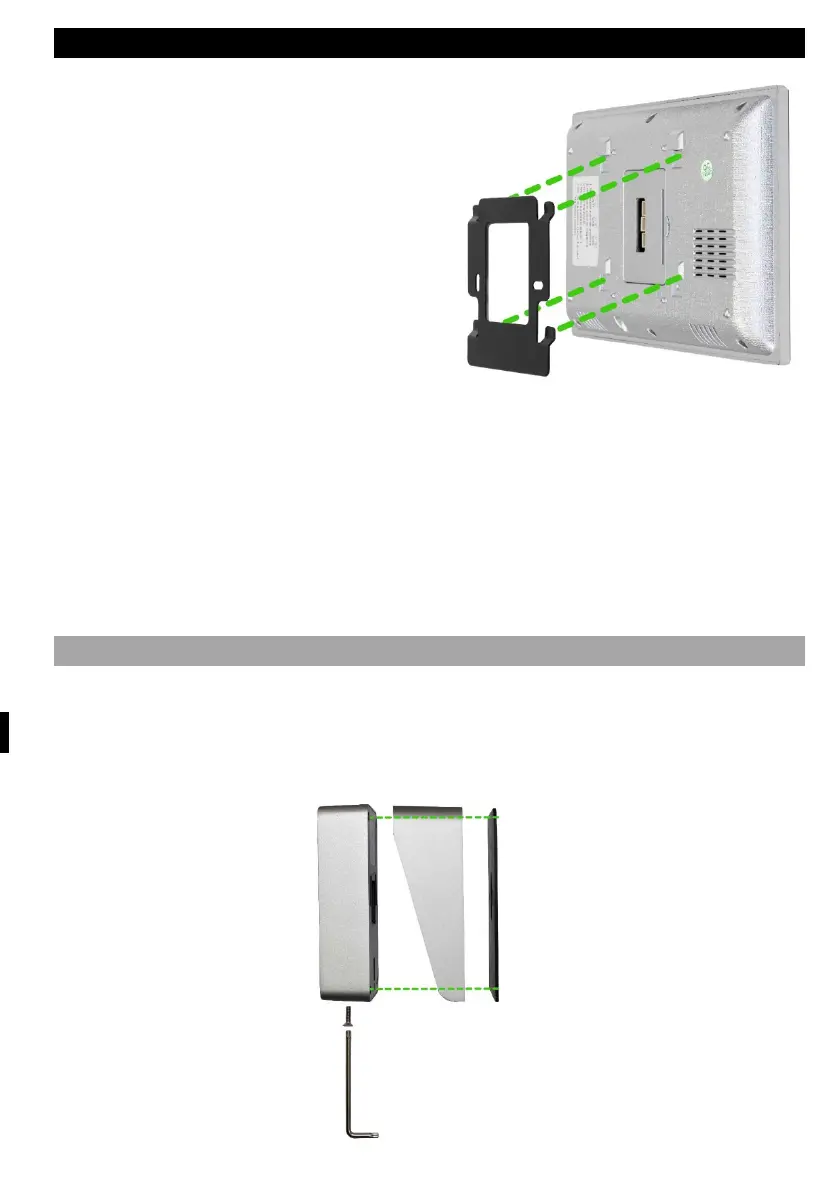
ttaching the monitor to the bracket.
Carefully slide the monitor onto the tabs shown and push downwards.
ATTACHING THE OUTDOOR UNIT AP1
Follow the picture below. After sliding the outdoor unit into the frame, secure from
the bottom with the screw provided. Always use the supplied gaskets for
installation.



 To Next Page