Installation and commissioning
50 Dok-ID:EXPERT-0003-EN-2011
Pos: 5.19 /S martT ur n/S mar tTur n-Neu-0 2.201 1/5.2 Abl auf der Inbetr iebn ahme @ 3\mod_1297939267607_38.doc @ 26287
Commissioning sequence
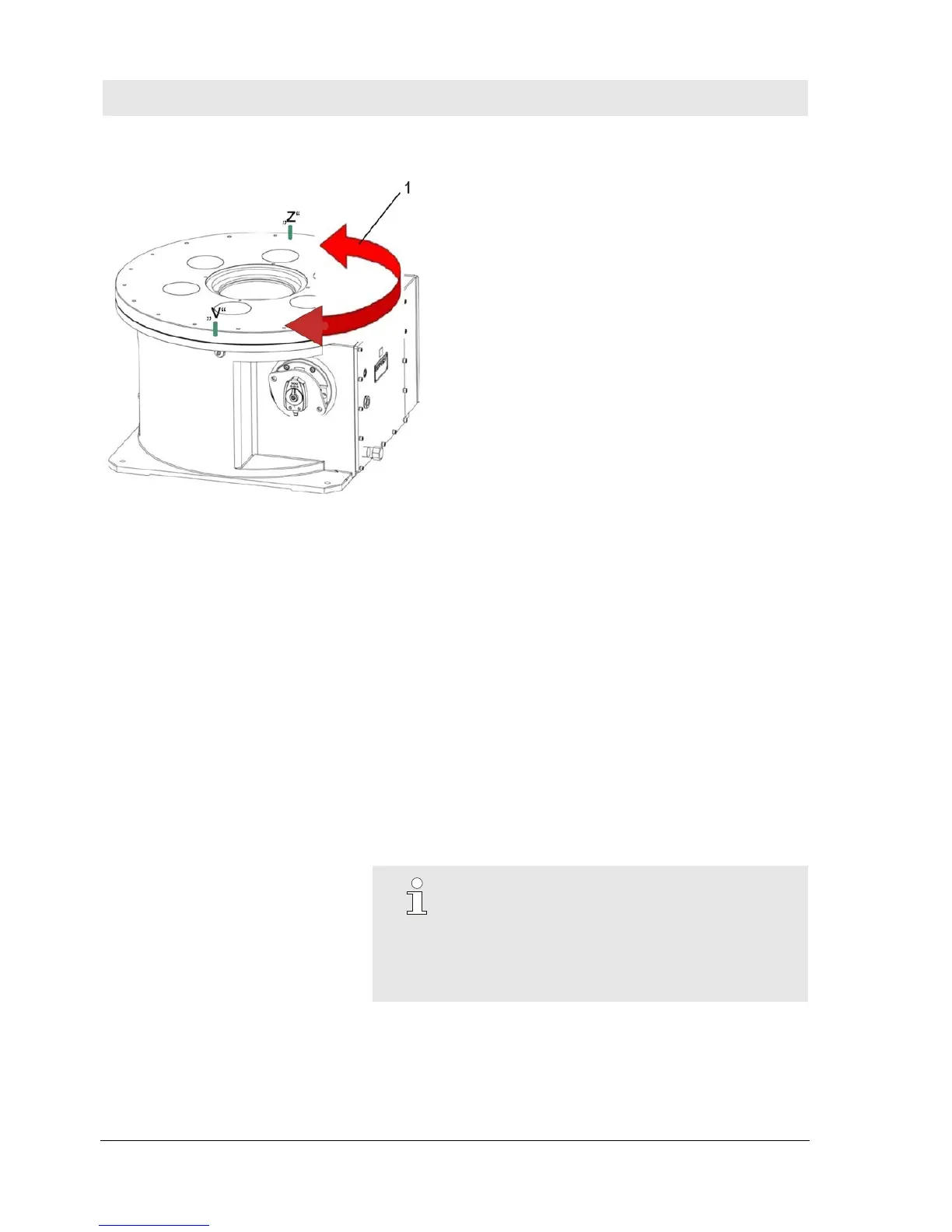
Fig. 23 Example: Movement range
1 Movement range
“B” backward
“F” forward
1. Turn drive roller (position encoder) in the movement range (1),
at least 45 degrees outside of the 0-position. The turntable will
then be between the positions "Front" and "Back" (only
necessary in reverse mode).
2. Set mode - lock movement drive roller on rotary switch S1.
3. Set clockwise rotation / counter-clockwise rotation - drive roller
switch S3.
4. Switch on the operating voltage.
5. Press "Reset" button 3 s – LED system fault will go out.
6. Turn the turntable several times at operating speed
NOTE!
If the turntable stops several times without fault in
the 0-position the self-adjustment and the
commissioning processes are concluded.
The settings of S1 and S3 are marked on the inside
of the cover at commissioning.


 To Next Page