This document is considered an uncontrolled copy when printed. Always ensure that you print and use a current version.
Copyright 2023 ExRobotics B.V.
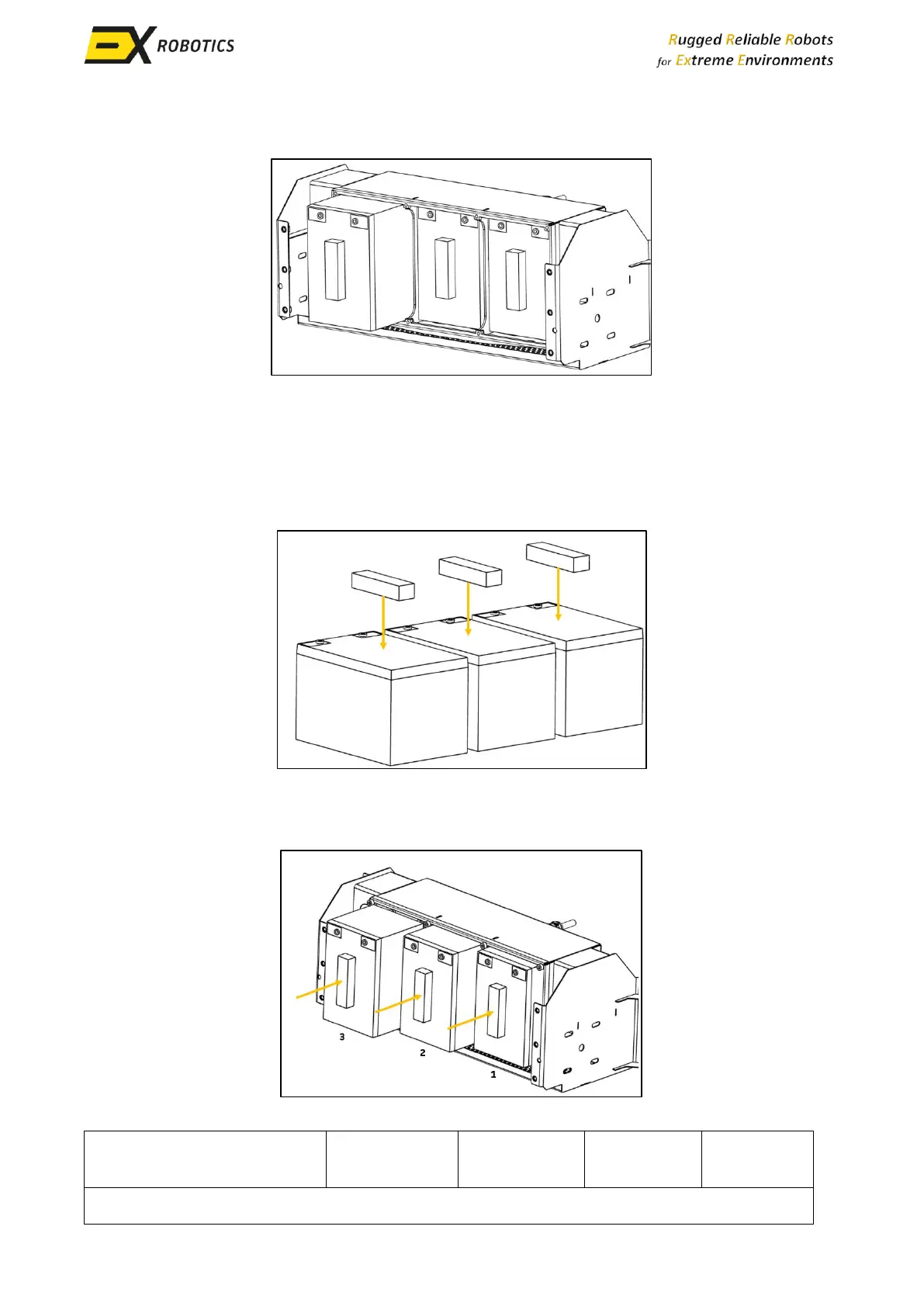
▪ Carefully ease the batteries out of the pack, starting with the leftmost. If necessary, use a
screwdriver gently on either the top or bottom of the battery to assist with the removal.
▪ Readjust the wire inside the battery pack to allow for the removal of the middle battery .
Once adjusted, remove the third battery.
9.7.3. Battery Replacement & Re-assembly
▪ New foam strips supplied by ExRobotics should be installed on the batteries. Place a strip in
the middle of each battery.
▪ To replace the batteries, follow the reverse order of the above steps. Insert the new batteries
into the battery pack, starting with the third battery and working towards the leftmost
battery. Ensure that the foam strips inside of the battery enclosure remain secure.



 To Next Page