DXP HD 4K PLUS Series • Operation 21
Creating ties — DXP 44, 84, and 88
NOTES:
• Audio ties are made only with de-embedded audio.
• Before beginning to create ties, ensure the unit is not in power save mode 2 (see
Power Save Modes on page30).
To tie an input to an output:
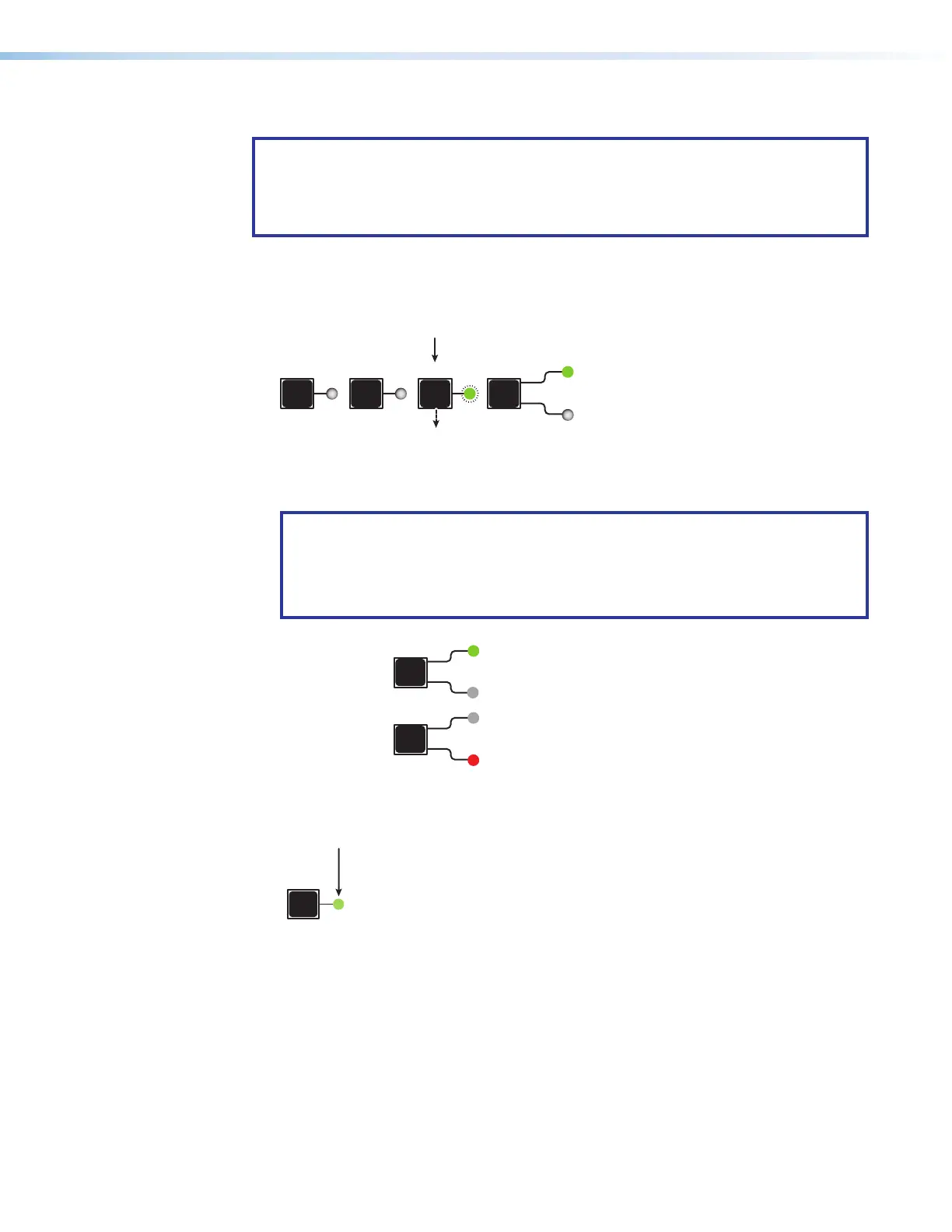
1. Press and release the Esc button to clear any input button, output button, or control
button indicators whose LEDs might be lit.
PRESET ESC I/O
AUDIO
Press the Esc button to clear all selections.
The LED blinks once.
Figure 10. Press the Esc button
2. Select video or audio by pressing the I/O button until the desired LED lights (green for
video or red for audio).
NOTE: You cannot select both audio and video for a tie at the same time. You must
repeat the tie process for each type of tie (audio and video) that you want to create
for the desired input and output.
For example, first create a video tie between an input and output, then create an
audio tie for the same input and output.
I/O
VIDEO
ess I/O button to
Lights green
I/O
AUDIO
Lights red when audio is selected.
Figure 11. Selecting Audio or Video using the I/O Button
3. Press the desired input button.
1
The LED lights to indicate the selection.
Figure 12. Selecting an Input for the Tie
10
11
12













 To Next Page