DXP HD 4K PLUS Series • Internal Web Page 88
Web Page Components — DXP 44, 84, 88
1
Input Status Panel
2
Output Status Panel
3
Communication Settings Panel
4
Device Info Panel
5
Date/Time Settings Panel
6
Passwords Panel
7
Configure This Device Panel
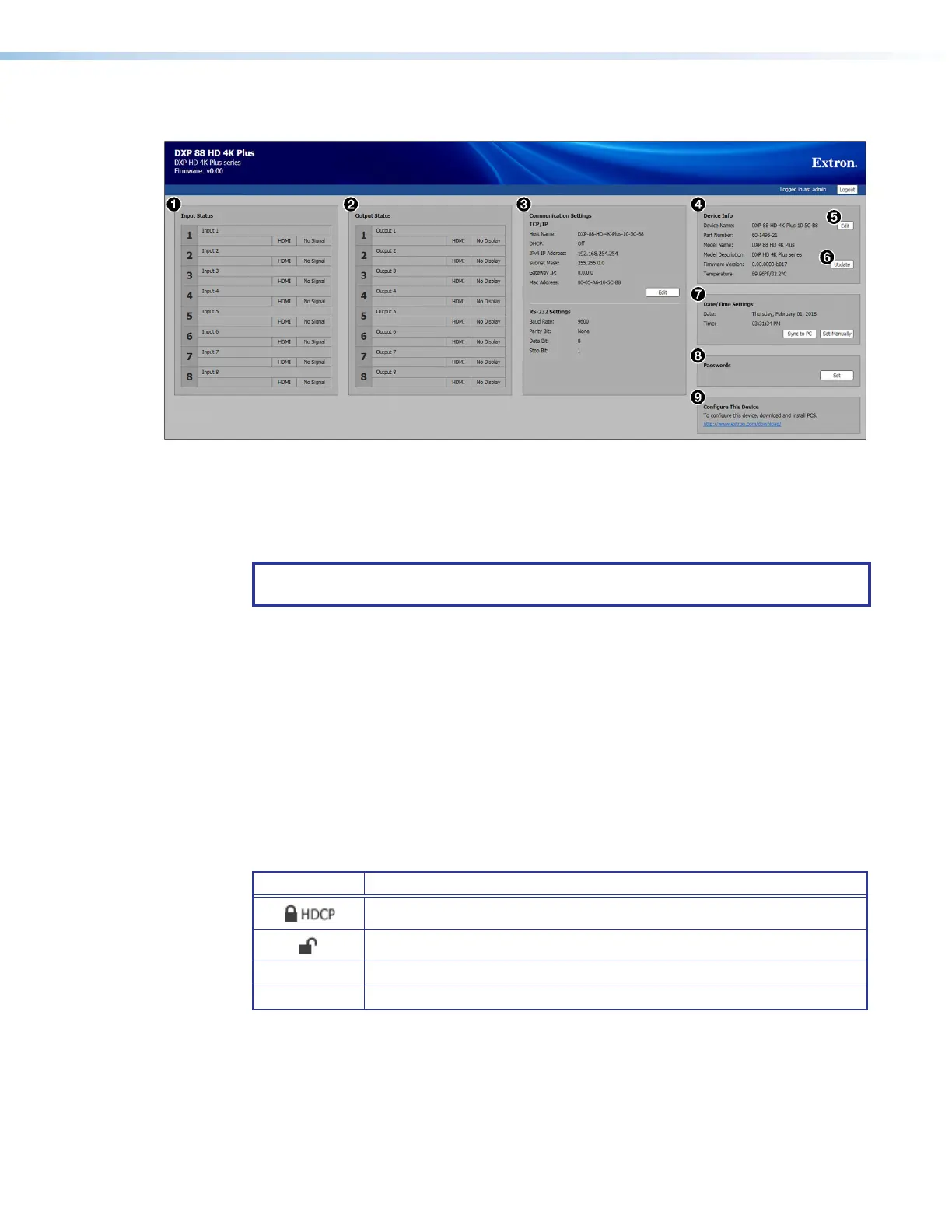
Figure 48. Internal Web Page — DXP 88
NOTE: Figure 48 shows a DXP 88 web page. The web pages for the DXP 44 and 84 are
identical except for the number of inputs and outputs.
Input Status Panel
The Input Status panel (see figure 48,
1
) displays information about the connected
inputs. The number of inputs displayed depends on the number of inputs available on the
DXP HD 4K PLUS Series model.
Each input is identified by number in the left column. For each input, the following
information is displayed:
• Input name — Displays the name of the input.
• Signal type — Displays the signal type of the input.
• HDCP encryption — Displays the HDCP encryption status of the input (see the table
below for symbol definitions).
Symbol Definition
The signal is HDCP encrypted.
The signal is not encrypted.
–
Unable to determine the HDCP status.
No Signal
There is no signal detected.
48













 To Next Page