DXP HD 4K PLUS Series • Operation 37
Worksheet Example 2: Daily Configuration
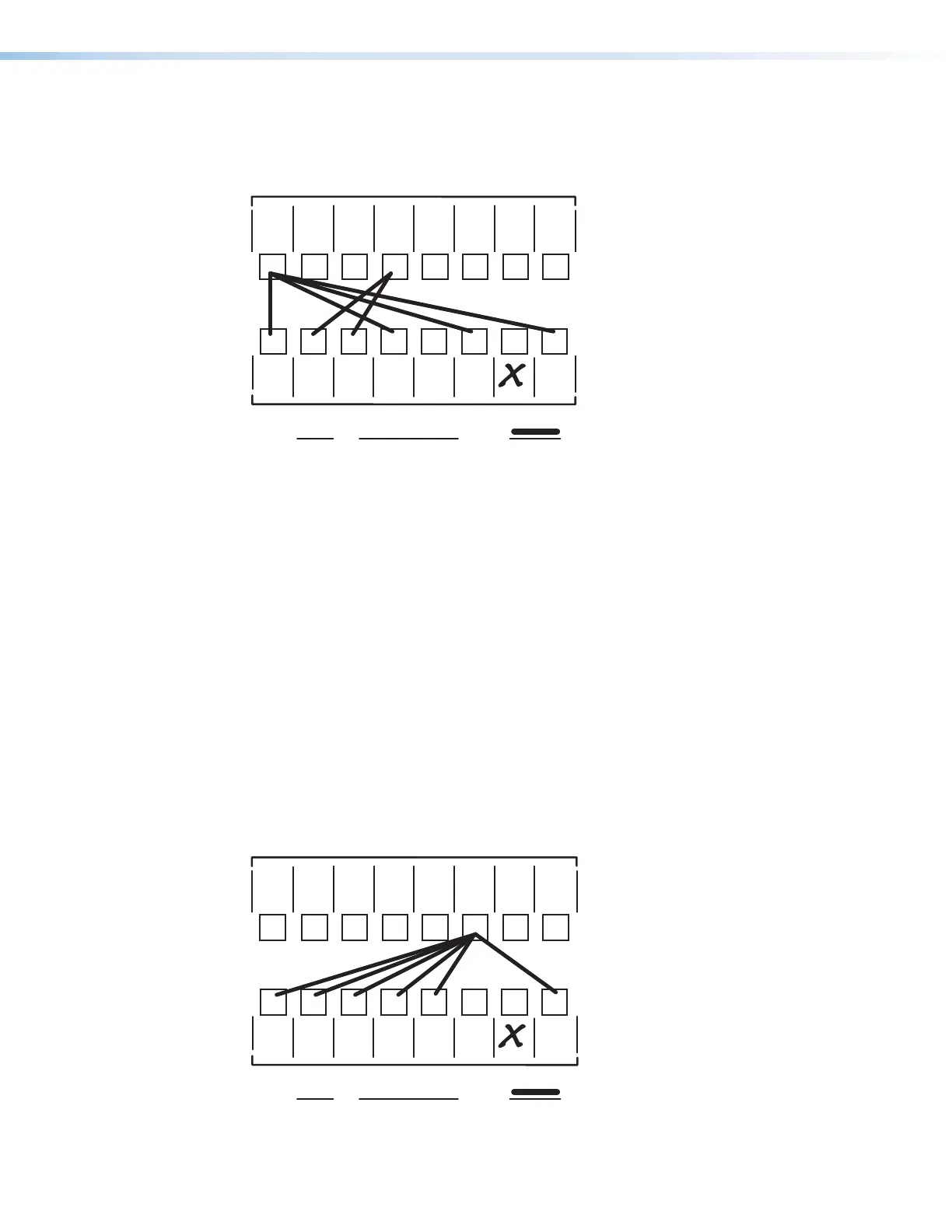
Figure 35 continues from worksheet example 1 by showing the video ties that make up the
configuration of preset 1. A solid ink line shows video ties.
1 2 345678
123456
Preset # Title: Video ties:
Fill in the preset number and use colors, dashes, and so forth, to make connecting lines.
Laptop
1
Media
Player
1
PC
1
Weekly status mtg 3
4K
Camera
2
4K
Camera
1
Main
podium
Main hall
1
Main hall
2
Podium
monitor
1
Conf.
Room
1
Podium
monitor
2
Demo
Room
1
Lobby
monitor
Editing
Station
1
1
Output Destinations
4K
Blu-ray
Player
1
Editing
Station
2
Figure 35. Worksheet Example 2: Daily Configuration
In this example:
• The image of the presenter, from the main podium camera (input 1), is:
• Displayed in the main hall (output 1)
• Displayed in the conference room (output 4) to the overflow crowd
• Displayed in the Demo Room (output 6)
• Displayed in the lobby (output 8)
• The presenter has a presentation stored on PC 1 (input 4) that is:
• Displayed in the main hall (output 2)
• Displayed locally on podium 1 (output 3).
Worksheet Example 3: Test Configuration
The AV system in our fictional organization needs to be fine tuned on a regular basis.
Figure 36 shows a typical test configuration, with an Extron video test generator (input 6)
generating a test pattern to all monitors (outputs 1, 2, 3, 4, 8).
1 2 345678
123456
Preset # Title: Video ties:
Fill in the preset number and use colors, dashes, and so forth, to make connecting lines.
Laptop
1
Media
Player
1
PC
1
Weekly status mtg
3
4K
Camera
2
4K
Camera
1
Main
podium
Main hall
monitor
1
Main hall
monitor
2
Podium
monitor
1
Conf.
Room
1
Podium
monitor
2
Demo
Room
1
Lobby
monitor
1
Editing
Station
1
1
Output Destinations
4K
Blu-ray
Player
1
Editing
Station
2
Figure 36. Worksheet Example 3: Test Configuration
35
36













 To Next Page