Quantum Series Videowall Processing Systems • Installation and Maintenance 27
If no project file has been saved on the Quantum, the default EDID setting of 1920x1200
at 60 Hz is applied.
See the Quantum Control Software User Guide, provided on the Quantum CD, for details
on selecting and monitoring EDIDs.
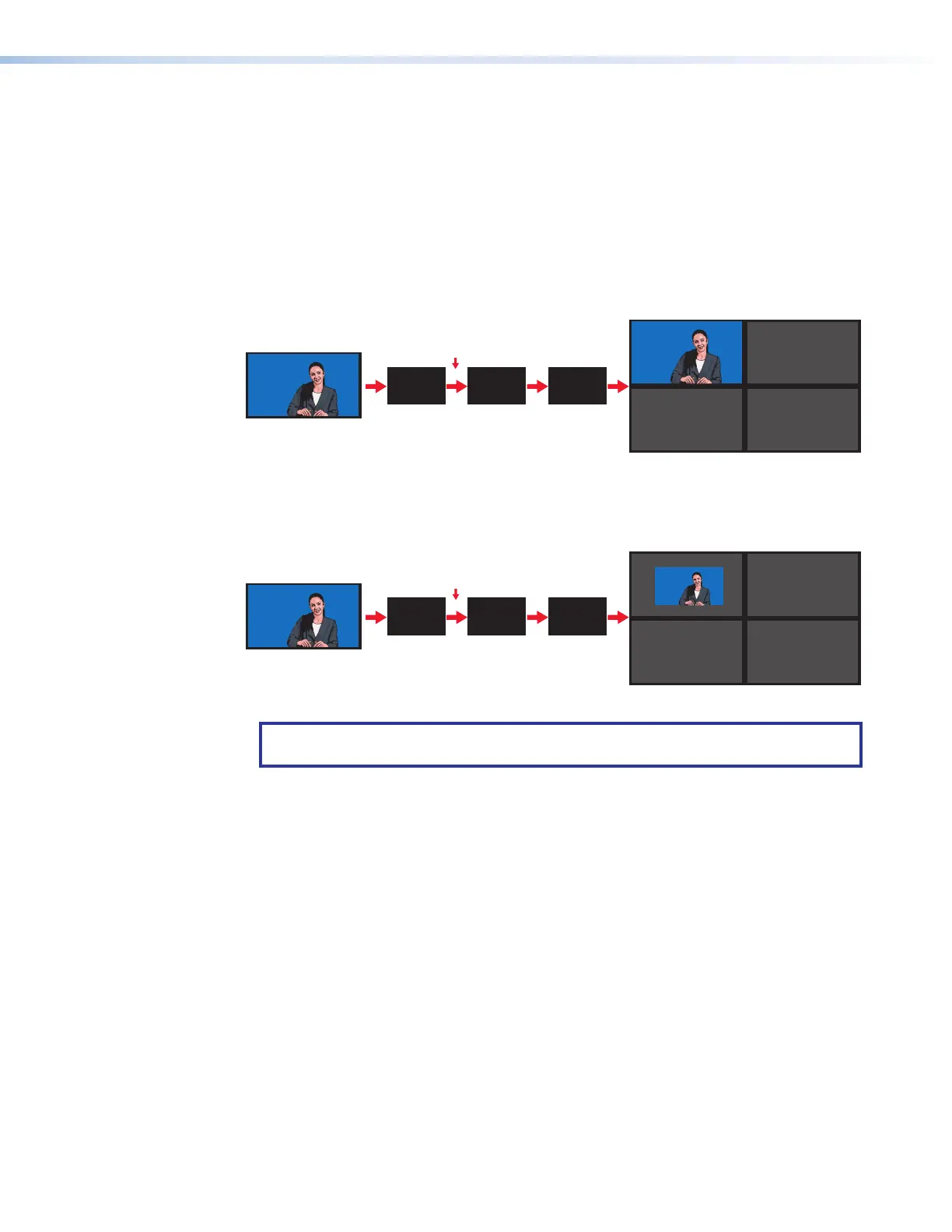
Source down-scaling
Each input card has an on-board scaler that down-scales the video sources in size to
1/16 of the original source (horizontally, vertically, or both). For simplicity, the example in
the diagram below assumes that each screen in the target display has the same resolution
as the source.
Ruth Dire
Extron Electronics
Ruth Dire
Extron Electronics
Ruth Dire
Extron Electronics
Input
Card
Card Outputs a
Unity Image
Source Is Not Scaled
(Unity / Native Resolution / 1:1)
Source Is Scaled Down
RAPT
Bus
Output
Card
Ruth Dire
Extron Electronics
Input
Card
Card Outputs a
Scaled-down Image
RAPT
Bus
Output
Card
Figure 19. Example of a Source Displayed Full-Sized and Down-scaled
NOTE: Sources emanating from the PCI bus (such as image files) are down-scaled to
the appropriate size by the output card graphics processor (GPU).
Up-scaling (magnification) is achieved by a scaler on the output card (see Source
up-scaling on page 41).
Detailed information on connecting to these input cards is provided in the following
sections.



 To Next Page