MPC-6000 / MPC-7000 / RND-2 INSTALLATION, OPERATION AND MAINTENANCE MANUAL
40
Keypad Connection to MPC6-DB2
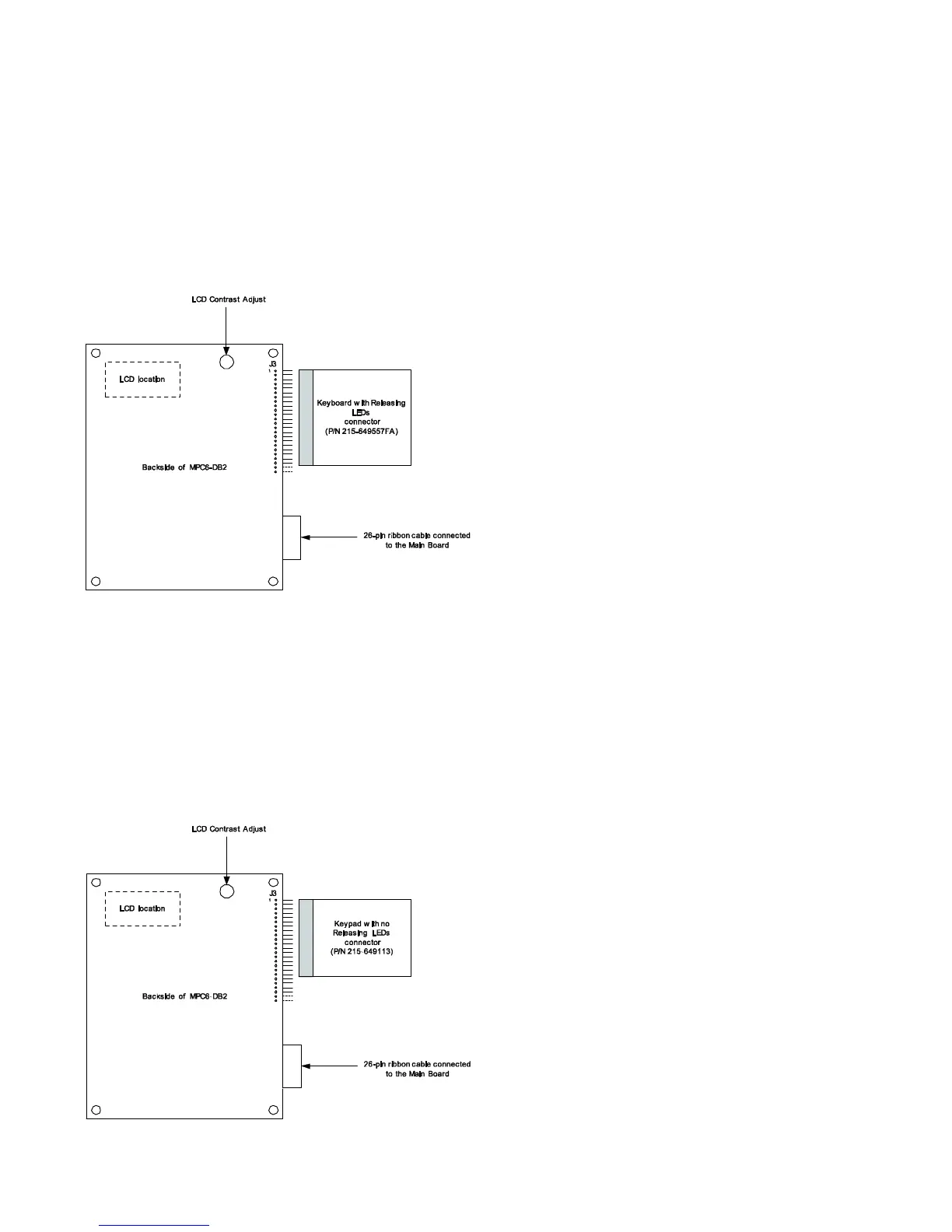
Keypad with releasing application LEDs (P/N 215-649577FA) for MPC-6000 only
Align the keypad connector (P/N 215-649557FA) to J3 of the MPC6-DB2 as shown below. If J3 is populated
with a 22-pin header, insert the keypad connector to J3 header until it is a tight fit.
If J3 is populated with 24-pin header, insert the keypad connector to J3 header with pin 1 of J3 properly
aligned with the keypad connector until it is a tight fit.
Verify that pins 23 and 24 (last two pins on the bottom) of J3 are not connected to the keypad
connector.
Keypad without releasing application LEDs (P/N 215-649113)
Align the keypad connector (P/N 215-649113) to J3 of MPC6-DB2 as shown below. If J3 is populated with a
22-pin header, insert the keypad connector to J3 header with pin 1 of J3 properly aligned with the keypad
connector until it is a tight fit. Verify that pins 19-22 (last four pins) of J3 are not connected to the
keypad.
If J3 is populated with 24-pin header, insert the keypad connector to J3 header with pin 1 of J3 properly
aligned with the keypad connector until it is a tight fit. Verify that pins 19-24 (last six pins) of J3 are not
connected to the keypad.



 To Next Page