16
BANK MODE
BANK MODE is a streamlined interface for organizing and accessing user-made presets that are saved in the 100
banks. Up to four user-dened presets can be stored per bank. Each preset can hold several parameters: loop on/
o status, loop order, volume pedal location, FTSW OUT jack conductor selection and status, internal buer on/
o status, outward MIDI PC commands, and outward MIDI CC commands. Preset parameters are determined in
LOOP MODE, PRESET EDITOR or the FAVORITES EDITOR and then saved into any preset slot, providing the ability
to congure and save more than 400 possible tones from one pedalboard setup, all available at the press of a
single footswitch.
The 100 available banks and their presets are all easily accessible at your feet. Use Footswitch 5 and Footswitch FS
to scroll through banks and footswitches 1-4 to recall the presets assigned to the four slots within each bank.
ENTERING BANK MODE
To enter BANK MODE from any other mode, press and hold Footswitch 5 for one second; the previously used
bank and preset will be loaded. Note that subsequently pressing and holding Footswitch 5 will toggle Switch-
board between BANK MODE and LOOP MODE.
BANK MODE SCREEN
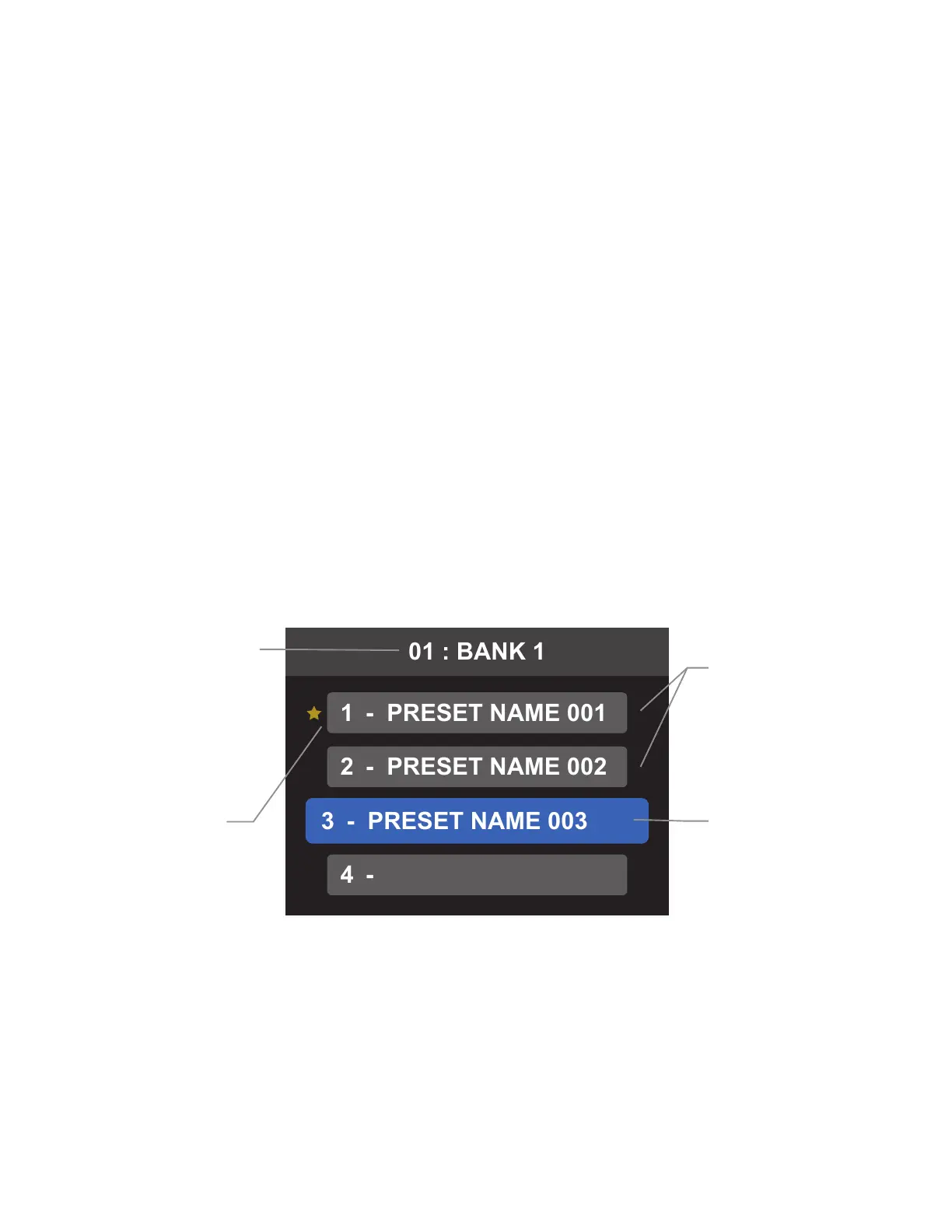
In BANK MODE, the display window shows the current bank name and number at the top of the screen, and four
preset slots numbered to correspond to the footswitches (1-4) that activate them. The currently active preset
appears in an enlarged blue box; inactive presets appear in slightly smaller gray boxes. Preset slots that are full
will show the user-generated preset name, while empty preset slots remain empty of text. Favorites are indicated
by a gold star to the left of the preset slot when inactive, and by gold highlighting when selected as the currently
active preset:
INACTIVE
PRESETS
Shown in gray
ACTIVE
PRESET
Highlighted
in blue
FAVORITE
PRESET
(Shown in
inactive state)
BANK NAME
AND NUMBER
BANK MODE: ACTIVATING PRESETS
In BANK MODE, footswitches 1-4 are used to select among the four preset slots available in the currently visible
bank; each footswitch corresponds to its identically numbered onscreen preset slot.
Activate a preset by pressing its corresponding footswitch. The LED above that footswitch will illuminate blue,
the corresponding onscreen preset slot will be highlighted in blue, and all parameters saved in that preset will
be recalled.



 To Next Page