25
CONVERTING FAVORITES TO PRESETS
Once a Favorite is loaded into a bank preset slot, it can be converted into a standard preset to unlink it from the
original Favorite.
To do so, start in BANK MODE and select a favorite to convert to a standard preset, then enter the PRESET EDI-
TOR. If any edits made to the Favorite’s parameters in the PRESET EDITOR are saved, the Favorite will convert to a
standard preset and will no longer be linked to the original Favorite.
BANK EDITING
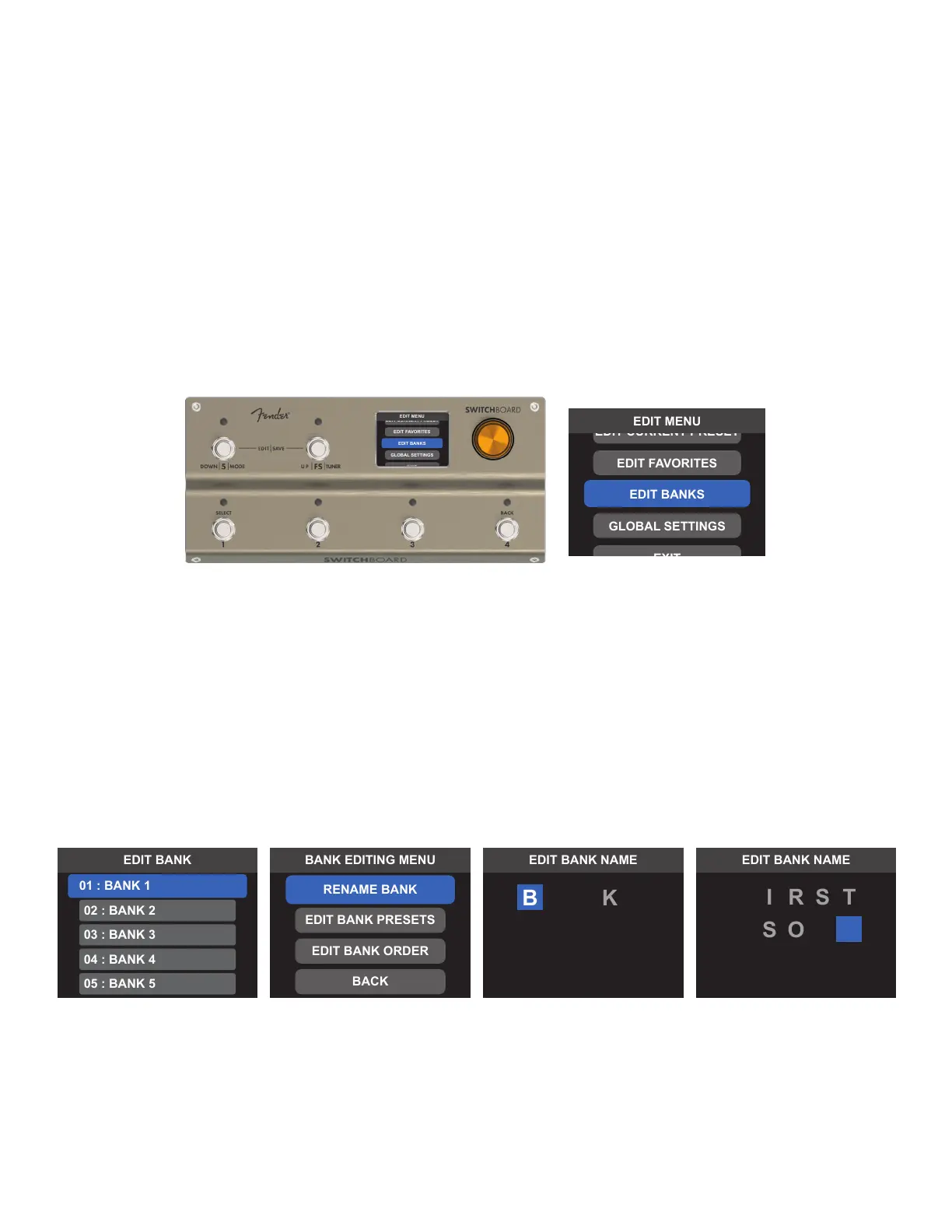
Switchboard’s 100 banks can be renamed and rearranged as needed. Banks are edited from the EDIT MENU by
selecting EDIT BANKS and using the encoder or footswitches to select the desired bank for editing.
RENAMING BANKS
Banks can be renamed to host user-generated names. Note that a bank name always includes its order number
followed by a colon (01:, 02:, etc) before the name.
To do so, enter the EDIT BANKS screen and select the bank to be renamed. Select RENAME BANK and use the
encoder or footswitches to scroll through and select up to 15 characters. When nished, press and hold the
encoder or press Footswitch 4 (BACK) to open the SAVE CONFIRMATION menu. Select SAVE AND RETURN to save
the new bank name:
F
N
G
NA
1



 To Next Page