This owner’s manual provides a thorough guide to the features and function of the Switchboard Eects Op-
erator. It’s the ultimate pedalboard control solution—a versatile command center and performance-friendly
footswitch interface that lets you toggle pedal groups on and o, reorganize your signal path and even
change setting on MIDI-enabled pedals. With a built-in tuner, input/output buers, internal volume pedal
and 500 presets slots to save your tones, Switchboard unleashes the full potential of your pedalboard.
1
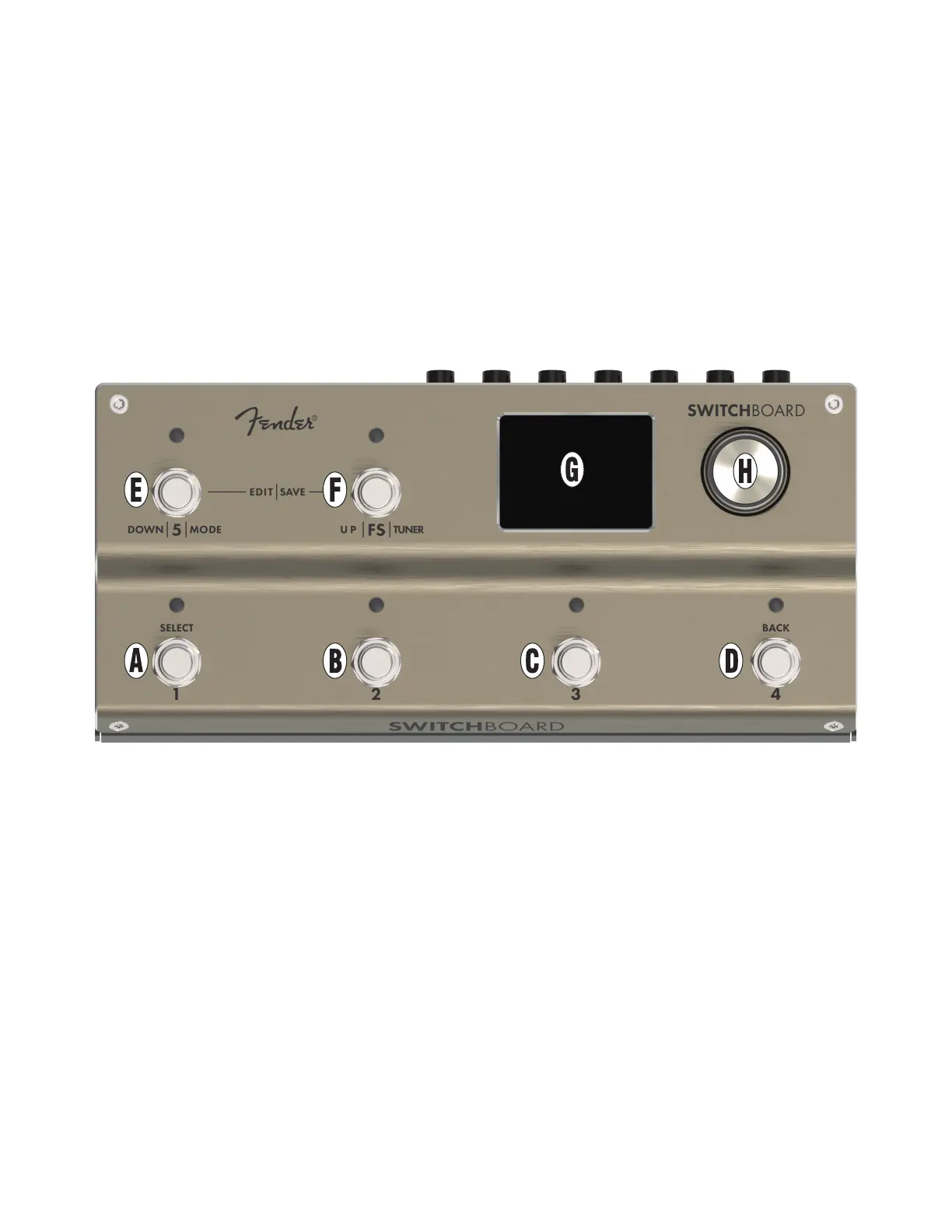
CONTROL PANEL
A. FOOTSWITCH : Multi-function footswitch used to
toggle loop on and o, engage preset or select
the currently highlighted menu item. Press and hold
footswitch to toggle a loop or preset momentarily for
as long as the footswitch is pressed.
B. FOOTSWITCH 2: Multi-function footswitch used
to toggle loop 2 on and o and engage preset 2.
Press and hold footswitch to toggle a loop or preset
momentarily for as long as the footswitch is pressed.
C. FOOTSWITCH 3: Multi-function footswitch used
to toggle loop 3 on and o and engage preset 3.
Press and hold footswitch to toggle a loop or preset
momentarily for as long as the footswitch is pressed.
D. FOOTSWITCH 4: Multi-function footswitch used to
toggle Loop 4 on and o, engage preset 4, or return to
previous menu. Press and hold footswitch to toggle
a loop or preset momentarily for as long as the
footswitch is pressed.
E. FOOTSWITCH 5: Multi-function footswitch used to
change modes, toggle loop 5 on and o and move
down in the current menu.
F. FOOTSWITCH FS: Multi-function footswitch used
to activate internal tuner, toggle FTSW out jack
conductors on and o and move up in the current
menu.
G. DISPLAY WINDOW: Full-color LCD shows current
mode and parameter/bank selections.
H. ENCODER: Multi-function rotary control with press-
switch function. For viewing, selecting and adjusting
presets, settings and other functions.
SWITCHBOARD EFFECTS OPERATOR



 To Next Page