2
REAR PANEL
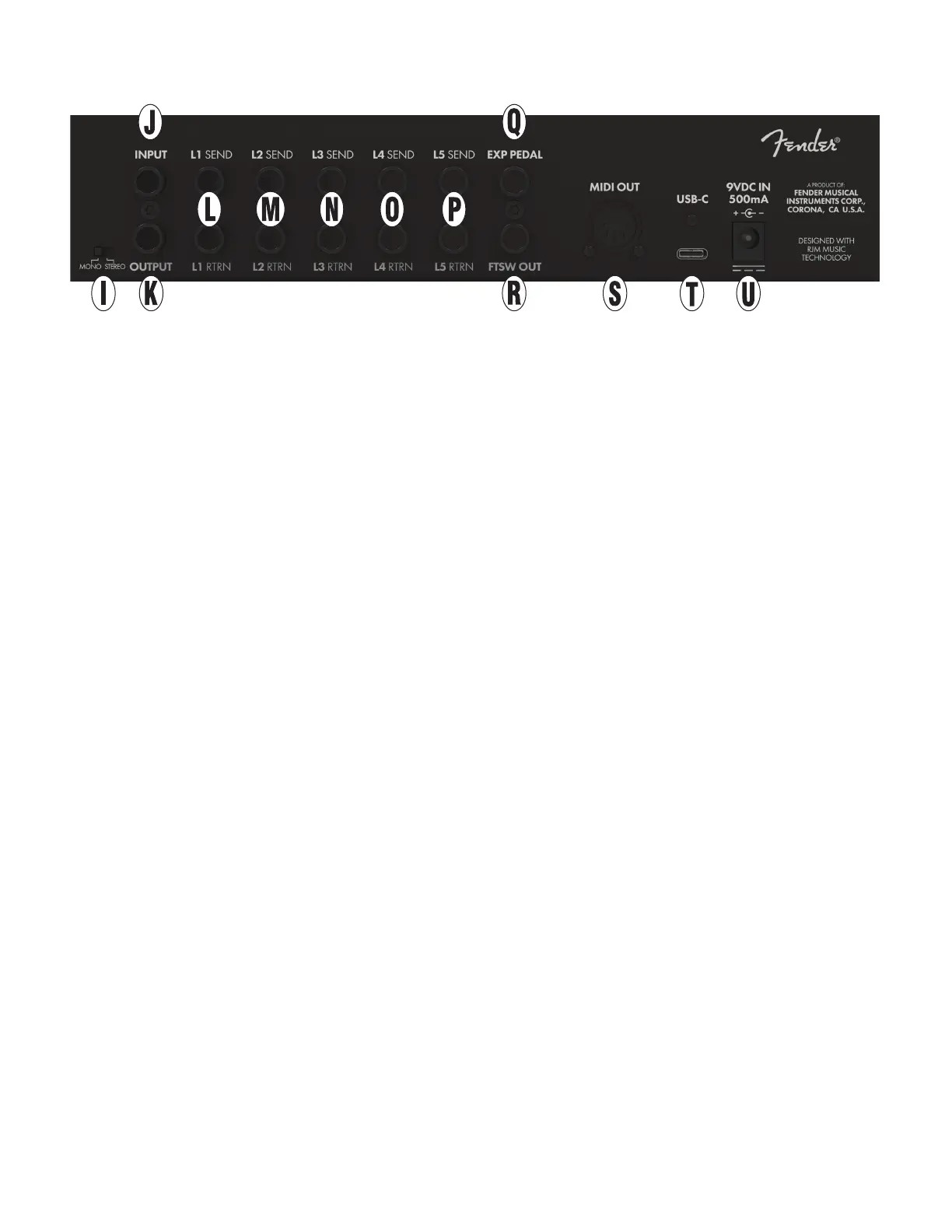
I. MONO/STEREO SWITCH: Selects between mono (TS
jack) and stereo (TRS jack) operation for loop return
and output jacks. Set to STEREO for use with stereo
eect pedals in loop .
J. INPUT: ¼” mono instrument input (high impedance).
K. OUTPUT: Stereo-capable ¼” output (low-impedance)
for connecting to amplier or next pedal in signal path.
L. LOOP 1 SEND/RETURN: ¼” mono send and return
jacks for connecting a pedal to eect loop 1. Connect
the Switchboard send jack to the eect pedal input
jack and the Switchboard return jack to the eect pedal
output jack.
M. LOOP 2 SEND/RETURN: ¼” mono send and return
jacks for connecting a pedal to eect loop 2.
N. LOOP 3 SEND/RETURN: ¼” mono send and return
jacks for connecting a pedal to eect loop 3.
O. LOOP 4 SEND/RETURN: ¼” mono send and return
jacks for connecting a pedal to eect loop 4.
P. LOOP 5 SEND/RETURN: ¼” mono send and stereo
cable return jacks for connecting an effect pedal to
effect loop 5. Any stereo effects should be placed
here.
Q. EXP PEDAL: ¼” TRS jack for connecting an expression
pedal.
R. FTSW OUT: ¼” TRS jack for latching or momentary
footswitch control; for use with many amplifier and
effect pedal controls such as channel switching,
reverb on/off, tap tempo and more.
S
. MIDI OUT: Connect external MIDI device here to
send MIDI PC and CC messages.
T. USB-C: USB-C jack for firmware updates.
U. POWER IN: Connect a 2.1mm center-negative 9VDC
power supply rated at 500mA or more. Switchboard
can be powered by most pedalboard power supplies;
check your power supply manual for compatibility.



 To Next Page