5
CONTROL FUNCTIONS
MODES
Switchboard operates in two modes—LOOP MODE and BANK MODE, both of which put exible and reliable
real-time eect control conveniently at your feet. Both modes can be changed at any time during operation with
the work done in each remaining in place until the user returns, providing two active pathways for performing,
writing or creating new presets.
LOOP MODE delivers perfor-
mance-focused real-time pedal-
board control and is ideal for
creating presets. BANK MODE is a
streamlined interface for recalling
saved presets from the 100 avail-
able banks.
Switchboard rst powers up in
LOOP MODE by default and subse-
quently powers up in the mode it
was last in when powered o.
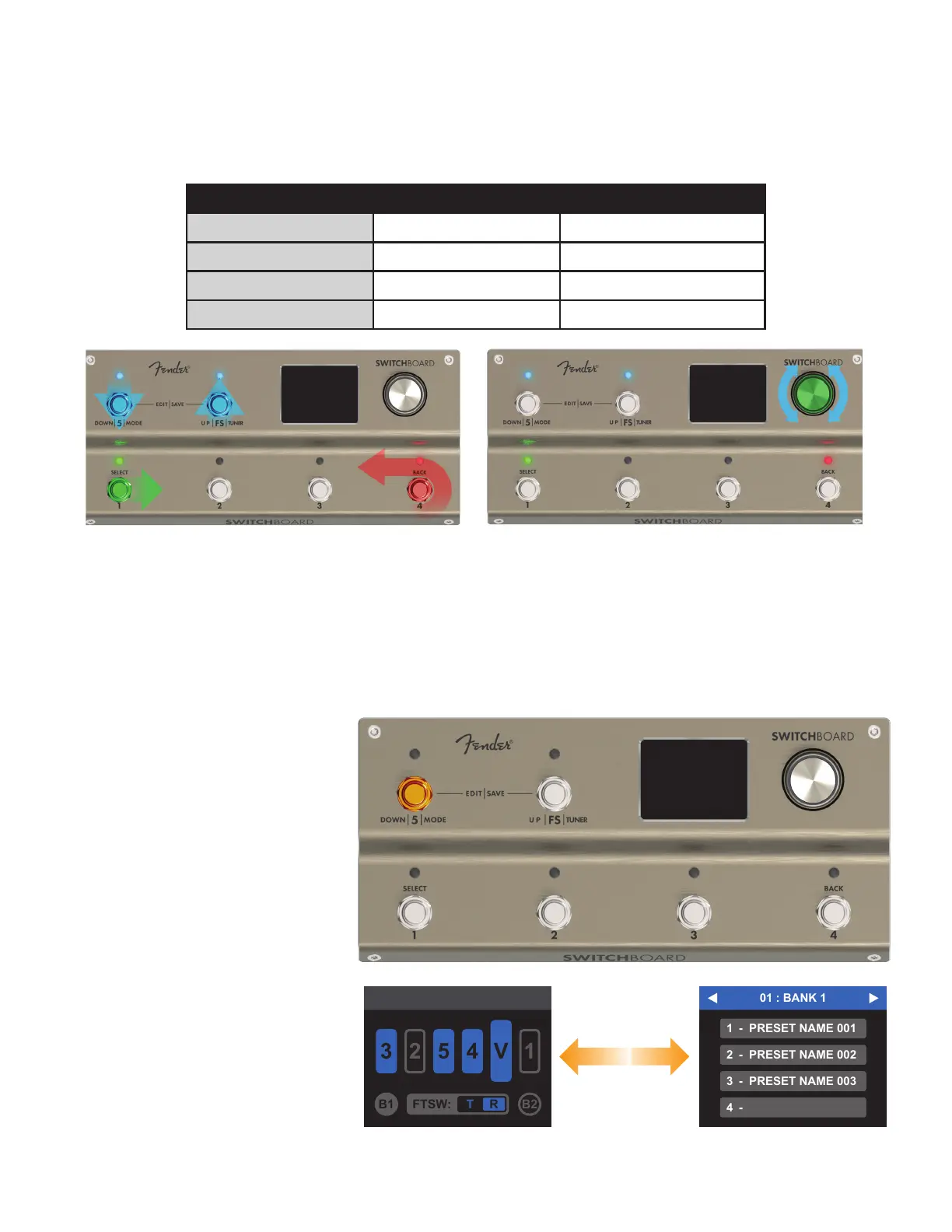
Press and hold Footswitch 5 for one
second to toggle between LOOP
MODE and BANK MODE.
NAVIGATION
Switchboards has several menus for selecting, editing and saving parameters and settings; these are easily navi-
gated using either the encoder or the footswitches:
FUNCTION FOOTSWITCH ENCODER
SCROLL UP FOOTSWITCH FS ROTATE RIGHT
SCROLL DOWN FOOTSWITCH 5 ROTATE LEFT
SELECT FOOTSWITCH 1 PRESS
BACK FOOTSWITCH 4 LONG PRESS (1 SECOND)
Footswitch menu controls Encoder menu controls
LOOP MODE



 To Next Page