20
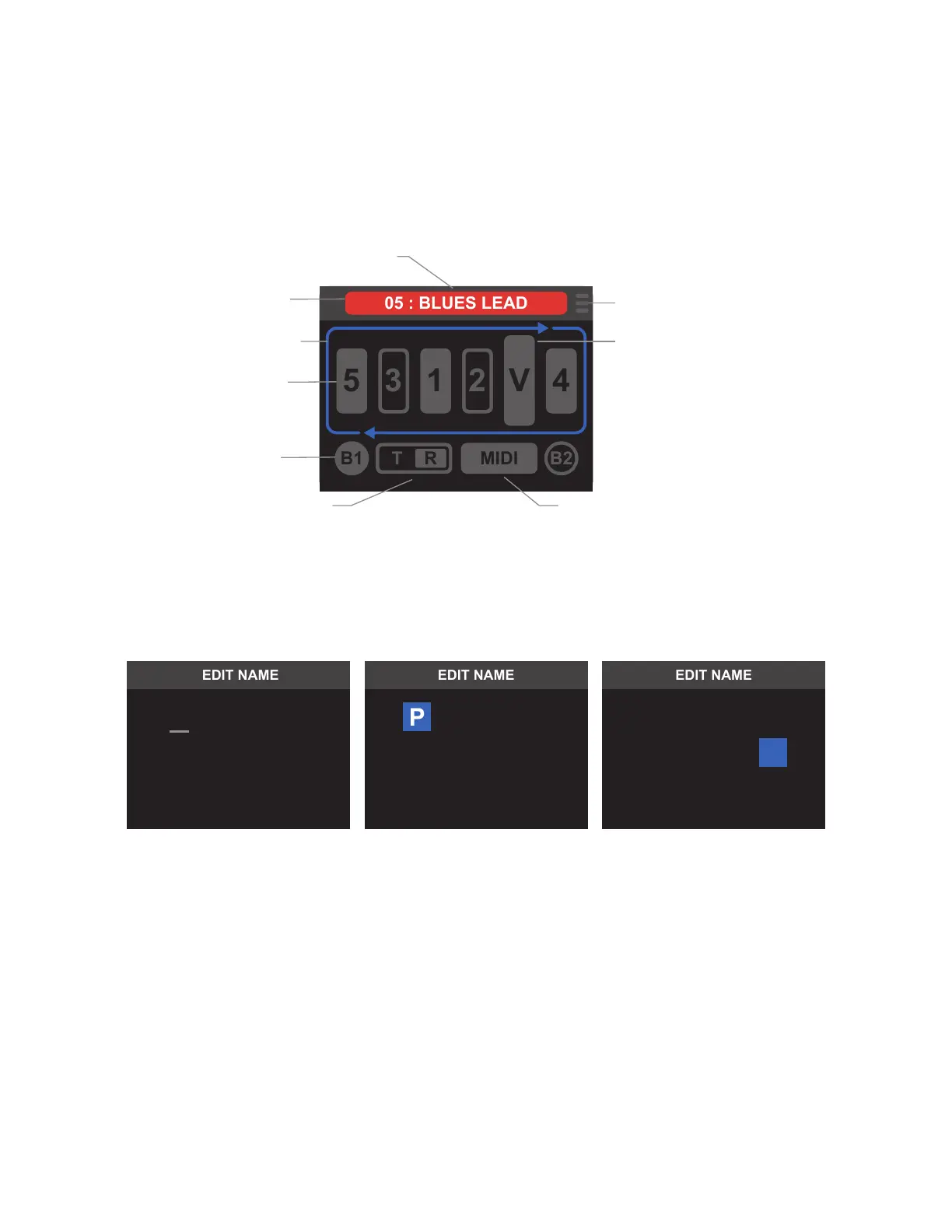
A. NAME EDITOR
Select the preset name bar to rename the preset. Use the encoder or footswitches to scroll through and change
the characters. When nished, press and hold the encoder or press Footswitch FS to open the SAVE MENU.
Select “Save and Return” to conrm the new name and return to the PRESET EDITOR screen.
B. CHANGE INDICATOR
When edits to a preset have been made, the box containing the preset name and number changes to red to
indicate that unsaved changes have been made. This “change indicator” will remain around the present name
until exiting the PRESET EDITOR or returning all preset parameters to their original settings.
C. EDIT LOOP ORDER
This menu option mirrors the function of LOOP MODE EDITOR. Rearrange loop order quickly and easily, and
place internal volume pedal in any position.
D. EDIT LOOPS
This menu option mirrors the function of LOOP MODE EDITOR. Select loop to edit position and on/o status.
E. EDIT BUFFERS
This menu option mirrors the function of LOOP MODE EDITOR. Toggle both buers on and o.
PRESET EDITOR SCREEN
For full preset parameter editing, the PRESET EDITOR displays the signal path graphic and options as the LOOP
MODE EDITOR, with the addition of MIDI and preset name editing.
The encoder rotary and press-switch functions can now be used to toggle through and select each icon, letting
the user select and edit each parameter individually. The currently highlighted icon illuminates in blue while
the others remain gray. Press the encoder while the icon is highlighted to edit the desired parameter. Each icon
type and function is explained in the following pages.
I. MENU ICON/
SAVE MENU
H. EDIT VOLUME
PEDAL
G. MIDI EDIT
MENU
F. EDIT
FOOTSWITCH
D. EDIT
LOOPS
C. EDIT LOOP
ORDER
B. CHANGE
INDICATOR
A. NAME
EDITOR
E. EDIT
BUFFERS
ER S E
P
1
T
ER S E
1
T
EL A N
C
OT
N E



 To Next Page