s
3.1.5 Definition of the direction of movement/position of the drive
In this document and on the WebConfig interface, the direction of movement or the position of drives
that are controlled by the Motion Terminal are generally described using the terms ‘advancing’ or
‘advanced’ and ‘retracting’ or ‘retracted’, respectively, which relate to piston rod cylinders with a
piston rod at one end. Depending on the pneumatic function, the meaning of the terms can be used for
other drives.
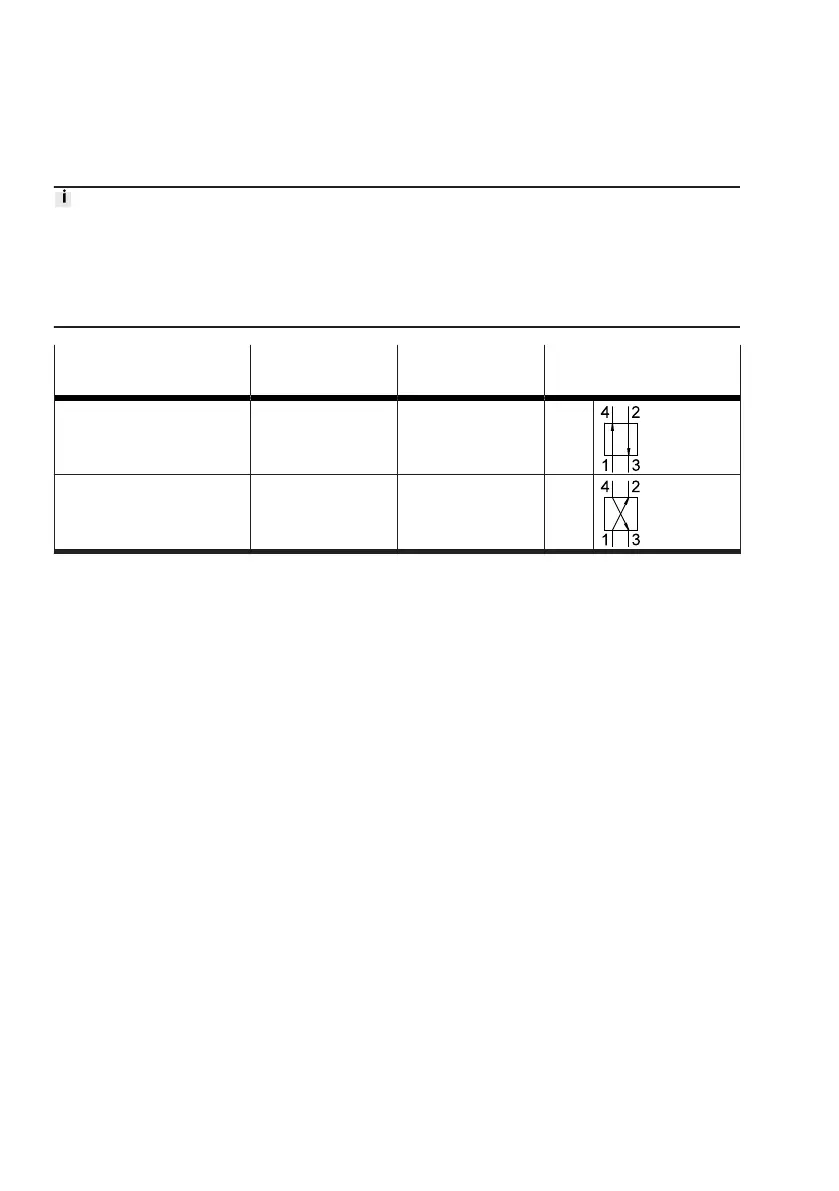
Term Port (4) Port (2) Switching position of the
valve
Advancing/advanced Pressurised Exhausted 14
Retracting/retracted Exhausted Pressurised 12
Tab. 10: Definition of the direction of movement
3.2
Firmware versions
Changes from one firmware version to the next can be found in the corresponding release notes, which
are provided with the firmware installation files in the Support Portal (
è
www.festo.com/sp). This
version of the manual refers to the following firmware version:
è
Tab. 2 Product version.
The device is updated to a new firmware version with the Festo Field Device Tool (FFT) (see Quick
Guide for the Motion Terminal VTEM
è
1.1 Applicable documents). The device will subsequently func-
tion in accordance with the factory settings. If required, existing parameterisation data and settings
can be exported to a configuration file before a firmware update and re-imported once the update has
been completed (
è
3.3.3 Export/import of parameterisation and settings).
3.3 WebConfig user interface
The Motion Terminal has a WebConfig interface for commissioning and functional testing.
It can be opened using a browser on a device connected to the Motion Terminal controller. It is not
possible to access the WebConfig interface for the controller using the Ethernet connection of a bus
node in the CPX terminal.
The settings, configurations and actual values of the Motion Terminal can only be viewed; they cannot
be changed without a password. The password must be entered via the menu bar of the WebConfig
and can be changed after successful authentication. A forgotten password can only be reset by
updating the firmware.










 To Next Page