Panda fpControl
Page 20 - Chapter 2: Panda fpControl 27.5.20
2.3.3 The fpControl AGT overview pages
The display mode/language of the display can be set in the menu.
Warning: The battery-specific charging parameters are set by the
Fischer Panda Service Point.
When exchanging a battery this must be checked and
adjusted accordingly.
Incorrect setting of the charging parameters may result in the
battery being damaged or destroyed. The specifications of
the battery manufacturer must be adhered to.
.
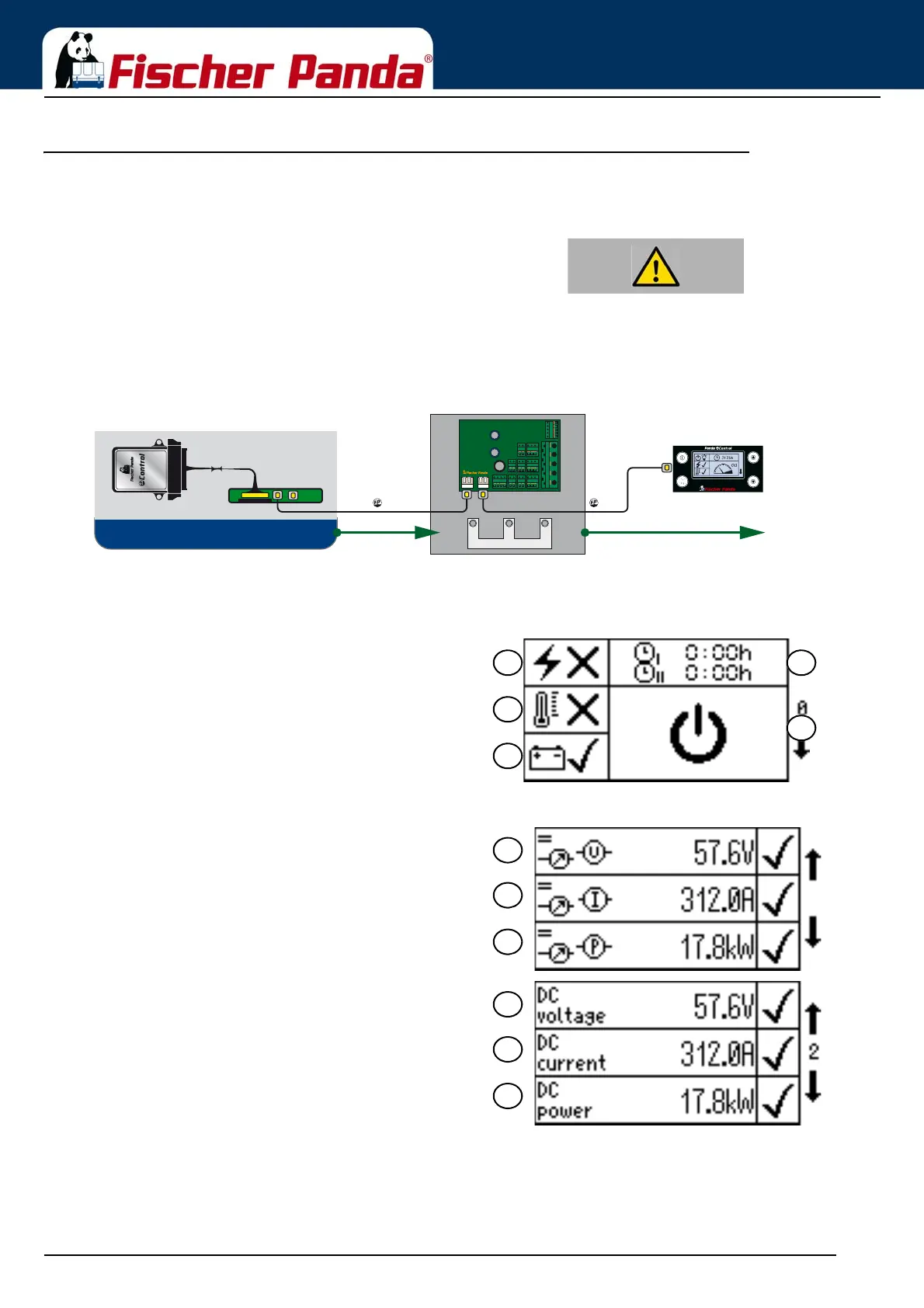
Fig. 2.3-1: Symbols used - Overview Page 1Overview Page 1:
01. Generator Status (on/off)
02. AC OK
03. Temperature of the generator (OK/Error)
04. Operating hours of the generator
05. Info screen
Overview Page 1 is the same in all languages.
Fig. 2.3.3-2: Overview Page 2 Symbols/EnglishOverview Page 2:
11. DC voltage [V]
12. DC current [A]
13. DC output [kW]
AC DC
Fischer Panda AGT Generator
Diode block
Controller GC-S
ǁǁǁĮƐĐŚĞƌƉĂŶĚĂĚĞ
Bus Bus



 To Next Page