HyPower-Geko Commissioning
FläktGroup DC-2014-0022-GB 2018-05/R5 • Subject to modifications 103
7.6 Setting address
The unit PCBs of the MATRIX 2000 control system are not fitted with address selection
switches.
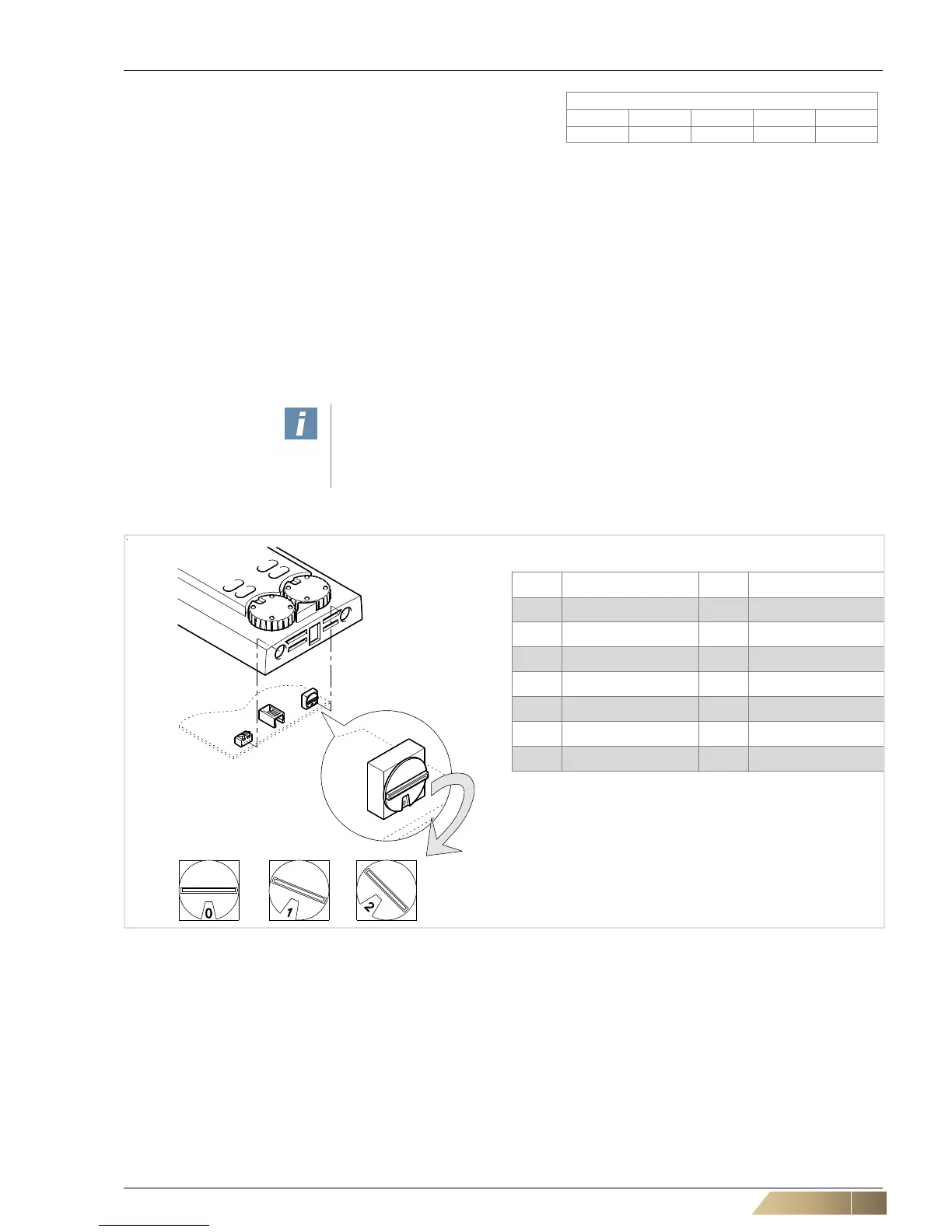
The relevant group address must be assigned on the control panel.
Single group (without networking multiple unit groups)
• Set the "0" address (manufacturer's default setting) on the control panel. Connected
MATRIX.V module must also be set to "0" address.
Networking multiple groups
• On the control panel, set the addresses 0-15. Each group is assigned its own ad-
dress. The labels A to F correspond to the addresses 10 to 15.
User instructions!
Assigning duplicate addresses on the control panels can cause malfunctions.
The default setting for the group address switch is “0” and must be changed, if
required.
Fig. 7-10: Set address on the control panel
Pos. 1: Control panel group 0 (address 0)
Pos. 2: Control panel group 1 (address 1)
Pos. 3: Control panel group 2 (address 2) and so on...


 To Next Page