Electrical connection HyPower-Geko
70 FläktGroup DC-2014-0022-GB 2018-05/R5 • Subject to modifications
6.8 Network and shielding connection MATRIX.Net
This section contains information about the MATRIX.Net and the correct network
setup. MATRIX.Net is a network for connecting various components of the FläktGroup
control system (network users) in one data bus. The bus enables the exchange of all
information required for control and regulation between the users.
Network users can include the following:
– Controller
– Control panels
– Global modules
– Central clock timer
– LON interface
– Service software.
6.8.1 Group structure
A group consists of a minimum 2 and maximum 20 users (control panel, 16 air treat-
ment units, valve module, DV module and LON module).
This means for example that a control panel and a controller/unit form a group.
However, a group can also be made up of a LON module and a controller/unit. The
LON module transmits setpoints and current readings to the group.
With units fitted with MATRIX 3000 and MATRIX 4000, a group can also be formed by
replacing the control panel by a global module, such as MATRIX.LON.
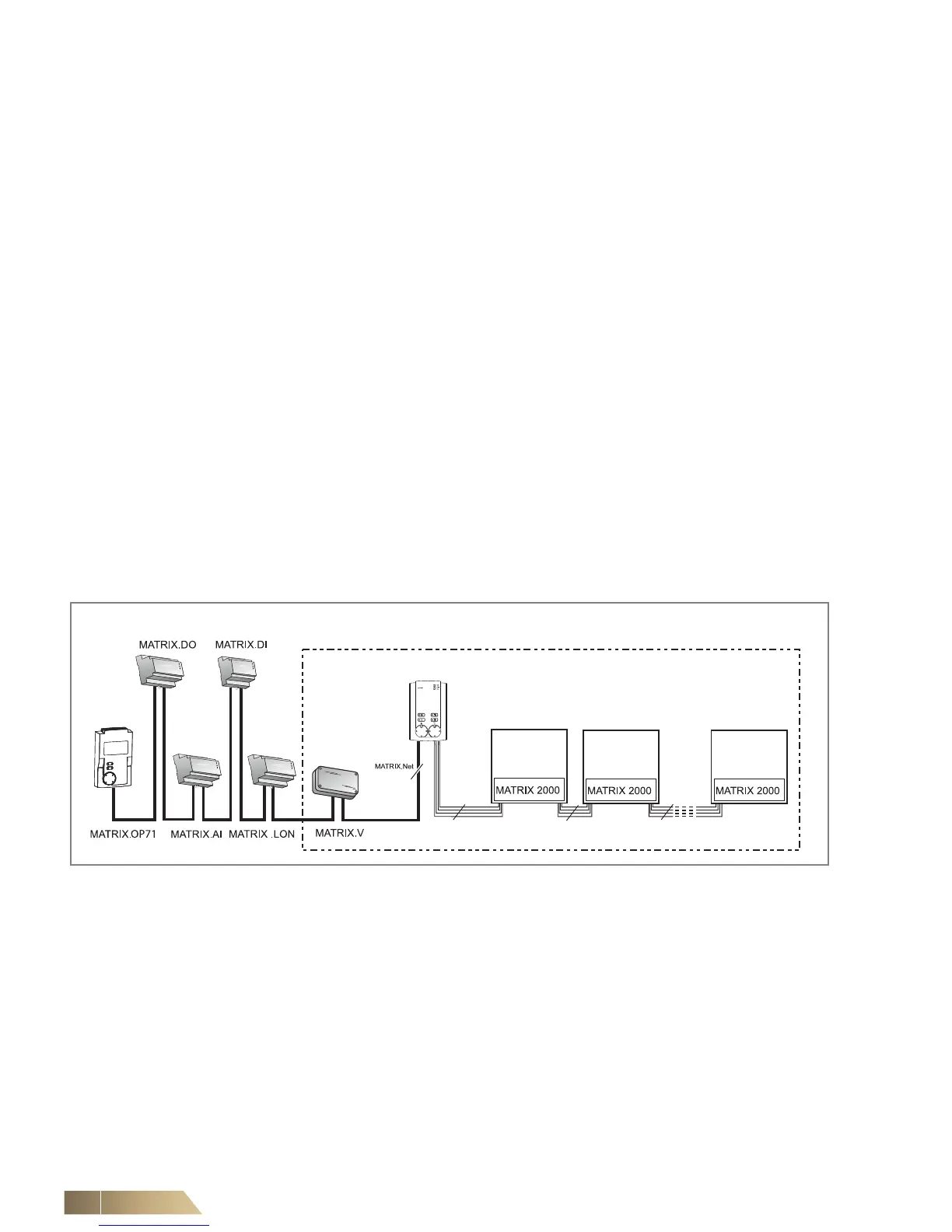
Group structure with the MATRIX 2000 system
A group can be formed with the MATRIX 2000 system as illustrated in fig. 6-26.
Fig. 6-26: Group structure with MATRIX 2000 controller type
The group address is assigned via the group address switch on the control panel –
refer to the “Commissioning and Testing” Chapter in the operation manual for
“MATRIX® control panels”.
The assignment of modules MATRIX.V, MATRIX.LON to this group is completed with
MATRIX.V via the group address switch or via software with MATRIX.LON – refer to
the “Commissioning and Testing” section in this operation manual or the one for
MATRIX® Global modules.
The MATRIX.Net network is connected via the control panel.


 To Next Page